Definition & Meaning
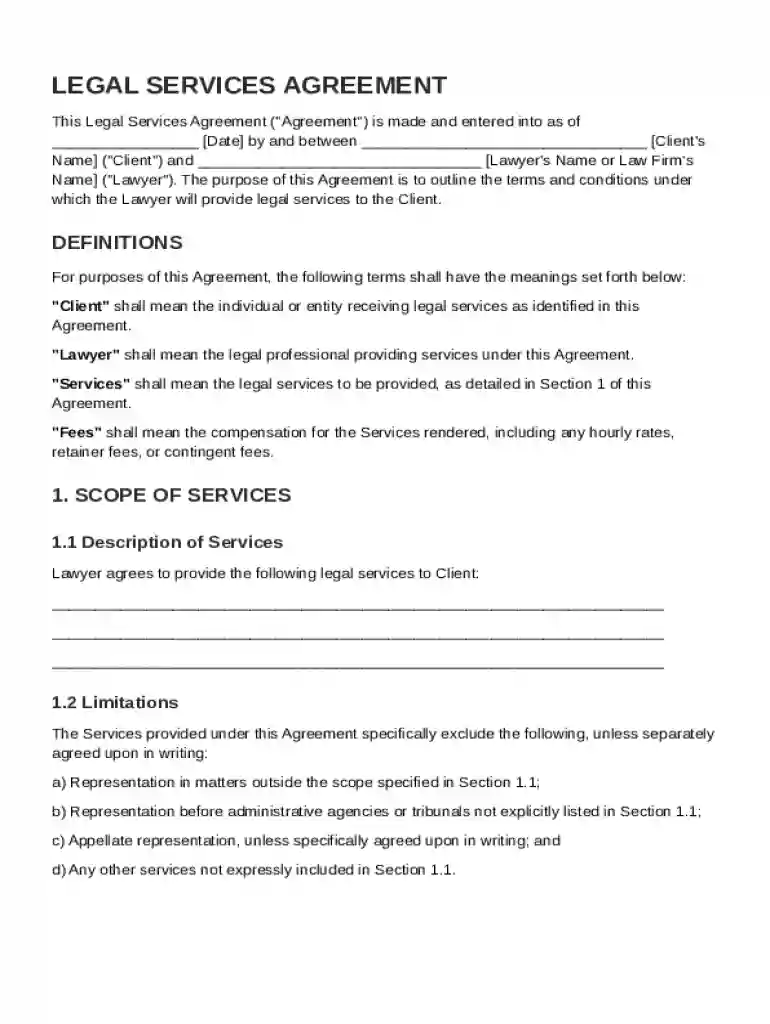
The "Lawyer Contract Template" serves as a standardized form used to outline the terms under which legal services are provided by a lawyer to their client. This template acts as a contractual foundation, detailing various essential elements that define the attorney-client relationship. It captures the essence of legal agreements, ensuring clarity and uniformity in interactions between legal professionals and clients. Key aspects covered in this template often include the scope of legal services, fee structures, and confidentiality clauses.
How to Use the Lawyer Contract Template
Using the Lawyer Contract Template involves several specific steps to ensure it meets the needs of both the lawyer and the client. This template is versatile and can be customized to fit different legal scenarios:
- Download and Review: Obtain the template and review it in detail to understand its structure and the information required.
- Customize the Template: Alter the sections to reflect the specifics of the legal services being provided. This might include adjusting the scope of services or modifying the payment terms to fit client-specific needs.
- Insert Parties' Details: Add the names, contact information, and roles of both parties involved in the contract to ensure all parties are clearly identified.
- Define the Services: Clearly outline the legal services to be provided, along with any limitations or specific terms that are pertinent to the engagement.
- Review and Approve: Both the lawyer and the client must review the document to ensure accuracy and mutual understanding before approval.
Important Terms Related to the Lawyer Contract Template
Understanding key legal terms is crucial when engaging with a Lawyer Contract Template. Here are essential terms that often appear in such contracts:
- Scope of Services: Refers to the specific legal services the lawyer agrees to provide and any exclusions.
- Fee Structure: The payment terms, which might include hourly rates, flat fees, or contingency fees.
- Payment Terms: Specific details about how and when payments are to be made, including billing cycles and overdue fees.
- Confidentiality: Provisions related to information privacy and the protection of client secrets.
- Termination Clause: Guidelines for ending the contract by either party, including required notices.
- Miscellaneous Provisions: Any additional clauses that address unique circumstances pertinent to the agreement.
Key Elements of the Lawyer Contract Template
The Lawyer Contract Template includes several critical elements that establish the groundwork for a clear and effective agreement:
- Identification of Parties: Clearly lists who the lawyer and client are, including any entities they represent.
- Statement of Work: Provides a detailed description of the legal work to be performed.
- Compensation Details: Specifies how the lawyer will be compensated for their services, ensuring that financial arrangements are transparent.
- Retainer Agreement: If applicable, includes any retainer fees required at the outset of the contract.
- Confidentiality Clauses: Assures the client that their sensitive information remains protected.
- Dispute Resolution: Details how disputes will be addressed, whether through arbitration, mediation, or court proceedings.
Legal Use of the Lawyer Contract Template
The legal use of the Lawyer Contract Template involves ensuring that the contract aligns with applicable state and federal laws:
- ESIGN Act Compliance: Templates often need to comply with the ESIGN Act if they include electronic signatures, ensuring they are legally binding.
- Jurisdiction: Define which state laws govern the agreement to minimize conflicts.
- Adherence to Legal Standards: The template should follow professional ethics codes applicable to legal practitioners in the relevant jurisdiction.
Who Typically Uses the Lawyer Contract Template
A wide array of individuals and entities might find the Lawyer Contract Template useful:

- Solo Practitioners: Individual attorneys who manage their legal practice.
- Law Firms: Legal entities that require standardized agreements for engaging with clients.
- Corporate Legal Departments: Businesses that utilize legal services for corporate governance or legal compliance.
- Clients Seeking Legal Representation: Those requiring clarity and formalization of their interactions with their legal representatives.
Examples of Using the Lawyer Contract Template
Different scenarios demonstrate the practical application of the Lawyer Contract Template:
- Corporate Litigation: A company may use the template to outline services for a litigation case.
- Real Estate Transactions: Real estate lawyers can customize the contract for negotiations and closings.
- Family Law: A family lawyer might use the template to detail services in divorce or custody cases.
- Estate Planning: Legal services related to drafting wills or managing trusts.
State-Specific Rules for the Lawyer Contract Template
Legal practices can vary significantly across states, making it important to adapt the Lawyer Contract Template to comply with specific regional regulations:
- State Bar Requirements: Some states may have specific rules on the disclosure of fee agreements.
- Professional Licensing Restrictions: State-specific standards may dictate how lawyers can advertise their services and outline contracts.
- Consumer Protection Laws: Rules that protect clients' rights within legal service agreements may influence contract terms.
These state-specific nuances ensure that the Lawyer Contract Template meets the necessary legal standards for enforceability and compliance.