Definition & Meaning
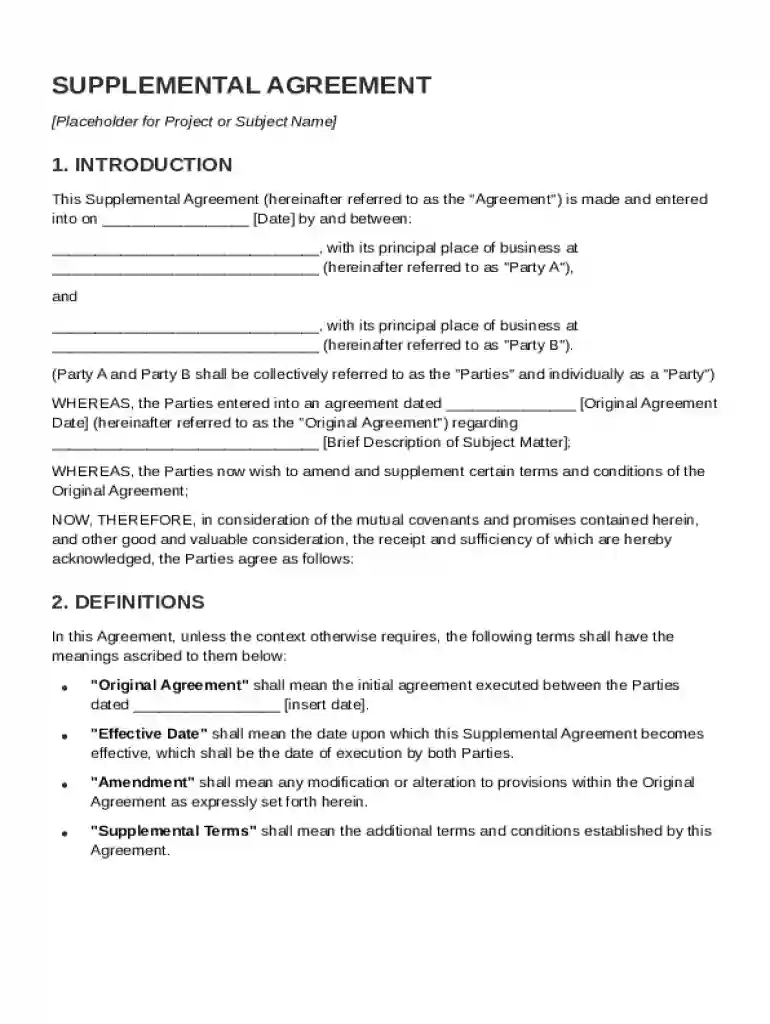
A Supplemental Agreement Template refers to a formal document used to amend and supplement the terms of an existing Original Agreement between two parties, commonly known as Party A and Party B. It is designed to modify, add to, or clarify certain provisions of the Original Agreement without invalidating the entire agreement. This template serves to document changes, such as revised terms, new obligations, or adjusted timelines that have been mutually agreed upon by both parties. It also ensures that the amended components are legally binding and in coherence with the previously established terms. This form is essential for maintaining clarity and legal standing in business and legal transactions.
Key Elements of the Supplemental Agreement Template
Headings and Clauses
The template is organized with specific headings and clauses to ensure clarity and comprehensiveness. Key elements typically include:
- Title: Identifies the document as a Supplemental Agreement.
- Parties Involved: Clearly states the names of Party A and Party B.
- Preamble: Provides background information and references the Original Agreement.
- Amendments: Details each specific change being made to the Original Agreement.
- Representations and Warranties: Includes declarations that the new agreement is valid and enforceable.
- Governing Law: States the jurisdiction under which the agreement is governed.
- Miscellaneous: Covers general provisions that ensure the agreement's validity.
Execution and Signatures
The document concludes with sections for both parties to sign and date the agreement, acknowledging their acceptance and understanding of the modifications. This ensures that the document is enforceable under law.
How to Use the Supplemental Agreement Template
Initialization and Preparation
- Review the Original Agreement: Before initiating a Supplemental Agreement, thoroughly examine the Original Agreement to understand the existing terms and identify which sections require modifications.
- Draft the Supplement: Use the template to draft the Supplemental Agreement, ensuring to specifically note each amendment.
- Consult Legal Advice: Depending on the complexity of the changes, it might be beneficial to consult with legal professionals to ensure the document meets all legal standards.
Steps for Implementation
- Obtain Consent: Ensure both parties consent to the proposed amendments before finalizing the document.
- Execute the Agreement: Obtain signatures from both parties and any witnesses as needed.
- Distribution: Provide copies to all relevant parties to ensure everyone is informed of the changes.
Legal Use of the Supplemental Agreement Template
Compliance and Enforcement
- Legally Binding: The Supplemental Agreement Template is designed to ensure that all amendments are legally binding and enforceable.
- Adherence to Regulations: It must comply with relevant local, state, and federal laws, ensuring that all changes are legitimate and recognized by the jurisdiction in which the agreement is executed.
- Document Retention: It is crucial to retain this document and any related communications to provide evidence of agreement in case of disputes.
Important Terms Related to Supplemental Agreement Template
Understanding Key Vocabulary
- Amendment: A formal change or addition proposed during the process of editing and finalizing the document.
- Original Agreement: The initial contract or agreement being amended by the supplemental document.
- Parties: The entities involved in the agreement who are impacted by the amendments.
State-Specific Rules for the Supplemental Agreement Template
Jurisdictional Variations
Each state may have distinct legal requirements or interpretations regarding contract amendments, which could include:
- Filing Requirements: Some states may require filing with a governmental body or additional notarization.
- Template Variations: Certain jurisdictions might necessitate specific language or clauses to be included for the amendments to be valid.
- Regulatory Compliance: Ensure all changes are in line with state-specific regulations that could impact the enforceability of the supplemental agreement.
Version or Alternatives to the Supplemental Agreement Template
Exploring Options
While the Supplemental Agreement Template is a common tool for contractual amendments, there are alternatives such as:
- Addendum: Serves a similar purpose but often used for adding terms rather than changing them.
- Rider: Typically supplements existing agreements with additional conditions or stipulations.
- Amended Agreement: In some cases, creating a completely revised agreement may be more suitable if extensive changes are needed rather than a supplemental adjustment.