
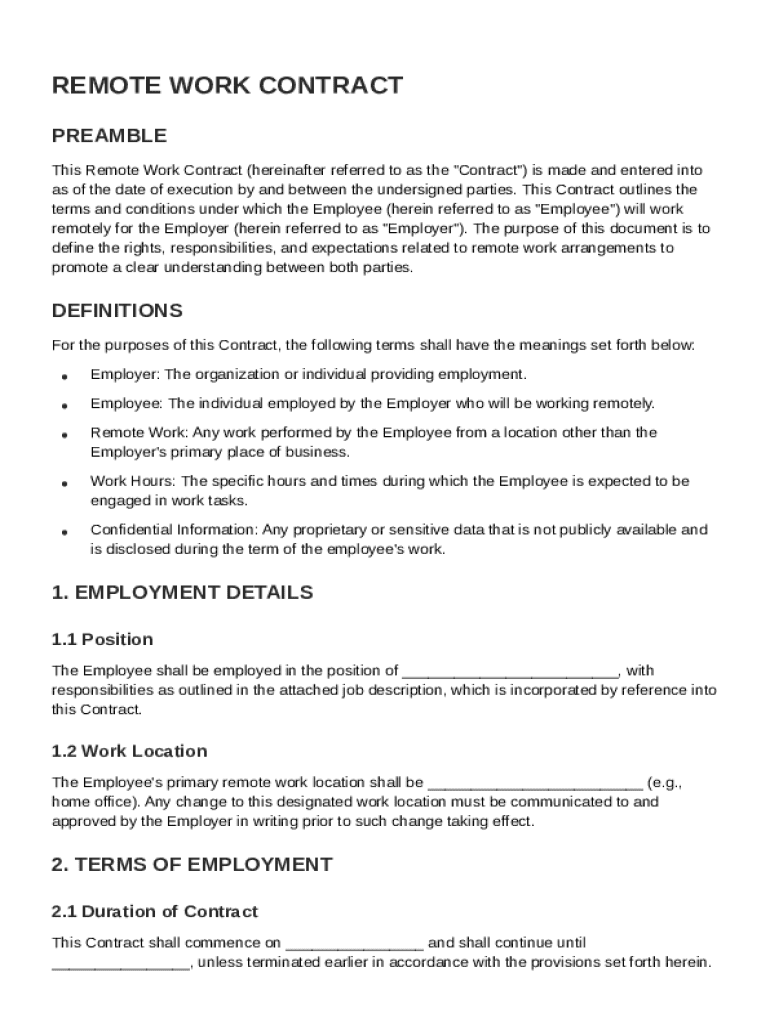







Definition & Meaning
A Remote Work Contract Template is a formal agreement that outlines the terms and conditions under which an employee will work remotely for an employer. This document includes essential components such as roles, responsibilities, working hours, compensation, and confidentiality obligations. By clearly defining these aspects, the contract helps set expectations and maintain a structured work environment, even when physically separated. Employers and employees alike benefit from having a clear, concise remote work agreement that can adapt to changes in the work environment while preserving productivity and accountability.
Essential Components
- Roles and Responsibilities: Clearly defines the duties expected from the employee.
- Working Hours: Specifies the standard work hours or if flexible scheduling is allowed.
- Compensation: Details payment structures, including salary, benefits, or hourly rates.
- Confidentiality Obligations: Protects proprietary company information and outlines penalties for breaches.
- Resources and Support from Employer: Describes the equipment and resources the employer will provide.
How to Use the Remote Work Contract Template
To effectively utilize the Remote Work Contract Template, both parties—employers and employees—must engage in a collaborative process. This involves thorough communication to ensure all terms are understood and agreed upon. Here’s a step-by-step guide on how to proceed:
- Customize the Template: Modify the document to reflect specific details relevant to the employer's business and the employee's role.
- Discuss and Agree: Both parties should review the contract and discuss any necessary adjustments to ensure mutual agreement.
- Finalize and Sign: Once both parties are satisfied, electronically sign the document through platforms like DocHub for a legally binding agreement.
Practical Example
Consider a small tech startup hiring a remote software developer. They would customize the contract to detail project milestones, deliverables, and reimbursement for home office equipment.
Steps to Complete the Remote Work Contract Template
Completing the Remote Work Contract Template involves several key steps to ensure all necessary information is included:
- Fill in General Information: Begin with the names and addresses of both the employer and the employee.
- Define Scope of Work: Clearly articulate the employee’s duties and any specific projects or responsibilities.
- Specify Working Conditions: Detail working hours, location flexibility, and availability requirements.
- Outline Compensation: Include details on salary, payment intervals, bonuses, or benefits.
- Address Confidentiality: Specify any non-disclosure agreements or data protection measures.
- Include Termination Clauses: Set forth terms under which the contract can be terminated by either party.
- Review and Sign: Ensure thorough review before signing digitally.
Potential Variations
For roles requiring flexibility, emphasize schedules that cater to different time zones. Adjust compensation clauses for commission-based roles or those requiring performance incentives.
Key Elements of the Remote Work Contract Template
Several critical components must be included to create a comprehensive remote work contract:
- Workplace Policies: Reflect the employer’s standard policies concerning remote work.
- Communication Protocols: Establish how and when communication will occur between the employee and the employer.
- Performance Evaluation: Define metrics or criteria for assessing the employee’s work performance.
- Amendment Procedures: Outline how changes to the contract can be made.
Detailed Breakdown
- Confidentiality Terms: May include specific sectors or projects subject to heightened confidentiality.
- Dispute Resolution: Provides mediation or arbitration details to settle workplace disputes without litigation.
Legal Use of the Remote Work Contract Template
The Remote Work Contract Template is legally enforceable and complies with U.S. labor laws. It serves as a binding agreement that ensures both parties understand their rights and obligations.
Legal Considerations
- Governing Law: Specify which state’s laws will govern the contract to ensure legal clarity.
- Compliance with Labor Laws: Ensure the contract reflects minimum wage, overtime, and other applicable labor standards.
Risk Mitigation
Incorporate clauses that protect both parties from unforeseen disruptions, such as pandemic-related adjustments in work conditions.
State-Specific Rules for the Remote Work Contract Template
While the fundamental elements of a remote work contract remain consistent, certain state-specific regulations must be adhered to. For instance:
- California: Requires explicit breaks and overtime compensation.
- New York: May mandate certain employee benefits and insurance covers.
Tailoring for Variations
Adjust the contract template to accommodate state-specific labor laws, particularly regarding employee classifications and entitlements.
Software Compatibility and Digital Use
DocHub and other digital platforms offer seamless integration for managing remote work contracts:
- Compatibility: Ensure software supports file formats including PDF or DOC.
- Digital Signing: Utilize electronic signatures to validate the contract legally.
Integration Solutions
- Google Workspace: Import and export contracts directly using Google Drive, maintaining a cohesive document management system.
- Cloud Storage: Leverage Dropbox or OneDrive for secure document storage and sharing.
Digital vs. Paper Version
With the rise of digital solutions, the Remote Work Contract Template is predominantly managed digitally for efficiency and environmental reasons.
Digital Advantages
- Efficiency: Faster processing and easier updates or amendments.
- Storage: Reduced physical storage needs and enhanced accessibility.
Practical Implementation
Use online tools to store and share signed contracts securely. Maintain digital backups to prevent losses due to hardware failures or office disturbances.




