
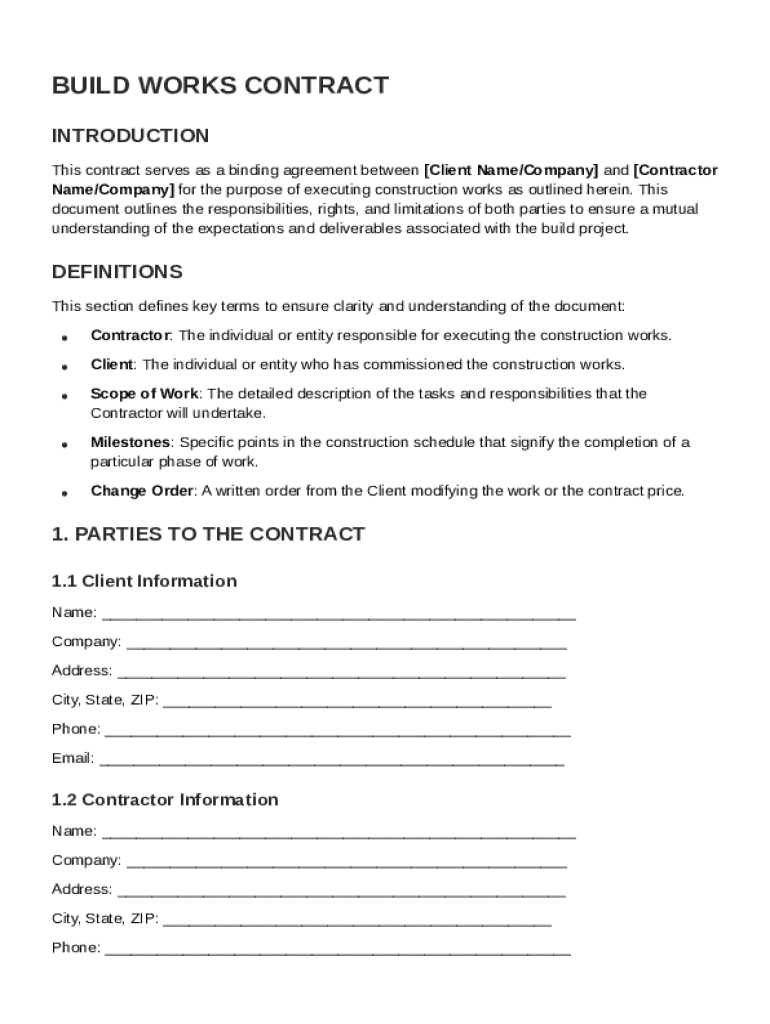







Definition and Meaning of Build Works Contract Template
A Build Works Contract Template serves as a foundational document establishing a legally binding agreement between a client and a contractor for construction services. It outlines the roles and responsibilities of each party involved, delineating their respective rights and limitations. By defining the scope of work, payment terms, and project management protocols, this template ensures both parties agree on critical aspects of the construction project to avoid misunderstandings or disputes. The comprehensive nature of the contract means it also includes provisions for change orders, termination conditions, and helps ensure a seamless project execution.
How to Use the Build Works Contract Template
To effectively use a Build Works Contract Template, follow these steps:
- Download and Review: Obtain the template from a reliable source such as DocHub. Carefully review the template to understand each section and its requirements.
- Customize Details: Personalize the template by filling out particular details pertinent to the specific construction project, such as project name, start and end dates, and the parties involved.
- Specifically Define Terms: Clearly define the scope of work, materials used, specific deadlines, and payment schedules to ensure transparency and understanding.
- Consult Legal Advice: It is advisable to have the completed template reviewed by a legal professional to ensure compliance with local laws and regulations.
- Finalize and Sign: Upon agreement from both parties on all terms, apply legally binding electronic signatures.
Consider utilizing DocHub’s electronic signature functionality to efficiently collect signatures from involved parties, with a secure audit trail.
Steps to Complete the Build Works Contract Template
To complete the Build Works Contract Template efficiently:
- Initialize the Template: Start by entering basic information about both the client and the contractor, such as names, addresses, and contact information.
- Specify Project Details: Describe the construction project, detailing the location, objectives, and any relevant technical specifics.
- Detail the Scope of Work: Clearly outline tasks to be performed, materials required, and any milestones for project completion.
- Stipulate Payment Terms: Define the billing process including total cost, payment frequency, methods accepted, and any contingency clauses.
- Identify Obligations and Responsibilities: State expectations, deliverable requirements, and the roles each party will play throughout the project duration.
- Add Termination Clauses: Outline scenarios that could lead to contract termination and any penalties or conditions.
- Include Dispute Resolution Terms: Add processes for handling disagreements or breaches of contract.
- Seek Approval and Sign: Once completed, both parties should review the agreement thoroughly before signing.
Key Elements of the Build Works Contract Template
A Build Works Contract Template includes several crucial components:
- Parties Involved: Identification of all parties to the contract.
- Scope of Work: Details the specific tasks and deliverables.
- Project Timeline: Establishes milestones and completion dates.
- Payment Terms: Outlines payment schedule and method.
- Change Order Process: Procedure for modifications to the contract.
- Termination Conditions: Circumstances under which the contract can be terminated.
- Insurance Requirements: Specifies necessary insurance coverage.
- Dispute Resolution: Agreed-upon methods for handling disagreements.
Each element is designed to ensure clarity and mutual understanding.
Legal Use of the Build Works Contract Template
Using a Build Works Contract Template legally requires consideration of several factors:
- Compliance with Laws: Ensure the contract complies with both state and federal construction laws and regulations.
- Accuracy: Provide accurate, truthful information about the project and parties.
- Capacity: Verify that all parties have the legal capacity to enter into a contract.
- Electronic Signatures: Utilize legally compliant electronic signatures which are valid and enforceable under the ESIGN Act.
It is crucial to consult with a legal professional to confirm that all legal obligations are met.
Who Typically Uses the Build Works Contract Template
The Build Works Contract Template is widely used by:
- Contractors and Builders: Who require a standardized, comprehensive document for construction agreements.
- Architects and Engineers: Engaged in overseeing the project execution and needing clear guidelines.
- Construction Companies: Seeking to formalize agreements with clients in clear terms.
- Real Estate Developers: When coordinating multiple contracts and timelines on larger projects.
These users leverage the template to ensure all aspects of a construction project are legally structured and managed.


State-Specific Rules for the Build Works Contract Template
Each state may have specific regulations affecting construction contracts:
- Licensing Requirements: Verify contractor licensing as some states have particular credential requirements.
- Consumer Protection Laws: Some states mandate specific disclosure requirements to safeguard client interests.
- Lien Laws: Understand lien protocols and procedures, which can vary significantly by state, and incorporate them into the contract.
Ensure your contract accounts for these variances by adapting its content to your location’s regulations.
Software Compatibility for the Build Works Contract Template
When completing or altering a Build Works Contract Template, consider software compatibility:
- DocHub: Enables seamless editing, annotation, and signing directly within the platform.
- Compatibility with Formats: Importation and conversion across a variety of file formats including DOC, PDF, and TXT.
- Integration with Cloud Services: Facilitates direct imports and exports with cloud storage platforms like Google Drive and Dropbox.
Ensuring compatibility minimizes technical barriers and maintains workflow efficiency.




