Studentaccounts.ucf.educontact-usContact UsStudent Account Services - University of Central ... 2026

Get Form
ucf student accounts Preview on Page 1

Here's how it works

01. Edit your ucf student accounts online
Type text, add images, blackout confidential details, add comments, highlights and more.
02. Sign it in a few clicks
Draw your signature, type it, upload its image, or use your mobile device as a signature pad.
03. Share your form with others
Send ucf student account services via email, link, or fax. You can also download it, export it or print it out.

How to use or fill out studentaccounts.ucf.eduContact Us Student Account Services - University of Central Florida with Our Platform

Form edit decoration
9.5
Ease of Setup
DocHub User Ratings on G2
9.0
Ease of Use
DocHub User Ratings on G2
  1. Click ‘Get Form’ to open it in the editor.
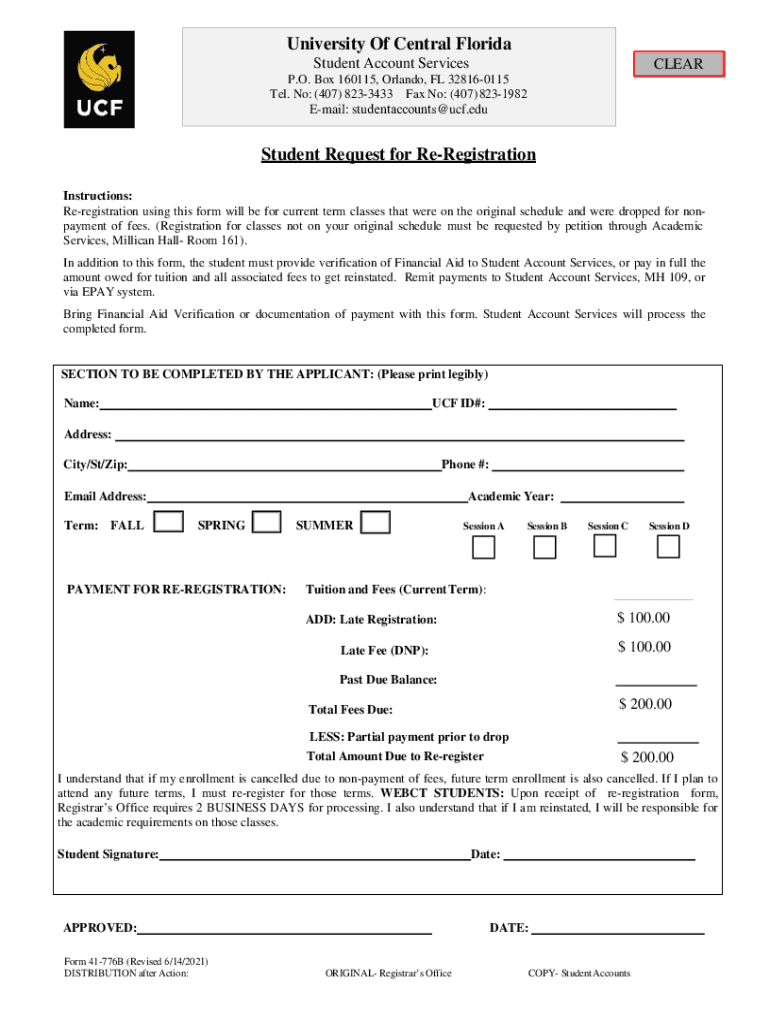
  2. Begin by filling in your personal information in the designated fields. Ensure you print legibly your Name, UCF ID#, Address, City/St/Zip, Phone #, and Email Address.
  3. Select the Term and Academic Year for which you are re-registering. Options include FALL, SPRING, or SUMMER.
  4. In the Payment for Re-Registration section, input the total fees due based on your tuition and any additional charges. Make sure to calculate accurately.
  5. Sign and date the form at the bottom to confirm your understanding of the re-registration process.
  6. Submit the completed form along with any required documentation such as Financial Aid Verification or payment receipt to Student Account Services via fax or in person.

Start using our platform today to streamline your document editing and submission process for free!

See more studentaccounts.ucf.educontact-usContact UsStudent Account Services - University of Central ... versions

We've got more versions of the studentaccounts.ucf.educontact-usContact UsStudent Account Services - University of Central ... form. Select the right studentaccounts.ucf.educontact-usContact UsStudent Account Services - University of Central ... version from the list and start editing it straight away!
Versions Form popularity Fillable & printable
2021 4.8 Satisfied (55 Votes)
2018 4.2 Satisfied (113 Votes)
2011 4.3 Satisfied (296 Votes)
be ready to get more

Complete this form in 5 minutes or less

Get form

Got questions?

We have answers to the most popular questions from our customers. If you can't find an answer to your question, please contact us.
Contact us
The tax Tuition Statement, IRS Form 1098-T, is available online and be printed at any time for your records through your myUCF portal account. It may be found under: Student Self Service - Finances - 1098t Tax Management. If you need access to your myUCF account, contact the IT Helpdesk at 407-823-5117.
Even if you didnt receive a 1098-E from your servicer, you can download your 1098-E from your loan servicers website. If you are unsure who your loan servicer is, log in to StudentAid.gov or call the Federal Student Aid Information Center at 1-800-4-FED-AID (1-800-433-3243; TTY 1-800-730-8913).
To enroll, sign in at my.ucf.edu and click Student Self-Service. Go to the Student Accounts link, then click Direct Deposit and follow the instructions.
To View Your 1098-T Form Log into ONE.UF. Select Campus Finances (Bursar) Card. Select View My Account. Under Related Links, select View 1098-T then choose the appropriate tax year. Graduates: If your access to ONE.UF has lapsed, you can restore it.
If your tuition was not paid or deferred by the payment deadline date, your current and pre‐ registered future term classes were dropped for nonpayment. This date is published on the academic calendar. As a result of the drop, a $100 drop for nonpayment (DNP) fee will be assessed to your account.

Security and compliance

At DocHub, your data security is our priority. We follow HIPAA, SOC2, GDPR, and other standards, so you can work on your documents with confidence.

Learn more
ccpa2
pci-dss
gdpr-compliance
hipaa
soc-compliance

People also ask

Form 1098-T will be made available via Self Service by January 31st. For student who did not consent to electronic delivery, Form 1098-T will also be sent standard mail and postmarked by January 31st. The form will be mailed to your address on file with Admissions Records. 4.
Contact Information STUDENT SERVICES Mailed Payments UCF Student Account Services Attn: Payment Processing P. O. Box 160115 Orlando, FL 32816-0115 Phone Number 407-823-2433 Fax Number 407-823-1982 Email studentaccounts@ucf.edu3 more rows