






Definition and Meaning
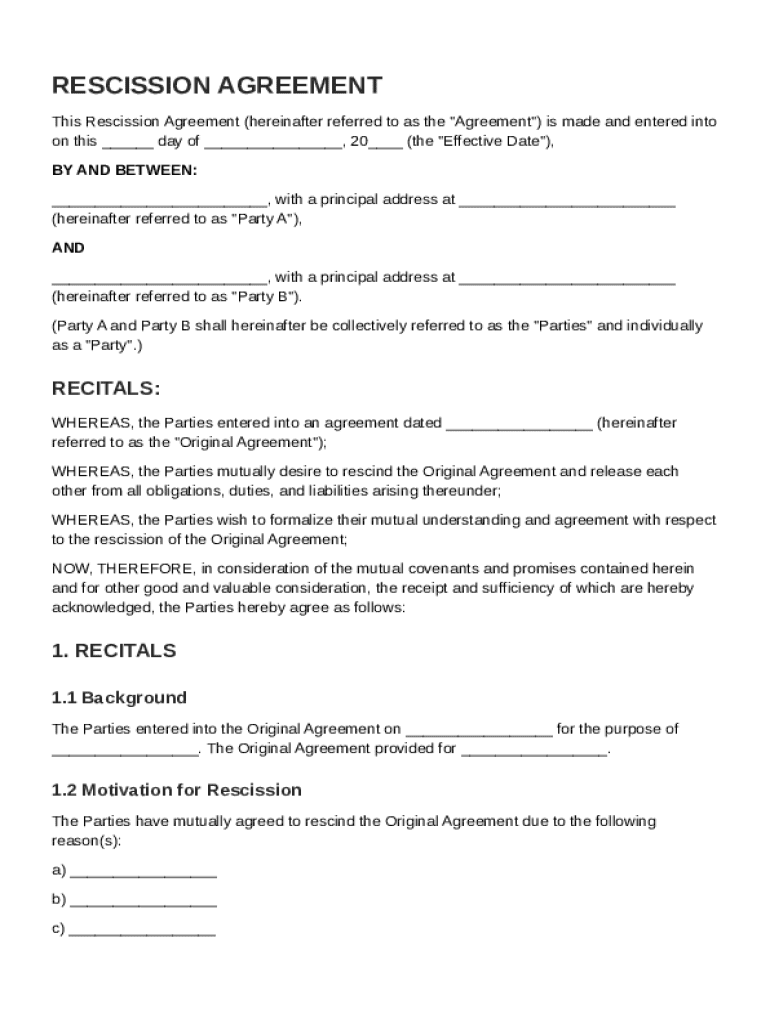
A Rescission Agreement Template is a legal instrument used to officially annul a previously established agreement between two parties, often referred to as Party A and Party B. The process of rescission involves the mutual consensus of both parties to terminate an original contract, essentially rendering it null and void. The agreement covers elements such as the reasons for the rescission, the mutual release of claims, and indemnification. Using this template ensures all parties have a clear understanding of their obligations and legal standings once the original agreement is voided.
How to Use the Rescission Agreement Template
To effectively utilize the Rescission Agreement Template, follow a structured approach:
-
Review the Original Agreement: Begin by carefully examining the terms of the original agreement that you wish to rescind. Ensure both parties are in mutual agreement about the rescission.
-
Customize the Template: Populate the template with specific details relevant to the agreement, such as the names of the parties, date of the original agreement, and the reasons for rescission.
-
Incorporate Key Clauses: Make sure to include essential clauses such as mutual release of claims, indemnification, governing law, and severability.
-
Execute the Agreement: Both parties should sign the document in the presence of a notary public to ensure its legal enforceability.
-
Keep Records: Retain copies of the signed rescission agreement for legal and audit purposes.
Key Elements of the Rescission Agreement Template
Certain core components should be included in a Rescission Agreement to ensure its completeness and legal validity:
-
Parties Involved: Clearly identify Party A and Party B, including their full legal names and addresses.
-
Original Agreement Reference: Provide detailed reference to the original contract, including its date and title, to avoid any ambiguities.
-
Mutual Release of Claims: State that both parties mutually release each other from any claims or obligations arising from the original agreement.
-
Indemnification Clause: Include a clause addressing indemnification liabilities to safeguard each party from future claims related to the agreement.
-
Governing Law: Specify the legal jurisdiction under which the rescission agreement falls.
Steps to Complete the Rescission Agreement Template
Here are the steps to effectively complete the template:
-
Identify the Parties: Enter the full names and roles of the individuals or entities involved.
-
Provide the Original Agreement Details: Document relevant information about the original agreement, like date and purpose.
-
State the Rescission Terms: Clearly state the reasons leading to the rescission and the terms on which both parties agree.
-
Include Mutual Releases: Draft the sections detailing the release of claims and liabilities.
-
Confirm Governing Law: Ascertain the state or jurisdiction governing the agreement.
-
Signatures: Secure signatures from all parties involved, witnessed by a notary if necessitated by the agreement terms.
Legal Use of the Rescission Agreement Template
The legal application of the Rescission Agreement Template is critical to ensure its enforceability:
-
Contractual Authority: Verify that the parties involved have the lawful authority to terminate the original contract.
-
Notary Acknowledgment: Where required, the agreement should be notarized to confirm the authenticity of signatures and the voluntariness of the agreement.
-
Amendments and Modifications: If any amendments are made, ensure they are also documented and agreed upon by all parties.
Who Typically Uses the Rescission Agreement Template
This template serves various individuals and organizations needing to rescind a legal agreement:
-
Businesses and Corporations: Often used when a contractual relationship can no longer be maintained due to changing business conditions.
-
Individual Contractors: Freelancers and contractors use it when projects or work relationships must be terminated.
-
Legal Professionals: Attorneys might employ the template while advising clients on contract terminations.


State-Specific Rules for the Rescission Agreement Template
Consider these aspects to align with state-specific regulations:
-
State Laws: Some states have unique stipulations or requirements for rescission agreements, particularly regarding disclosures and formalities.
-
Jurisdictional Variance: The rescission provision might differ based on the state where the agreement is executed; it's imperative to consult local laws to ensure compliance.
-
Notarization Requirements: Certain jurisdictions may mandate the notarization of the agreement for it to be deemed valid.
Examples of Using the Rescission Agreement Template
Real-world applications of the Rescission Agreement Template include:
-
Dissolution of Business Partnerships: Two business partners mutually decide to cancel their partnership agreement due to a shift in strategic direction.
-
Real Estate Transactions: If a buyer and seller agree to cancel a real estate sale and return to pre-contract conditions, this template facilitates the legal termination process.
-
Employment Contracts: Employers and employees use this template to terminate employment agreements mutually, often in exchange for a severance package or other settlement terms.