






Definition and Meaning
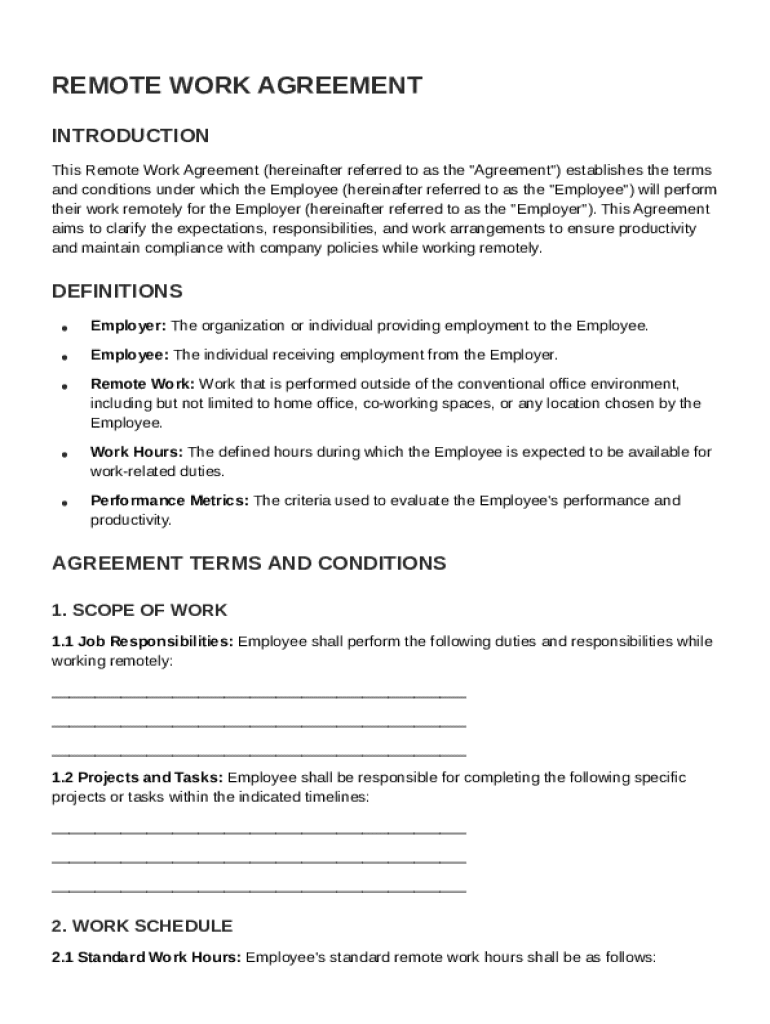
The "Remote Work Agreement Template" is a structured document that outlines the conditions and protocols under which an employee can work remotely. This template establishes the framework for remote work, ensuring clear communication between the employer and employee. It encompasses authorized work hours, expected performance standards, communication protocols, and compliance with company policies. By defining these conditions formally, the template ensures both employer and employee understand their roles and responsibilities, which can help prevent misunderstandings and maintain productivity in a remote work setting.
Key Components of the Agreement
- Work Hours and Availability: Specifies the employee's expected work schedule, including core hours when the employee must be available for communication.
- Performance Metrics: Details the standards and benchmarks the employee must meet to ensure productivity while working remotely.
- Confidentiality and Data Security: Outlines the protocols for protecting sensitive company information, including the use of secure networks and encrypted communications.
- Communication Expectations: Defines the frequency and preferred methods of communication between the employee and management.
- Equipment Provisions: Specifies the technology and equipment the employer will provide and the employee's responsibility for maintaining it.
How to Use the Remote Work Agreement Template
Using the remote work agreement template effectively involves understanding its structure and customizing it to suit specific needs of the organization. To begin, employers should review and select relevant clauses that reflect the company's remote work policies.
Customization Steps
- Review Each Section: Thoroughly read each component of the template to understand its implications.
- Adjust Clauses as Needed: Modify any sections to better align with company-specific practices or policies.
- Include Company Policies: Add any additional company rules or guidelines that aren't covered in the template.
- Validate Legal Compliance: Consult with legal experts to ensure the final document complies with labor laws and regulations.
Examples of Customization
- A tech company may emphasize confidentiality and data security, adding specific protocols for data encryption and remote server access.
- Educational institutions might tailor sections on performance metrics to address the specific productivity measures relevant to teaching staff.
Key Elements of the Remote Work Agreement Template
Identifying and comprehending the key elements of the remote work agreement template are vital for ensuring comprehensive coverage of remote work terms.
Essential Components
- Job Description and Duties: Clearly define the employee's role and responsibilities within the company.
- Evaluation Process: Establish how the employee's performance will be reviewed, including methods and frequency of evaluations.
- Termination Conditions: Articulate conditions under which the remote work agreement may be terminated by either party.
- Dispute Resolution: Outline procedures for resolving disagreements related to the remote work arrangement.
Practical Application
Ensuring all parties understand these elements helps in maintaining consistent work output and managing expectations. For instance, a marketing firm may focus heavily on specifying deliverables and key performance indicators relevant to creative tasks, ensuring remote workers meet strategic goals.
State-Specific Rules for the Remote Work Agreement Template
Remote work agreements must often conform to state-specific laws and regulations. Understanding and incorporating these nuances is a vital step in creating a valid and enforceable agreement.
State Variations
- Minimum Wage Requirements: Each state may have different minimum wage laws that employers must respect even in remote work scenarios.
- Overtime Legislation: The treatment of overtime may differ, so agreements should address these regulations specific to the employee's location.
- Worker's Compensation: Specific rules may apply regarding worker's compensation for remote employees.
Compliance Tips
Employers should investigate state labor laws and adjust agreement terms to ensure compliance. For example, California-based organizations must consider stringent privacy laws that affect how employee data is handled.
Steps to Complete the Remote Work Agreement Template
Completing the remote work agreement template requires careful attention to detail to ensure its effectiveness and legal soundness.
Step-by-Step Guide
- Gather Necessary Information: Collect employee details, job descriptions, and relevant company policies.
- Fill Out Basic Information: Start with basic details such as employee name, position, and department.
- Customize Agreement Clauses: Tailor each section based on the company’s specific remote work policies.
- Review with Legal Counsel: Ensure all sections comply with applicable laws and internal policies.
- Employee Review and Signature: Allow employees to review the agreement, ask questions, and provide their signature to acknowledge understanding and acceptance.
Common Checkpoints
To avoid missing critical points during completion, ensure data accuracy, proper clause customization, and thorough legal compliance verification.
Legal Use of the Remote Work Agreement Template
Understanding the legal footing of the remote work agreement is crucial. It supports enforcing company policies and safeguarding against potential disputes.
Legal Considerations
- Compliance with Federal and State Laws: Ensure the template aligns with labor laws such as FMLA and discrimination regulations.
- Incorporation of Company Policies: The agreement should reflect company policies related to remote work, ensuring legal support for future actions.
- Employee Rights: Document employees’ rights within the remote work setting, such as the right to a safe work environment.
Example Cases
An organization may face legal challenges if ambiguities exist in the agreement or if it violates labor laws. Keeping the document compliant and up to date with legal trends can preclude such issues.
Who Typically Uses the Remote Work Agreement Template
This template is extensively used by various types of organizations that implement remote work for their employees.


Typical Users
- Corporations: Adopt these agreements to manage teleworkers and maintain efficiency across diverse locations.
- Small Businesses: Use the agreement to provide structured, yet flexible, work arrangements for employees.
- Public Sector Organizations: Ensure that employees adhere to government guidelines while working remotely.
Industry Examples
Organizations in tech, consulting, education, and even healthcare increasingly utilize these templates to facilitate remote work arrangements. Tailoring the template to suit specific industry needs ensures that it addresses all pertinent aspects of remote work.
Software Compatibility and Integration
The digital version of the remote work agreement template offers significant advantages in terms of accessibility and integration with various software systems.
Compatibility Overview
- Cloud Platforms: Easily integrated with platforms like Google Workspace for seamless document management and sharing.
- Document Signing Software: Supports digital signature solutions for electronic agreement of terms.
- HR Management Systems: Compatible with software solutions for streamlined employee record management.
Integration Tips
Choosing a robust digital platform allows for efficient template creation, dissemination, and recording of agreements. Leveraging tools like DocHub can enhance the document workflow by providing comprehensive editing and signing capabilities.