







Definition & Meaning
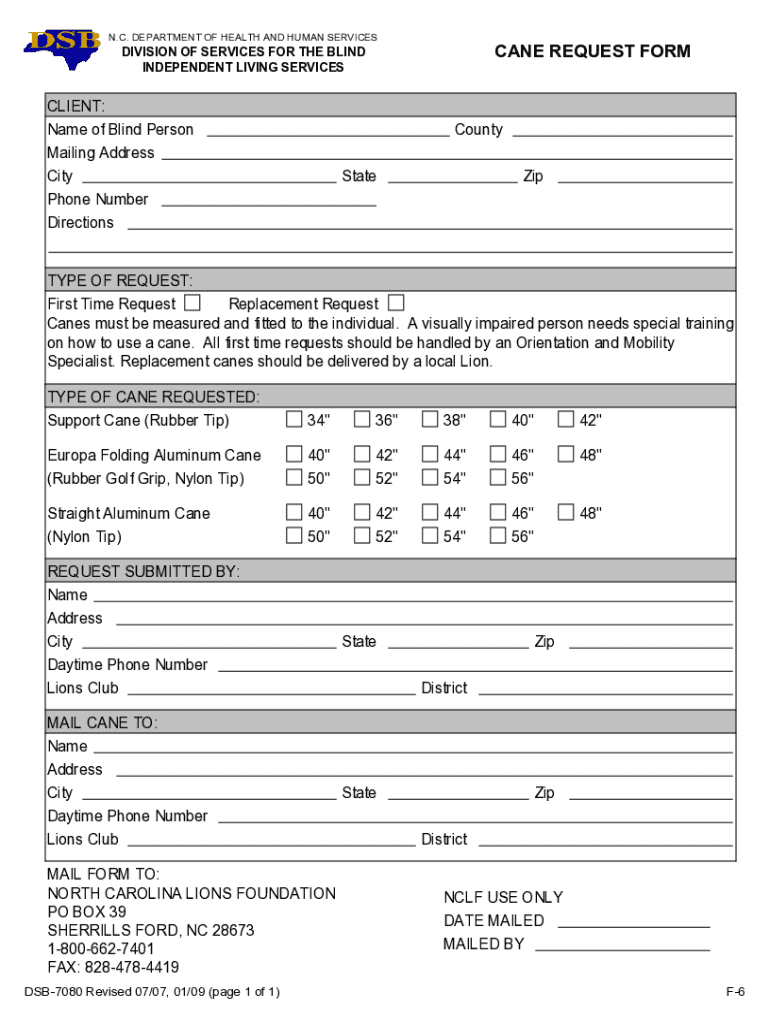
The "dsb-7080-ia" refers to a specific form used for requesting canes for visually impaired individuals, curated by the North Carolina Department of Health and Human Services, particularly under the Division of Services for the Blind. This form is essential for eligible individuals to request either their first white cane or a replacement, ensuring mobility assistance is accessible.
Key components of the form include:
- Personal information fields for the client and requester
- Options for choosing the type of cane
- Submission instructions and additional procedural guidance
The form is a critical tool in facilitating independence and mobility for the visually impaired, underscoring its importance in vision-related aid programs.
How to Use the dsb-7080-ia
When approaching the "dsb-7080-ia," it is important to follow a structured method to ensure all necessary details are accurately filled. Here is an overview of the steps involved:
-
Acquisition of the Form: Obtain the form from the North Carolina Department of Health and Human Services website or request it via mail from the designated office.
-
Personal Information Section:
- Fill in your full name, address, and contact information.
- Include any identification numbers if required.
-
Cane Selection:
- Specify whether you are requesting a new cane or a replacement.
- Indicate the exact type or size of cane needed.
-
Requester Details: If someone else is completing the form on behalf of the visually impaired individual, their information must also be included.
-
Submission:
- Follow the directions for mailing the form or submit it in person.
- Ensure any required supplementary documents are attached.
These steps make the process straightforward, ensuring the requester provides all necessary information to expedite the request efficiently.
Steps to Complete the dsb-7080-ia
Completing the "dsb-7080-ia" form carefully ensures that the request is processed without delays. Here’s a detailed process to complete the form:
-
Preparation:
- Gather all relevant personal and contact information for both the requester and the client.
- Determine the cane's specifications required (type, size, etc.).
-
Completing Required Sections:
- Input the client's details accurately in the designated areas.
- If applicable, fill in the requester's information ensuring clarity and precision.
-
Indicating the Need for a Cane:
- Clearly mark whether this is a new request or a replacement.
- Deepen the request by selecting the specific type of cane needed based on the available options.
-
Verification and Review:
- Double-check all inputted information for errors.
- Confirm all fields are completed in full, and necessary attachments are prepared.
-
Submission:
- Follow precise instructions on where and how to submit the form.
- Utilize tracked mail options or confirmed delivery services if the form is sent via postal mail.
These structured guidelines ensure a seamless submission process, helping avoid common errors and reducing wait times for processing.
Key Elements of the dsb-7080-ia
Several essential components make up the "dsb-7080-ia" form, each requiring precise attention to ensure correct processing:
-
Personal and Contact Information: Accurate input of the client's and requester's information is critical to ensure the request is associated with the correct individual.
-
Cane Type Selection: This section allows the requester to specify the cane needed, offering choices that accommodate the user's specific mobility requirements.
-
Authentication of Need:
- This can involve detailing the requester’s relationship to the client.
- May include additional documentation verifying the requirement for a cane, enhancing the request’s legitimacy.
-
Submission Instructions:
- Clear guidance on where to send the completed form.
- Additional instructions for first-time versus replacement requests to differentiate procedural steps.
These elements combine to provide a comprehensive request form tailored to the needs of visually impaired individuals, aiding mobility and enhancing quality of life.
Who Typically Uses the dsb-7080-ia
The "dsb-7080-ia" form is utilized by a specific demographic and associated individuals:
-
Visually Impaired Individuals: Primarily, those requiring an initial or replacement white cane use this form to facilitate mobility assistance.
-
Caregivers and Family Members: Individuals acting on behalf of visually impaired clients often complete the form, indicating their support in the request process.
-
Healthcare Professionals: Occasionally, professionals may assist patients in completing the form, especially if additional recommendations or documentation are involved.
These users engage with the form as part of a collective effort to ensure that visually impaired individuals receive the necessary resources for independent mobility.


Legal Use of the dsb-7080-ia
The legal application of the "dsb-7080-ia" involves specific regulatory standards to ensure proper use and statutory compliance:
-
Confidentiality: The form must be handled with care to maintain the privacy and confidentiality of the client's information, adhering to legal privacy obligations such as HIPAA where applicable.
-
Authorization Requirements:
- When another individual completes the form on behalf of someone else, written consent or specific authorization may be required.
- Ensures legal accountability and legitimacy in processing the request.
-
Accurate Information: Providing false information can have legal repercussions. Therefore, all data provided must be true and verifiable to ensure authenticity in the request process.
These legal components ensure that the form’s use aligns with state and federal regulations governing health-related support applications.
Required Documents
Completing the "dsb-7080-ia" form often requires accompanying documentation to support the request fully:
-
Identification Documents: Copies of a government-issued ID may be necessary to verify the identity of the client or the requester.
-
Proof of Visual Impairment: Documentation from an eye care professional verifying the individual's visual status and necessity for a cane.
-
Previous Cane Details (if applicable):
- For replacements, including information about the previous cane can be required.
- Details such as the type, size, and any registered serial numbers enhance the accuracy of the replacement request.
Having these documents ready and attaching them to your submission ensures a smoother processing experience.
Form Submission Methods
Submission methods for the "dsb-7080-ia" allow applicants flexibility in delivering their request:
-
Mail: Traditional mailing services can be used to submit the physical form, ideal for those without immediate internet access.
-
In-Person Submission: Applicants may drop off completed forms at designated offices within the Department of Health and Human Services. This method may provide immediate feedback on form accuracy.
-
Digital Submission:
- While primarily a paper form, if digital submission becomes available, it would offer a more instant manner of delivery.
- Ensures rapid processing and acknowledgment by the receiving department.
Choosing the appropriate submission method depends on personal accessibility, urgency, and departmental guidelines.




