






Definition and Meaning
Transportation Operations (Road Use Management), often referred to by its official shorthand, revolves around the framework used to regulate road usage and transportation activities. This includes guidelines for vehicle operation and driver conduct on public roads, ensuring the safety and efficiency of transportation systems. It encompasses laws, policies, and procedures aimed at managing traffic flow, maintaining road safety standards, and optimizing transportation infrastructure.
Core Components
- Traffic Regulations: Rules governing the operation of vehicles on roadways to maintain safety and order.
- Road Infrastructure Management: Strategies for maintaining and improving road networks.
- Safety Compliance: Guidelines to ensure vehicle and driver adherence to safety standards.
- Policy Implementation: Development and enforcement of transportation policies.
How to Use the TRANSPORT OPERATIONS (ROAD USE MANAGEMENT) Form
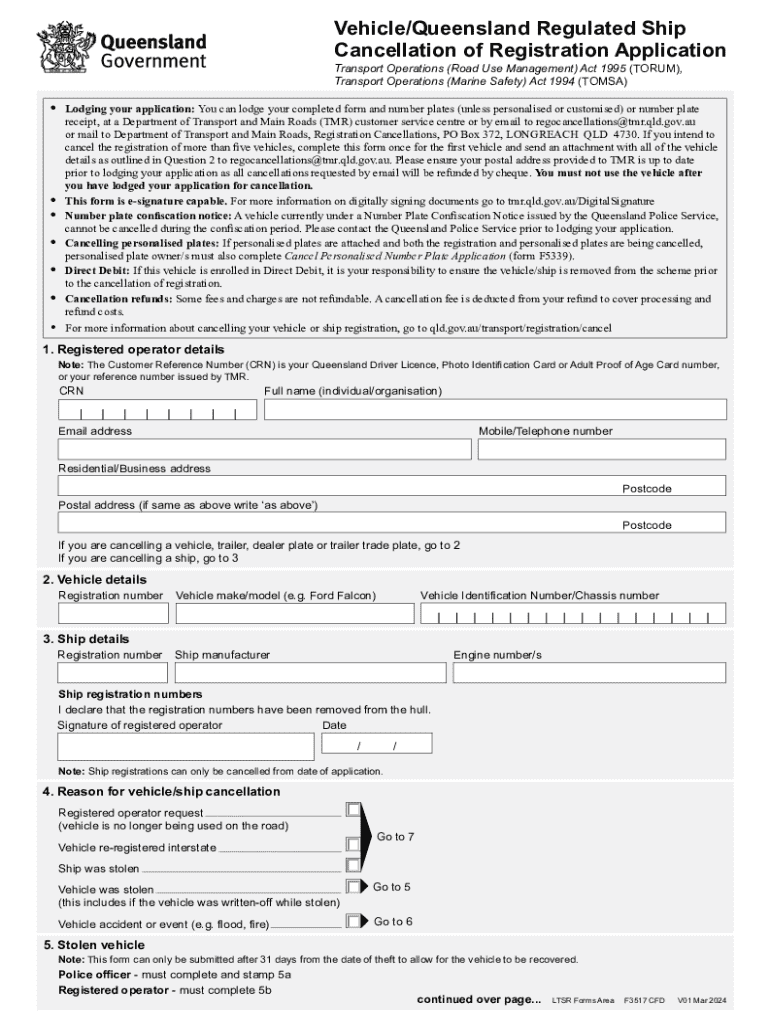
Using the TRANSPORT OPERATIONS (ROAD USE MANAGEMENT) form involves a thorough understanding of its purpose and the information required to complete it accurately.
- Identify the Purpose: Determine if the form is needed for the registration, deregistration, or reporting of a road use management-related activity.
- Gather Information: Collect all necessary personal, vehicle, and legal details before filling out the form.
- Complete the Form: Fill out each section carefully, ensuring all data is accurate and up-to-date.
- Review and Submit: Double-check the information for completeness and accuracy before submitting the form through the preferred method.
Common Scenarios
- Vehicle registration or deregistration
- Reporting of traffic accidents
- Application for road use permits
Steps to Complete the TRANSPORT OPERATIONS (ROAD USE MANAGEMENT)
Completing the TRANSPORT OPERATIONS (ROAD USE MANAGEMENT) form involves several steps designed to ensure comprehensive and precise input of all required information.
- Download or Access the Form Online: Obtain a copy of the form from the relevant transportation authority's website.
- Read Instructions Carefully: Understand the directives provided for filling out the form to avoid errors.
- Fill in Personal Details: Include your full name, contact information, and identification number.
- Provide Vehicle Information: Add details like vehicle make, model, VIN, and license plate number if applicable.
- Specify Type of Request: Indicate whether the form pertains to registration, cancellation, or reporting.
- Attach Required Documents: Ensure that you attach any necessary documents, such as proof of identity or vehicle ownership.
- Sign and Date the Form: Provide your signature and the date to validate the form.
- Submit the Form: Deliver the completed form via mail, online submission, or in person at the designated office.
Legal Use of the TRANSPORT OPERATIONS (ROAD USE MANAGEMENT)
The legal context in which the TRANSPORT OPERATIONS (ROAD USE MANAGEMENT) form is used is crucial for ensuring compliance with transportation laws.
- Compliance with Traffic Laws: The form helps enforce adherence to road use regulations.
- Vehicle Registration and Deregistration: Legalizes the status of vehicles on public roads.
- Accident and Incident Reporting: Facilitates the legal reporting of road incidents for accountability.
Legal Considerations
- Completing the form accurately to prevent potential legal penalties
- Understanding the legal consequences of non-compliance
- Ensuring the use of the form aligns with the applicable transportation laws and regulations
Important Terms Related to TRANSPORT OPERATIONS (ROAD USE MANAGEMENT)
Understanding key terminologies associated with TRANSPORT OPERATIONS (ROAD USE MANAGEMENT) can aid in navigating the form.
- Vehicle Identification Number (VIN): Unique code used to identify individual vehicles.
- Road Use Permit: Legal authorization for specific uses of roadways.
- Traffic Compliance: Adherence to traffic laws and safety standards.
- Registration Number: Identifier assigned to a vehicle for official recognition.
Definitions
- Registration: The process of officially recording a vehicle for road use.
- Traffic Monitoring: Surveillance and analysis of road traffic to ensure smooth operations.
Form Submission Methods
The TRANSPORT OPERATIONS (ROAD USE MANAGEMENT) form offers various submission channels to suit user preferences and accessibility.
- Online Submission: Use the official transportation authority's portal for electronic submission.
- Mail: Send the completed form along with necessary documents via postal mail to the designated office.
- In-Person: Submit the form by personally visiting a local department of transportation office.
Advantages of Each Method
- Online: Fast processing, immediate confirmation of submission
- Mail: Provides physical proof of submission
- In-Person: Allows for direct assistance and clarification of doubts
Who Issues the Form
The TRANSPORT OPERATIONS (ROAD USE MANAGEMENT) form is typically issued by state or local government transportation departments or authorities responsible for regulating and overseeing road use within their jurisdiction.
- State Departments of Transportation: Manage road use regulations at a state level.
- Local Transportation Authorities: Handle jurisdiction-specific road use management.
Roles and Responsibilities
- Regulation of road use policies
- Administration of vehicle registration processes
- Enforcement of traffic compliance measures
Key Elements of the TRANSPORT OPERATIONS (ROAD USE MANAGEMENT)
Understanding the fundamental elements of the TRANSPORT OPERATIONS (ROAD USE MANAGEMENT) form is essential for its proper completion.
Main Components
- Personal and Vehicle Information: Essential for identifying the applicant and their vehicle.
- Purpose of Submission: Clarifies the intent, such as registration, cancellation, or reporting.
- Supporting Documentation: Verifies the information provided in the form.
- Acknowledgments and Declarations: Legal affirmations required for form validation.