Type text, add images, blackout confidential details, add comments, highlights and more.

02. Sign it in a few clicks
Draw your signature, type it, upload its image, or use your mobile device as a signature pad.

03. Share your form with others
Send it via email, link, or fax. You can also download it, export it or print it out.

How to use or fill out qf3517 qld form 2012 with our platform
Ease of Setup
DocHub User Ratings on G2
Ease of Use
DocHub User Ratings on G2
Click ‘Get Form’ to open the qf3517 qld form 2012 in the editor.
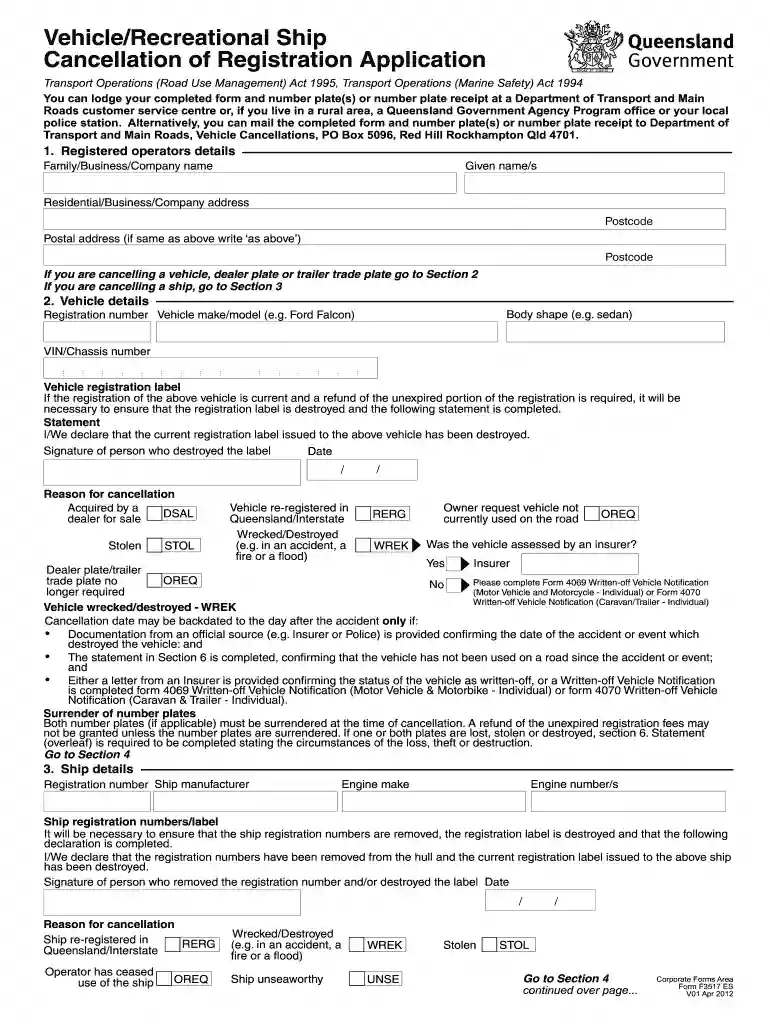
Begin by filling out the 'Registered Operator's Details' section. Enter your family, business, or company name, followed by your given names and addresses. Ensure that you provide accurate postcode information.
Proceed to Section 2 for vehicle details. Input the body shape, registration number, make/model, and VIN/chassis number of the vehicle. If applicable, complete the statement regarding the destruction of the registration label.
If cancelling a ship, navigate to Section 3 and provide ship details including registration number and engine specifications. Complete the declaration about removing registration numbers.
In Section 4, indicate if your vehicle/ship was stolen and provide necessary police documentation if applicable.
Complete Section 5 with your declaration confirming all information is true. Ensure signatures are provided where required.
Finally, review all sections for accuracy before submitting your completed form through our platform.
Start using our platform today to fill out your qf3517 qld form 2012 online for free!
We've got more versions of the qf3517 qld form 2012 form. Select the right qf3517 qld form 2012 version from the list and start editing it straight away!
What is Form 12? Form 12 Inspection Certificate (Aspect Certificate) is issued by a building certifier or an approved inspector after conducting an inspection of construction work. This form confirms that the inspected work complies with Queenslands building regulations and codes.
What does a building certifier do in QLD?
Building certifiers manage the building approval and inspection process with all relevant practitioners. This helps ensure that all aspects of the building work comply with the Building Act 1975.
Who can issue a Form 12 QLD?
Who can sign this certificate (Form 12)? (part 9, division 2, section 74 of the BR 2021) A person assessed and appointed as a competent person (inspection) must complete the approved form (Form 12) and give it to the building certifier after they (1) inspect the aspect of work; and (2) are satisfied the aspect of work
What is the standard format for QLD plates?
Standard issue State or territoryText/background colourSerial format Queensland Maroon/white nnnOan South Australia Black/white SnnnDaa Tasmania Blue/white M nn aa Victoria Blue/white 2Danaa5 more rows
What is the difference between Form 12 and 15?
Q1: Whats the difference between Form 12 and Form 15? Form 15 certifies a design (like a slab or patio), while Form 12 confirms the completed work matches the certified design. Both are often needed for approval.
Related Searches
How to cancel rego QLD onlineCancellation of registration form (F3517)QLD rego cancellation formCancel qld rego direct debitSurrender plates QLDCancel rego direct debitRego refund QLDCan you cancel rego online
Security and compliance
At DocHub, your data security is our priority. We follow HIPAA, SOC2, GDPR, and other standards, so you can work on your documents with confidence.
Only a certified structural engineer or another qualified professional can complete and sign a Form 15. The engineer must assess the design or product to ensure it follows Australian building codes and standards. Their certification provides assurance that the structure will be safe and durable once built.
What documents do I need to cancel QLD rego?
Before you cancel your car registration, ensure you have the following: Your Queensland drivers licence or another form of identification. The vehicles registration certificate (if available) Your number plates (if returning them for a refund) A completed Vehicle Registration Cancellation Application (F3517)
Cookie consent notice
This site uses cookies to enhance site navigation and personalize your experience.
By using this site you agree to our use of cookies as described in our Privacy Notice.
You can modify your selections by visiting our Cookie and Advertising Notice.