2020 NJ BSDW 108-2026

Get Form
2020 NJ BSDW 108 Preview on Page 1

Here's how it works

01. Edit your form online
Type text, add images, blackout confidential details, add comments, highlights and more.

02. Sign it in a few clicks
Draw your signature, type it, upload its image, or use your mobile device as a signature pad.

03. Share your form with others
Send it via email, link, or fax. You can also download it, export it or print it out.

Definition and Meaning of 2020 NJ BSDW 108

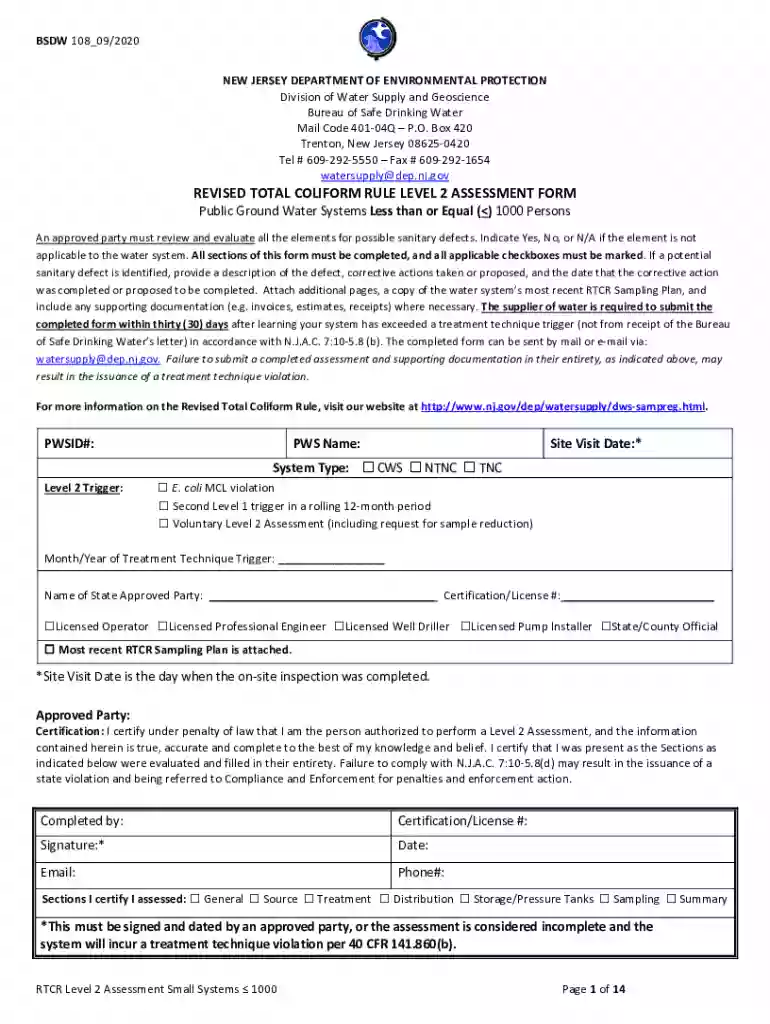
The 2020 NJ BSDW 108 is a form used for the Revised Total Coliform Rule Level 2 Assessment by public groundwater systems in New Jersey. It is specifically designed for systems serving one thousand or fewer people. The purpose of the form is to evaluate potential sanitary defects in water systems to ensure safe drinking water. Key sections include general system conditions, source integrity, and treatment processes. By completing this form, water systems can identify and rectify issues, ensuring compliance with New Jersey's state regulations to avoid violations.

How to Use the 2020 NJ BSDW 108

Using the 2020 NJ BSDW 108 requires a systematic approach to evaluate a water system's compliance. Facility operators should:

  1. Gather data on system operations and recent test results.
  2. Review system components, such as distribution networks and storage facilities.
  3. Use the form to identify and document potential sanitary issues.
  4. Recommend corrective actions based on assessment findings.
  5. Ensure the completion of the form within thirty days of identifying issues.

Operators must follow each section in sequence to ensure all aspects of the system are assessed thoroughly.

Steps to Complete the 2020 NJ BSDW 108

Completing the 2020 NJ BSDW 108 involves several detailed steps:

  1. Prepare Documents: Gather existing records relevant to the water system's operation and recent test results.
  2. System Assessment:
    • Examine each component like storage tanks and distribution systems.
    • Document findings that indicate possible sanitary issues.
  3. Evaluate Source Integrity: Assess the robustness of the source, including wells and springs, for contamination risks.
  4. Treatment and Testing: Review the efficacy of current treatment methods and the integrity of sampling protocols.
  5. Corrective Actions: Make recommendations for resolving identified issues, ensuring compliance with state requirements.

Each step ensures the form is completed accurately, reflecting the system’s current status.

Important Terms Related to 2020 NJ BSDW 108

Understanding several key terms is crucial for effectively completing the form:

  • Total Coliform: A group of closely related bacteria that indicates water system sanitation.
  • Sanitary Defect: Conditions that may lead to contamination within the system.
  • Corrective Action: Steps taken to address identified faults to meet health standards.
  • Level 2 Assessment: Detailed evaluation of systems with significant total coliform issues.

These terms help users accurately interpret and complete the form, ensuring adherence to regulations.

Compliance and Legal Use of the 2020 NJ BSDW 108

Legal compliance with the 2020 NJ BSDW 108 is mandatory for relevant water systems. The form helps detect sanitary defects, which, if untreated, could pose legal liabilities and health risks. Proper completion within the set timeframe is necessary to:

  • Avoid penalties associated with non-compliance.
  • Document the system's commitment to safety.
  • Utilize the assessment in potential legal defenses regarding water safety issues.

Programs should implement review mechanisms to meet deadlines and validation processes for submitted data.

Key Elements of the 2020 NJ BSDW 108

The form contains several critical elements that require thorough attention:

  • General System Overview: Captures the basic operational details, including size and population served.
  • Source and Site Evaluation: Details the infrastructure's condition and location-specific risks.
  • Treatment Processes: Documents existing purification methods and any points of failure.
  • Distribution and Storage: Evaluates the integrity and maintenance of distribution pipelines and storage units.

These elements form the backbone of a comprehensive compliance assessment, providing a structured approach to water safety evaluation.

State-Specific Rules for the 2020 NJ BSDW 108

New Jersey implements specific rules that systems must follow when completing the 2020 NJ BSDW 108. These include:

  • Submission Timeline: Water systems must submit the completed form within thirty days of coliform detection.
  • Compliance Requirements: Each water system must meet New Jersey state drinking water regulations to avoid treatment technique violations.
  • Reporting Mandates: Accurate reporting of findings and corrective measures to state authorities is required.

Understanding these rules helps ensure compliance and the adoption of best practices for water safety.

Examples of Using the 2020 NJ BSDW 108

Several practical examples illustrate the form's application in real-world scenarios:

  • Small Municipal Water Systems: Effectively identifying and addressing contamination sources in smaller municipalities.
  • Non-Compliance Risk Mitigation: Used as a tool by water systems to demonstrate adherence to regulatory standards during inspections.
  • Corrective Strategy Development: Water systems utilize findings to create targeted corrective action plans to improve system reliability.

These examples demonstrate how entities leverage the form to maintain regulatory compliance and safeguard public health.

be ready to get more

Complete this form in 5 minutes or less

Get form

Security and compliance

At DocHub, your data security is our priority. We follow HIPAA, SOC2, GDPR, and other standards, so you can work on your documents with confidence.

Learn more
ccpa2
pci-dss
gdpr-compliance
hipaa
soc-compliance