




Here's how it works



How to use or fill out Youth Ministry Waiver Parental Consent Form Emergency - fbcpineville

- Click ‘Get Form’ to open it in the editor.
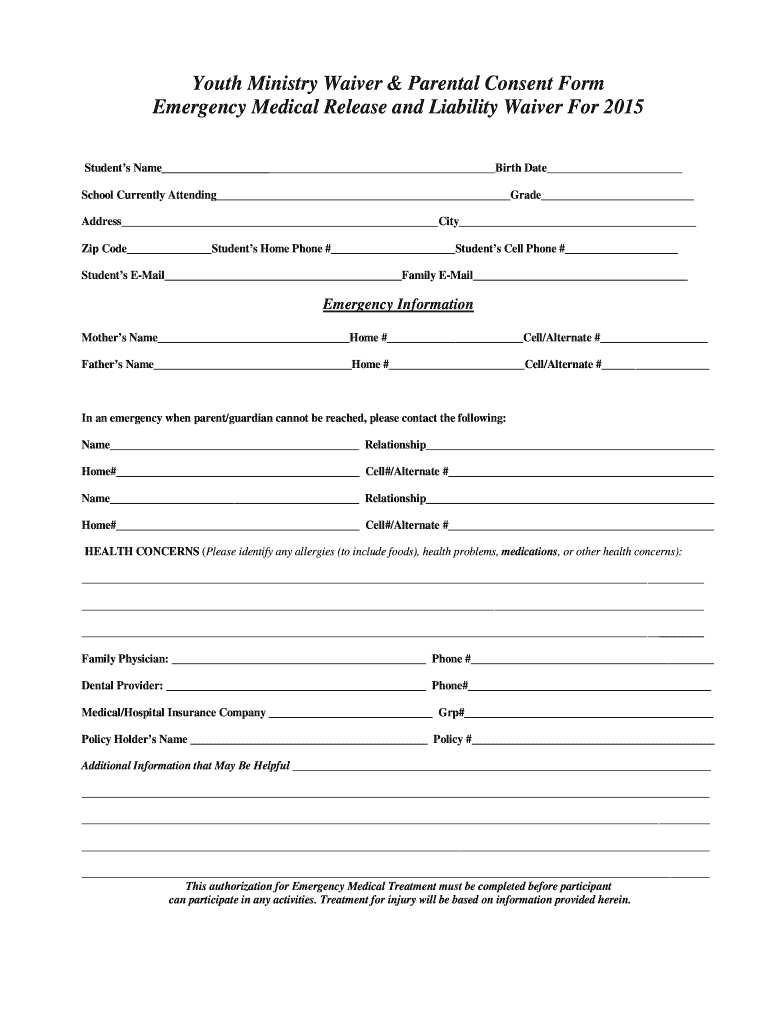
- Begin by entering the student's name and birth date at the top of the form. This information is crucial for identification.
- Fill in the school currently attending and grade, followed by the address, city, zip code, and contact numbers for both home and cell.
- Provide emergency contact details for both parents, including names and alternate phone numbers.
- In the health concerns section, list any allergies or medical conditions that may be relevant during activities.
- Complete the insurance information section with your provider's details to ensure coverage during emergencies.
- Review all sections carefully before signing at the bottom of the form. Ensure that both parent/guardian and participant signatures are included.
Start filling out your Youth Ministry Waiver Parental Consent Form today for free using our platform!
It's free
See more Youth Ministry Waiver Parental Consent Form Emergency - fbcpineville versions
Got questions?
How can I eSign my youth group waiver form from Gmail?
With DocHub, it’s pretty simple. The platform offers users an add-on called DocHub for Gmail, which you can locate in the Google Workspace Marketplace without being charged. Install it and grant it access to your Google account. Open your email with your youth group waiver form attached and click on the add-on button in the right-side panel. Sign in to your DocHub account, and upload the form to our editor, where you can complete it and sign.
How do you complete Youth Ministry Waiver Parental Consent Form Emergency - fbcpineville on Android?
It is a no-brainer on a computer or via a mobile device to complete a Youth Ministry Waiver Parental Consent Form Emergency - fbcpineville with DocHub. All you need to do is open any installed browser on your smartphone and proceed to the DocHub site. Once authenticated, add your file and open it in editing mode. Use our toolbar to make your edits and save changes. Optionally, keep your file in your files or send it to a recipient on the spot.
What is a minor waiver form?
What is the emergency use consent?
What is the purpose of a consent letter?
Security and compliance
At DocHub, your data security is our priority. We follow HIPAA, SOC2, GDPR, and other standards, so you can work on your documents with confidence.
Learn more


