Youth medical & liability release form 2026

Get Form
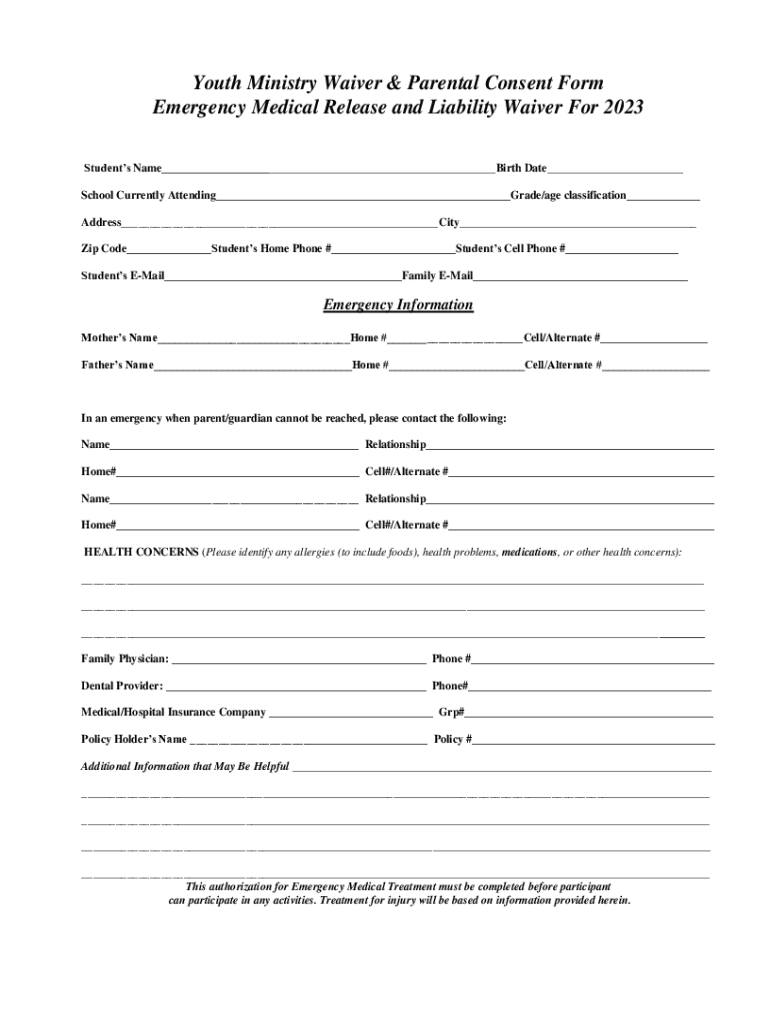
youth medical & liability release form Preview on Page 1

Here's how it works

01. Edit your form online
Type text, add images, blackout confidential details, add comments, highlights and more.
02. Sign it in a few clicks
Draw your signature, type it, upload its image, or use your mobile device as a signature pad.
03. Share your form with others
Send it via email, link, or fax. You can also download it, export it or print it out.

How to use or fill out youth medical & liability release form with our platform

Form edit decoration
9.5
Ease of Setup
DocHub User Ratings on G2
9.0
Ease of Use
DocHub User Ratings on G2
  1. Click ‘Get Form’ to open the youth medical & liability release form in the editor.
  2. Begin by filling in the student’s name, birth date, school currently attending, and grade/age classification. This information is crucial for identifying the participant.
  3. Next, provide the student's address and contact details, including home and cell phone numbers. Ensure accuracy for emergency communication.
  4. In the Emergency Information section, list both parents' names along with their contact numbers. Include alternate contacts if parents cannot be reached.
  5. Detail any health concerns such as allergies or medications in the designated area. This information is vital for ensuring the safety of your child during activities.
  6. Complete the consent sections regarding emergency medical treatment and photography permissions. Make sure to read these carefully before signing.
  7. Finally, sign and date the form at the bottom to acknowledge understanding and agreement to its terms.

Start using our platform today to easily complete your youth medical & liability release form online for free!

See more youth medical & liability release form versions

We've got more versions of the youth medical & liability release form form. Select the right youth medical & liability release form version from the list and start editing it straight away!
Versions Form popularity Fillable & printable
2023 4.8 Satisfied (47 Votes)
2015 4.7 Satisfied (35 Votes)
be ready to get more

Complete this form in 5 minutes or less

Get form

Got questions?

We have answers to the most popular questions from our customers. If you can't find an answer to your question, please contact us.
Contact us

Yes, and it’s really easy! DocHub is a web-based PDF editor with advanced document processing capabilities that allow you quickly edit your paperwork, fill out empty fields and insert new ones for other people to fill out, and create electronic signatures in several ways. Upload your youth medical & liability release form, provide information as requested, and select how you want to eSign your document - by typing your name, drawing your signature, uploading its picture, or using a QR code.

You need only a web connection and a browser to complete your youth medical & liability release form by using an iOS phone. Open the DocHub website and authenticate. Then, add your document or choose it from the list in your dashboard. Then use our editing tools to complete your form and save all your adjustments. You can also send it to a dedicated recipient right away.

With WaiverSign, you can quickly and easily create and sign online waivers, release of liability forms, digital consent forms, permission slips, damage release forms, electronic rental agreements, and more.
A general release of liability, also known as a liability waiver, is a contract between two parties to release one party from liability or harm that may arise from ordinary negligence in advance of an incident occuring.
I, , parent or legal guardian of , born , do hereby consent to any medical care and the administration of anesthesia determined by a physician to be necessary for the welfare of my child while said child

Security and compliance

At DocHub, your data security is our priority. We follow HIPAA, SOC2, GDPR, and other standards, so you can work on your documents with confidence.

Learn more
ccpa2
pci-dss
gdpr-compliance
hipaa
soc-compliance

People also ask

While creating your own release forms is possible, its important to consider a few things before you decide to do so. Consent forms involve intricate legal considerations that have to be specifically tailored to the situation at hand and adhere to certain laws and regulations.
I, [Name of Releaser], hereby release and discharge [Name of Releasee], from any and all liability, claims, demands, or causes of action that may hereafter have for injuries or damages arising out of my participation in the [Activity], including but not limited to losses caused by the negligence of the released parties
What to Include in a Release of Liability Form Releasor: Full name of the releasor. Releasee: Full name of the releasee. Effective date: The date the waiver takes effect. Incident: Details of the injury, debt, or accident. Compensation: The total that must be paid in exchange for signing the waiver.

Related links