






Definition and Meaning of the CR-725 Form
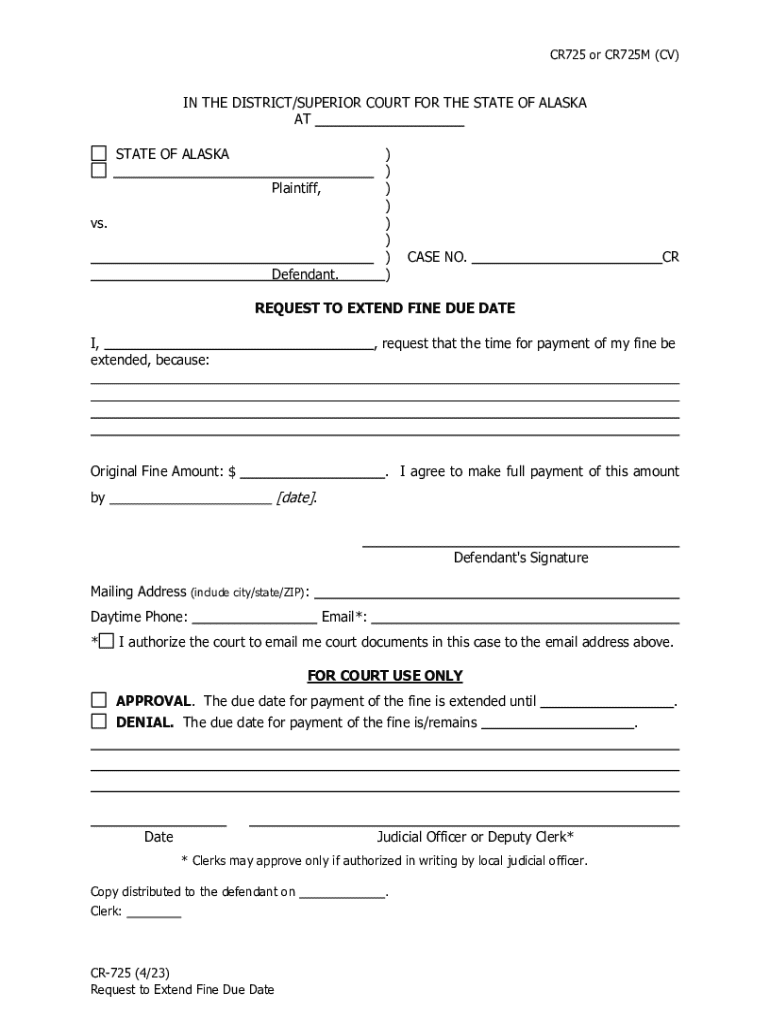
The CR-725 form serves as a request for defendants within the State of Alaska to extend the due date for paying a fine. It is primarily used in legal contexts to seek additional time beyond the originally agreed deadline. Understanding this form is crucial as it plays a critical role in ensuring compliance and providing defendants with the time needed to arrange their finances.
Purpose and Justification
The major purpose of the form is to offer defendants the opportunity to manage their finances better by granting extra time to pay a fine. This can be particularly useful in situations where immediate payment is not feasible due to temporary financial constraints. The request must provide a valid reason for the extension, which might include significant financial hardship or unforeseen circumstances that prevent timely payment.
Key Components
The form generally includes several sections that gather specific information. This involves the defendant's personal details such as name, contact information, and case number, along with the original amount of the fine. Additionally, the defendant's signature, as well as a space for court approval or denial, are crucial parts of this document.
How to Use the CR-725 Form
Utilizing the CR-725 form effectively requires understanding each component and ensuring all necessary information is provided.
Step-by-Step Completion Process
- Gather Necessary Information: Before completing the form, collect all pertinent details such as case number, fine amount, and personal identification.
- Fill Out Personal Information: Start by entering your full name, address, and other contact details as required.
- Provide Fine Details: Indicate the original amount of the fine and any relevant case reference numbers.
- Justify the Request: Explain the reasons for needing an extension. This section should clearly detail any financial difficulties or specific situations influencing your request.
- Sign the Form: Ensure the form is signed, providing an official acknowledgment of the accuracy of the information supplied.
- Submit to the Court: Once completed, the form must be submitted for review, where it will be approved or rejected by court officials.
Common Mistakes to Avoid
- Failing to provide a compelling reason for the extension request can lead to denial.
- Incomplete or inaccurate information may cause delays or rejection.
- Missing the submission deadline or submitting to the incorrect court can invalidate the request.
Who Typically Uses the CR-725
The primary users of the CR-725 form are defendants in Alaska who have been issued fines requiring payment within a specific timeframe.


Applicable Scenarios
- Financial Hardship: Individuals experiencing temporary financial challenges that impact their ability to pay fines on schedule.
- Administrative Delays: Situations where processing times or delays in receiving notifications necessitate additional time.
- Legal Representatives: Attorneys representing clients who are unable to directly manage fine payments due to various circumstances.
Key Elements of the CR-725 Form
Understanding the components of the CR-725 form ensures accurate and efficient completion.
Essential Sections
- Defendant Information: Includes personal details like name and contact information.
- Fine Details: Original fine amount and any associated case or reference numbers.
- Request Justification: Outlines the reasons for requesting an extension and any supporting documentation.
- Court Decision Space: Allows space for an official court decision and signature.
Supporting Documentation
Providing additional documents that support your request for an extension can enhance the likelihood of approval. This might include financial statements or letters from employers validating financial hardship.
Legal Use of the CR-725 Form
The CR-725 form is governed by specific legal statutes within the State of Alaska, ensuring it is utilized appropriately.
Compliance with Legal Standards
- The form must adhere to any requirements set out under Alaska state law, ensuring that all documentation and statements are accurate and truthful.
- Incorrect use or fraudulent statements on the CR-725 can result in legal consequences, including potential penalties.
Approval or Denial Process
Approval for an extension depends on the provided justification and whether it meets the court's criteria for hardship or necessity. The court's decision is final, and further requests may require additional documentation or evidence.
How to Obtain the CR-725 Form
Accessing the CR-725 form follows standard procedures typical to obtaining legal documents.
Where to Find the Form
- Court Offices: Forms may be available directly from the courthouse where the original fine was issued.
- Online Resources: Some jurisdictions might provide downloadable versions from their official court or government websites.
- Legal Representatives: Attorneys can often obtain and provide the form as part of their client services.
Considerations for Accessibility
When seeking to obtain the form, consider any specific requirements or procedures necessary for your location, such as identification or case information.
State-Specific Rules for the CR-725
Legal frameworks and procedures regarding the CR-725 may vary slightly based on local regulations within different areas of Alaska.
Variations Across Regions
- Each court may have different documentation requirements or preferred methods of submission.
- Specific rules for what constitutes valid justification might vary, impacting how you compile your reasons for an extension.
Importance of Local Knowledge
Understanding the specific requirements of the court handling your case can improve the chances of successful approval by adhering strictly to their guidelines and ensuring comprehensive submissions.