




01. Edit your form online
Type text, add images, blackout confidential details, add comments, highlights and more.

Type text, add images, blackout confidential details, add comments, highlights and more.

Draw your signature, type it, upload its image, or use your mobile device as a signature pad.

Send it via email, link, or fax. You can also download it, export it or print it out.
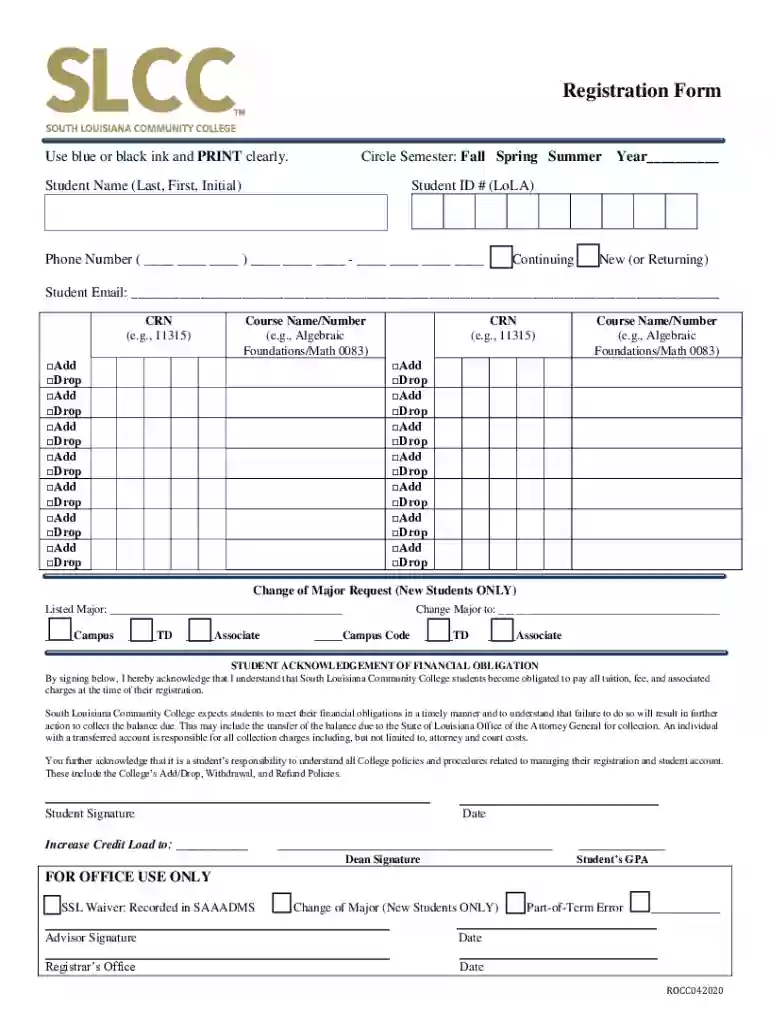
The PDF Registration Form for South Louisiana Community College serves as a comprehensive document required for current or prospective students to register for courses. This form is essential in capturing crucial information such as personal details, course selections, and any desired academic changes, such as a change of major. Moreover, it includes an acknowledgment section for financial obligations related to tuition and fees. Its purpose is to streamline the registration process by ensuring all necessary information is collected in an organized manner, facilitating smoother administrative operations.
Personal Information: Begin by filling out your full name, student ID, date of birth, and contact information. Ensure accuracy to avoid any delays in processing.
Select Semester: Indicate the semester for which you are registering. This typically includes options like fall, spring, or summer, along with the year.
Course Selection: List the courses you plan to add or drop. Provide course codes, titles, and any relevant section numbers.
New or Returning Student: Specify whether you are a new student or returning. This helps the college categorize your registration appropriately.
Change of Major: If applicable, indicate any requests to change your major. This section requires the acknowledgment of an academic advisor.
Acknowledgment of Financial Obligations: Sign the section acknowledging your responsibility for tuition and fees. This is crucial for avoiding financial hold on your account.
Signatures: Ensure the form is signed by both the student and the relevant college officials to validate the submission.
College Website: Visit the official South Louisiana Community College website under the student services or registrar section to download the form.
Administrative Office: Physical copies of the form are often available at the registrar or admissions office on campus.
Email Request: Request a digital copy through the college’s official email communication.
This form is primarily used by:
Prospective Students: Individuals applying for enrollment in upcoming semesters.
Current Students: Returning students who need to register for new courses or modify their schedule.
Academic Advisors and Administrators: College personnel involved in approving course registrations, changes of major, and verifying student details.


Personal Information Section: This includes fields for personal details such as name, ID, and contact information.
Course Selection and Changes: Blocks for adding or dropping courses are essential for tailoring academic schedules.
Signatures and Acknowledgments: Spaces for student’s and college officials’ signatures confirm the submission and agreement to financial responsibilities.
Semester Registration: The process of enrolling in courses for a specific academic term.
Change of Major: A formal request to switch the focus of one's academic study within the institution.
Financial Obligations: Responsibilities relating to tuition and fees associated with course enrollment.
The form is a legally binding document once signed. It establishes a student’s official registration status and their financial responsibility for tuition. Legal penalties can arise if the information is falsified, or financial obligations are not met.
Online Submission: Some institutions may allow uploading the completed form through an online portal.
In-Person Submission: Delivering the form in person to the registrar’s office ensures direct processing.
Mail Submission: Sending the form via mail is suitable for students who are not currently on campus. Ensure to mail it early to avoid missing deadlines.
Digital Version: Offers convenience with online completion and submission capabilities. It can be accessed from any location and submitted electronically.
Paper Version: Requires physical handling, which may be preferable for those who are less comfortable with digital forms. However, it requires manual submission and may take longer to process due to postal delays or in-office submissions.
We've got more versions of the PDF Registration Form - South Louisiana Community College form. Select the right PDF Registration Form - South Louisiana Community College version from the list and start editing it straight away!
At DocHub, your data security is our priority. We follow HIPAA, SOC2, GDPR, and other standards, so you can work on your documents with confidence.


