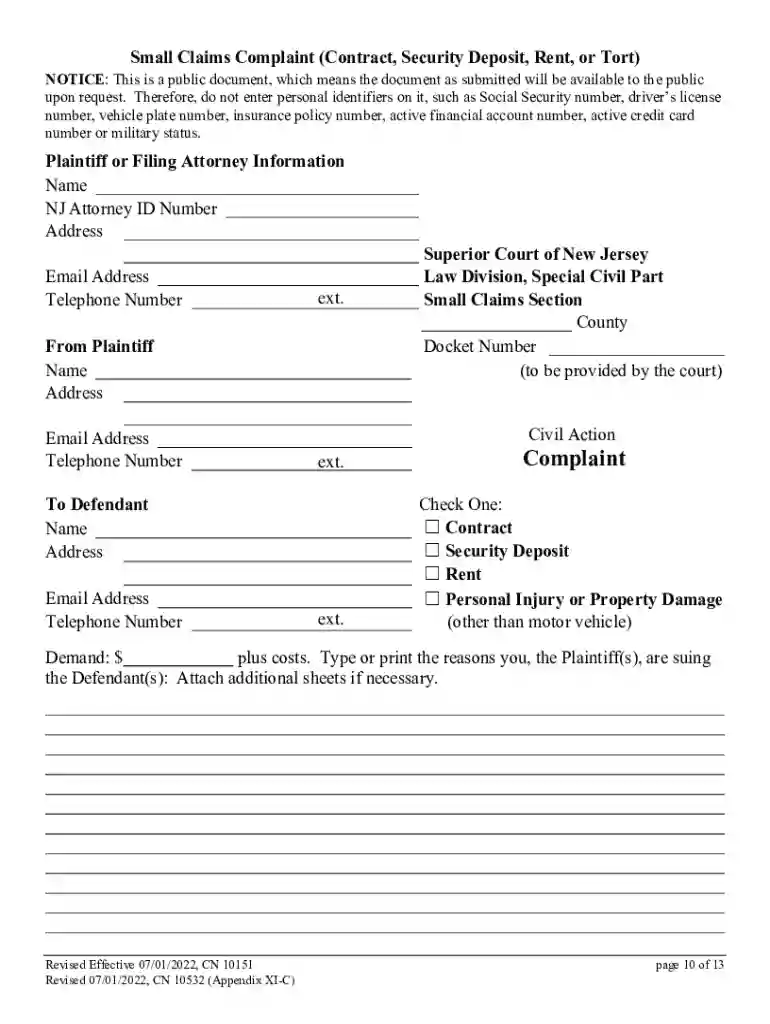
New Jersey Small Claims Non-Motor Vehicle Complaint 2026

Get Form
New Jersey Small Claims Non-Motor Vehicle Complaint Preview on Page 1

Here's how it works

01. Edit your form online
Type text, add images, blackout confidential details, add comments, highlights and more.

02. Sign it in a few clicks
Draw your signature, type it, upload its image, or use your mobile device as a signature pad.

03. Share your form with others
Send it via email, link, or fax. You can also download it, export it or print it out.

Definition and Meaning

The concept of "form online" refers to the digital method of completing and submitting forms through an internet-based interface, eliminating the need for physical paperwork. This process streamlines data entry and enhances efficiency, making it easier for users to complete necessary documentation regardless of their location. The switch from traditional paper forms to digital versions allows for automation in processing, increased accuracy, and faster completion times due to instant data validation and submission.

How to Use the Form Online

To use a form online effectively, users should begin by accessing a reliable platform that hosts the desired form. Many services require creating an account to manage and save forms for future reference. Typically, the process includes selecting the appropriate form category, entering the necessary information into predefined fields, and reviewing the details for accuracy.

  • Navigation Tips: Platforms often feature intuitive interfaces with step-by-step guides to assist users in navigating through the form. Interactive elements like drop-down menus and auto-suggestions aid in quick and precise data entry.

  • Error Checking: Built-in validation tools detect common mistakes and prompt users to correct errors before submission, ensuring that every form is complete and accurate.

Steps to Complete the Form Online

Completing a form online generally follows a sequential process designed for ease and accuracy. Here’s a typical workflow:

  1. Access the Form: Visit the platform where the form is hosted. Ensure you have the required permissions or login credentials if necessary.
  2. Fill Out Required Fields: Enter information into all mandatory fields, which may include personal, financial, or business details.
  3. Attach Documents: If the form requires attachments, select the files from your computer or cloud storage.
  4. Review Information: Before submission, double-check all entries for correctness. Some platforms offer a summary view.
  5. Submit and Confirm: Once everything is verified, submit the form. A confirmation page or email will generally follow, indicating successful submission.

Important Terms Related to Form Online

Understanding key terms can simplify the form online process:

  • E-Signature: A digital form of a handwritten signature that is legally binding.
  • OAuth 2.0: An authentication protocol ensuring secure access to private data.
  • Fillable Fields: Interactive elements within a form where users can input data.

These terms play crucial roles in the functionality and security of online forms.

Legal Use of the Form Online

Legally, online forms are governed by the same laws that apply to traditional documents. It's essential that any electronic form complies with relevant statutes and regulations such as the ESIGN Act, which validates the use of electronic signatures and records.

  • Data Protection: Forms must be hosted on secure platforms that adhere to privacy laws like GDPR or CCPA, providing necessary safeguards for users' sensitive information.

Key Elements of the Form Online

Several components are integral to the successful deployment of an online form:

  • Interactive Fields: Include text boxes, checkboxes, and radio buttons, allowing structured data entry.
  • Instruction Sections: Provide guidance on how to fill out each section, reducing the likelihood of errors.
  • Submission Buttons: Initiate the form submission process with a single click.

These elements combine to create a user-friendly experience, facilitating accurate and efficient form completion.

State-Specific Rules for the Form Online

In the U.S., state-specific regulations may govern certain forms online, impacting how they are completed or what information is required. For example, tax forms may have distinct filing requirements based on the state's tax laws.

  • Variations in Requirements: Users should verify that they are using the correct form version for their state to ensure compliance with local statutes.

Examples of Using the Form Online

Online forms are ubiquitous across various industries and sectors:

  • Government Services: For filing taxes, applying for permits, or voter registration.
  • Education: Applications for school enrollment or financial aid.
  • Healthcare: Patient information forms or insurance claims.

These scenarios illustrate the versatility and increasing necessity of online forms in modern transactions and communications.

Form Submission Methods: Online, Mail, and In-Person

Forms can be submitted through multiple channels, each with its benefits:

  • Online: Instant submissions with confirmation receipts and tracking capabilities.
  • Mail: Preferred for documents requiring original signatures; involves longer processing times.
  • In-Person: Offers direct interaction for complex queries or transactions requiring immediate feedback.

The choice of method often depends on user preference, urgency, and specific regulatory requirements for the form involved.

be ready to get more

Complete this form in 5 minutes or less

Get form

Got questions?

We have answers to the most popular questions from our customers. If you can't find an answer to your question, please contact us.
Contact us
Online forms are used to achieve the following: Collect customer data as part of sales and marketing processes. Process financial details during checkout, especially on ecommerce stores. Respond to customer support tickets. Request information and signatures in contracts and proposals.
An online form is an electronic application in which data is entered by the person filling it out for recording and further processing via predefined data fields. Such electronic forms can be found, for example, on websites or as attachments in e-mails.
Use docHub eSignature to fill out a PDF form and sign it Sign up for a free docHub account to fill and sign PDFs. Some PDF forms are fillable and some arent.
To convert a PDF to fillable online, upload your document to docHub. docHub online editor instantly converts any PDF document to a fillable format online. You can fill your PDF with our various tools and features. To fill the form with text, choose the Text button and start typing.
How to Create a Request Form Define Your Use Case and Requirements. Start Building Your Form. Add and Customize Form Fields. Personalize the Form Design. Set Up Notifications and Approvals. Publish and Share Your Form. Test and Manage Submissions.

Security and compliance

At DocHub, your data security is our priority. We follow HIPAA, SOC2, GDPR, and other standards, so you can work on your documents with confidence.
Learn more
ccpa2
pci-dss
gdpr-compliance
hipaa
soc-compliance

People also ask

Electronic forms are online web pages or electronic documents designed to capture, validate, and submit data in forms processing. Electronic forms (eforms) provide a series of fields where data is collected, often using a Web browser.
Online Application Form means the electronic sign-up form which is available on the Companys website (the websites) and which a prospective Client has to complete in order to become the Companys Client.

Related links