



Nj non motor 2026

Get Form
nj non motor Preview on Page 1

Here's how it works

01. Edit your form online
Type text, add images, blackout confidential details, add comments, highlights and more.

02. Sign it in a few clicks
Draw your signature, type it, upload its image, or use your mobile device as a signature pad.

03. Share your form with others
Send it via email, link, or fax. You can also download it, export it or print it out.

How to use or fill out nj non motor with our platform

Form edit decoration
9.5
Ease of Setup
DocHub User Ratings on G2
9.0
Ease of Use
DocHub User Ratings on G2
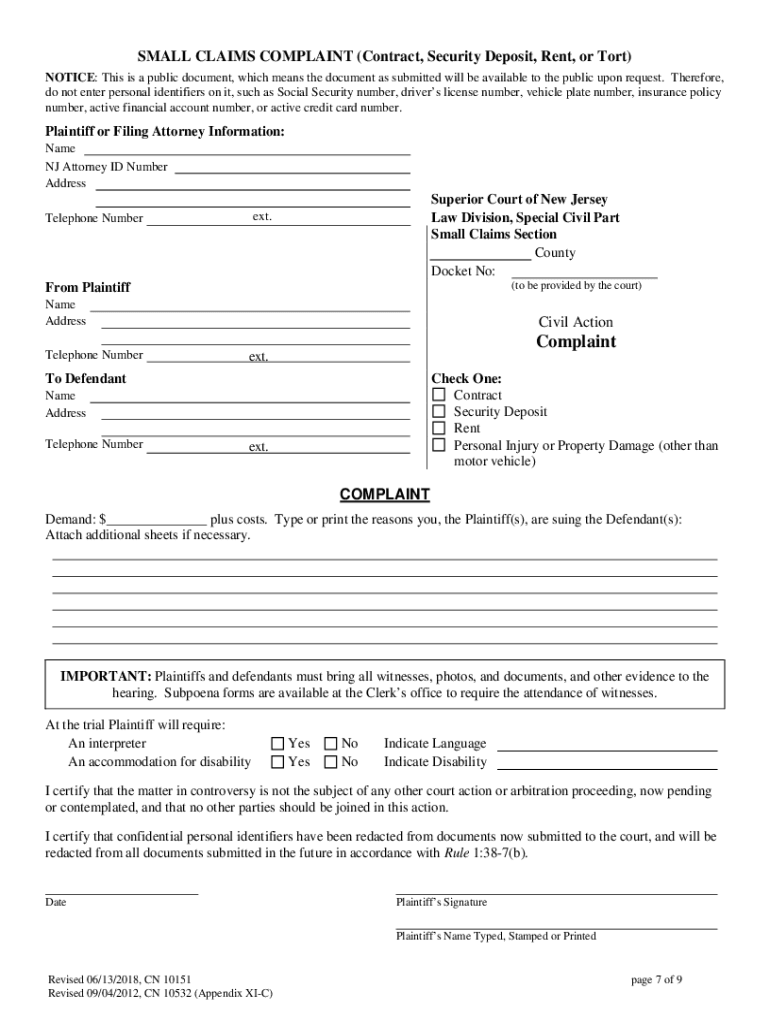
  1. Click ‘Get Form’ to open the Small Claims Complaint in the editor.
  2. Fill out the top section of the Small Claims Complaint (Form A) with your information, including your name and address. Specify whether your claim is for a contract, security deposit, or tort.
  3. In the 'Complaint' section, clearly state the amount you are owed and provide detailed reasons for your claim. You can attach additional sheets if necessary.
  4. Complete the Small Claims Summons (Form B) by entering both plaintiff and defendant information. Ensure you check the appropriate box for your type of claim.
  5. Attach the required filing fee as a check or money order made out to the Treasurer, State of New Jersey.
  6. Review all completed forms for accuracy and ensure they are signed where necessary before submitting them to the court.
  7. Mail or deliver your completed forms to the appropriate county court office. Keep a copy for your records.

Start using our platform today to streamline your document editing and form completion process for free!

See more nj non motor versions

We've got more versions of the nj non motor form. Select the right nj non motor version from the list and start editing it straight away!
Versions Form popularity Fillable & printable
2018 4.8 Satisfied (149 Votes)
2017 4.3 Satisfied (34 Votes)
be ready to get more

Complete this form in 5 minutes or less

Get form

Got questions?

We have answers to the most popular questions from our customers. If you can't find an answer to your question, please contact us.
Contact us
Any New Jersey resident 14 years of age and older with a disability can apply for a non-driver ID, issued solely for the purpose of providing identification. It is not a license to drive and cannot be used to park in a person(s) with a disability parking space. There is no renewal fee for this non-driver ID card.
39:3-10 is the New Jersey statute regarding the licensure of drivers. Specifically, the law states that no one is permitted to drive a vehicle on a public highway in New Jersey unless the person has a probationary or drivers license or a permit, or is under the supervision of a driving course.
New Jersey residents 14 years of age and older may apply for a non-driver photo identification (ID). The non-driver ID is issued solely for the purpose of providing identification and is not a license to drive.
39:4-56.5 Abandonment of motor vehicle. It shall be unlawful for any person to abandon a motor vehicle on or along any highway, other than a limited access highway, or other public property or on any private property without the consent of the owner or other person in charge of the private property.
Yes, you can register a car without a drivers license. A drivers license is only required to legally operate a motor vehicle on public roads, but you do not need a drivers license to register your vehicle.

Security and compliance

At DocHub, your data security is our priority. We follow HIPAA, SOC2, GDPR, and other standards, so you can work on your documents with confidence.

Learn more
ccpa2
pci-dss
gdpr-compliance
hipaa
soc-compliance
be ready to get more

Complete this form in 5 minutes or less

Get form

People also ask

Privately-used trailers, house type semi-trailers and private utilities are included in the category other non-commercial motor vehicles (Code 22) for registration purposes. Trailers (manufactured or homemade) and semi-trailers weighing less than 2,500 lbs.
A new drivers license or non-driver ID, featuring the existing photo and signature on file with the MVC, will be mailed to you within 10 business days after receipt of your payment.

Related links

