Type text, add images, blackout confidential details, add comments, highlights and more.
02. Sign it in a few clicks
Draw your signature, type it, upload its image, or use your mobile device as a signature pad.
03. Share your form with others
Send fr31 via email, link, or fax. You can also download it, export it or print it out.
How to use or fill out sc fr with our platform
Ease of Setup
DocHub User Ratings on G2
Ease of Use
DocHub User Ratings on G2
Click ‘Get Form’ to open the sc fr in the editor.
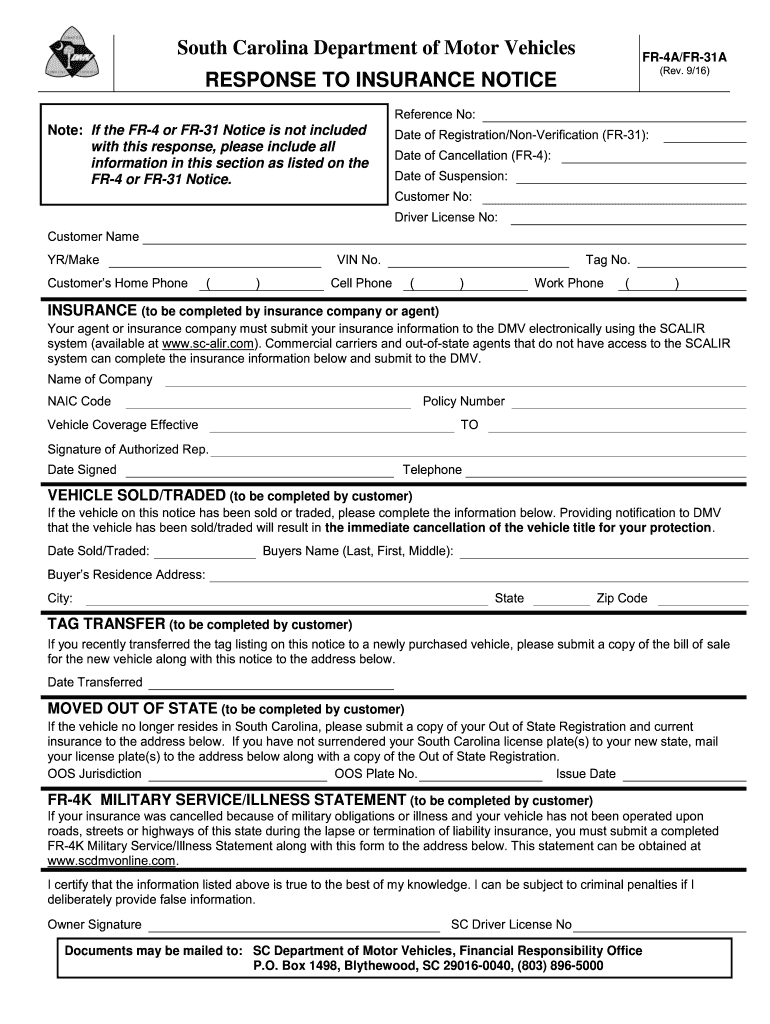
Begin by entering your Customer No and Driver License No in the designated fields. Ensure that all information matches your official documents for accuracy.
Fill in your Customer Name, Vehicle Information (YR/Make, VIN No., Tag No.), and contact numbers (Home Phone, Cell Phone, Work Phone) as required.
For the insurance section, provide details such as the Name of Company, NAIC Code, Policy Number, and Coverage Effective Dates. If applicable, have your insurance agent submit this electronically via SCALIR.
If you sold or traded the vehicle, complete that section with the Date Sold/Traded and Buyer’s information to ensure proper title cancellation.
If you moved out of state, fill in the Out of State Registration details and submit any necessary documentation as indicated.
Finally, review all entries for accuracy before signing at the bottom. Your signature certifies that all provided information is true.
Start using our platform today to streamline your form completion process for free!
Accident Reporting - Parking and Transportation Services
Obtain a legible copy of the Police Report (Financial Responsibility form FR-10) from the responding officer. Report to the USC Transportation ServicesRead more
South Carolina Department of Motor Vehicles FR-309 FR
According to South Carolina Law 56-5-1270, the driver or owner of a vehicle which is in any manner involved in an accident that is not investigated by law.Read more
Cookie consent notice
This site uses cookies to enhance site navigation and personalize your experience.
By using this site you agree to our use of cookies as described in our Privacy Notice.
You can modify your selections by visiting our Cookie and Advertising Notice.