



Here's how it works



How to use or fill out kzn database login with our platform

- Click ‘Get Form’ to open the kzn database login in the editor.
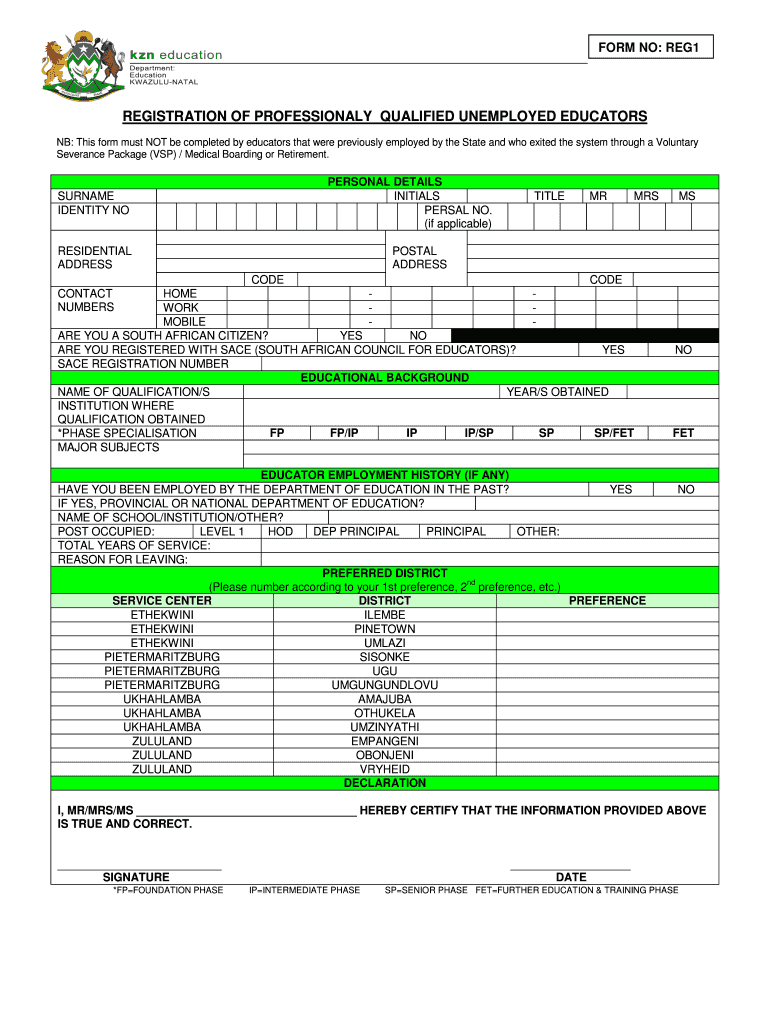
- Begin by entering your surname and identity number in the designated fields. Ensure that these details are accurate as they are crucial for your registration.
- Fill in your personal details, including initials, residential address, and contact numbers. Select your title (Mr, Mrs, Ms) from the dropdown menu.
- Indicate whether you are a South African citizen and if you are registered with SACE. If yes, provide your SACE registration number.
- Complete the educational background section by listing your qualifications, years obtained, and the institutions where you studied. Specify your phase specialization and major subjects.
- If applicable, detail your educator employment history including previous positions held and reasons for leaving.
- Select your preferred district service center by numbering them according to preference.
- Finally, certify that all information provided is true by signing and dating the declaration section before submitting the form.
Start using our platform today to streamline your kzn database login process for free!
It's free
Got questions?
Can I sign my kzn database in electronic format?
As outlined by eSignature regulations, documents approved electronically have the same validity as those approved with pen and paper. You can eSign almost any business and personal documentation. Four types of documents still call for handwritten signatures only - wills and testamentary trusts, court orders and other court forms, state statutes governing divorce, adoption, or other family law, and notice of cancellation of utility services. If you adhere to the guidelines and use a safe and compliant software solution, like DocHub, you can eSign your kzn database without printing it.
How do you edit kzn unemployed educators database online registration on Android?
Document editing with DocHub is equally convenient on desktop and mobile devices. You only need an internet browser to edit your kzn unemployed educators database online registration on Android. Open our site and sign in to access the instruments you need. Add your document and introduce your intended modifications. After that, you can keep your form in your document storage or send it out immediately.
Who is the head of the KZN DOE department?
What is the KZN Circular 75 of 2025?
How to reset my KZN database password?
Security and compliance
At DocHub, your data security is our priority. We follow HIPAA, SOC2, GDPR, and other standards, so you can work on your documents with confidence.
Learn more