Type text, add images, blackout confidential details, add comments, highlights and more.

02. Sign it in a few clicks
Draw your signature, type it, upload its image, or use your mobile device as a signature pad.

03. Share your form with others
Send it via email, link, or fax. You can also download it, export it or print it out.

How to use or fill out Fillable Post-Completion Optional Practical Training (OPT) Regulatory
Ease of Setup
DocHub User Ratings on G2
Ease of Use
DocHub User Ratings on G2
Click ‘Get Form’ to open it in the editor.
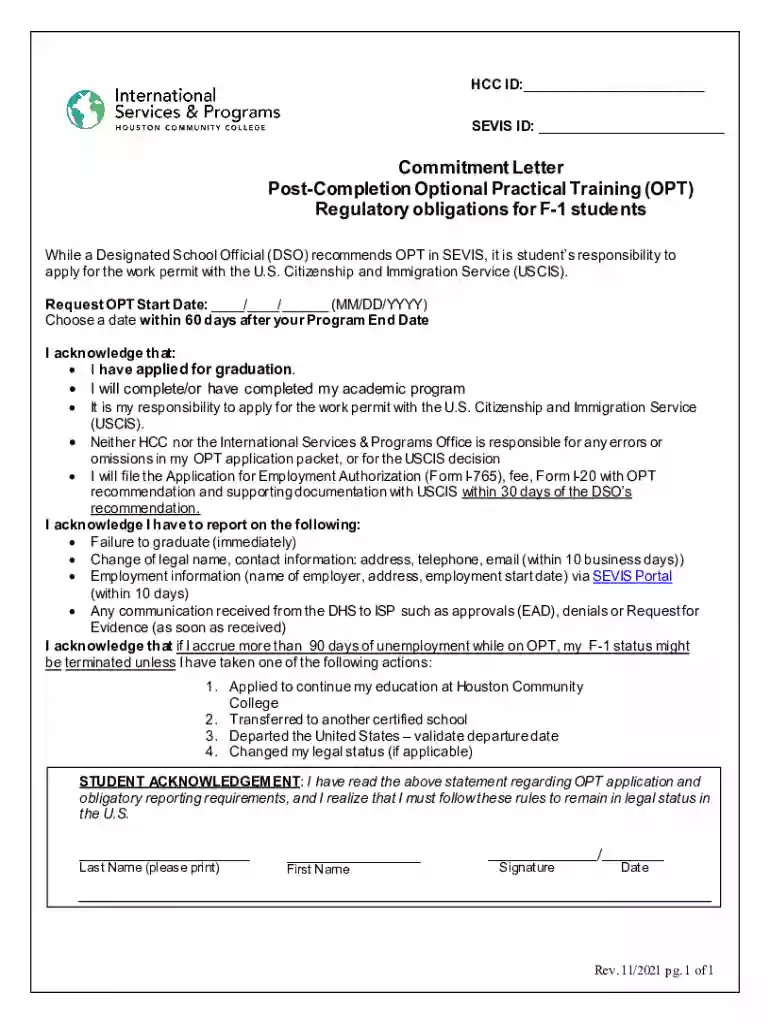
Begin by entering your HCC ID and SEVIS ID at the top of the form. These identifiers are crucial for processing your application.
In the 'Request OPT Start Date' section, select a date within 60 days after your Program End Date. Ensure this date aligns with your graduation timeline.
Read through the acknowledgment statements carefully. Confirm that you have applied for graduation and completed your academic program by checking the appropriate boxes.
Fill in your last name, first name, and provide your signature along with the date at the bottom of the form to finalize your acknowledgment.
Start using our platform today to complete your OPT application effortlessly and for free!
Fill out Fillable Post-Completion Optional Practical Training (OPT) Regulatory online It's free
See more Fillable Post-Completion Optional Practical Training (OPT) Regulatory versions
We've got more versions of the Fillable Post-Completion Optional Practical Training (OPT) Regulatory form. Select the right Fillable Post-Completion Optional Practical Training (OPT) Regulatory version from the list and start editing it straight away!
What information are you required to report in the SEVP portal during OPT?
In the SEVP portal you will be responsible for reporting any of the following changes within 10 days: local address. email address. new/change in employment status.
What do I need to report to OISS while on post-completion OPT?
Within 10 Days of Any of the Following: Start of employment. End of employment. Change of employers. Current employer changes name and/or address. Change of Visa Status (e.g. to H-1B) Change in residential address. Update to biographical information (e.g. name, surname, etc.)
How soon must you file your post-completion OPT application to USCIS once your OPT-i-20 has been issued?
Applications received by USCIS later than 30 days from the issuance date on page 1 of the OPT I-20 will be denied. USCIS must receive your completed OPT application materials before your 60-day grace period ends. The 60-day grace period begins after your program end date listed on page 1 of your OPT I-20.
What is post-completion optional practical training OPT?
Post-Completion OPT is a type of work authorization for a student in F-1 status; as such, the student is required to maintain F-1 status and continue to report to OIS. A student on Post-Completion OPT can work in the U.S. for up to 12 months after completing their degree program.
What are the two types of OPT?
*OPT Type Pre-Completion: All employment occurs before the Program End Date. Post-Completion: All employment occurs after the Program End Date.
Related Searches
Fillable post completion optional practical training opt regulatory processingOPT visa rules for employersOPT for international students Latest NewsSTEM OPTOPT visa requirementsPre completion OPTOPT applicationUSCIS OPT
Security and compliance
At DocHub, your data security is our priority. We follow HIPAA, SOC2, GDPR, and other standards, so you can work on your documents with confidence.
This transmittal introduces Chapter 40, Hospital and Hospital Health Care Complex Cost Report,. Form CMS-2552-10, which contains instructions for the completion
Post-Completion OPT (Optional Practical Training After
F-1 OPT regulations require students on Post-Completion Optional Practical Training to report to the Interna- tional Center any of the following changes
This page lists the USCIS forms that are currently available to file online. Visit the File Online page to learn about the benefits of filing a form using our
Cookie consent notice
This site uses cookies to enhance site navigation and personalize your experience.
By using this site you agree to our use of cookies as described in our Privacy Notice.
You can modify your selections by visiting our Cookie and Advertising Notice.