




Here's how it works

01. Edit your dochub com fillable form online
Type text, add images, blackout confidential details, add comments, highlights and more.

02. Sign it in a few clicks
Draw your signature, type it, upload its image, or use your mobile device as a signature pad.

03. Share your form with others
Send hospital discharge summary sample via email, link, or fax. You can also download it, export it or print it out.
How to use or fill out online discharge summary with our platform

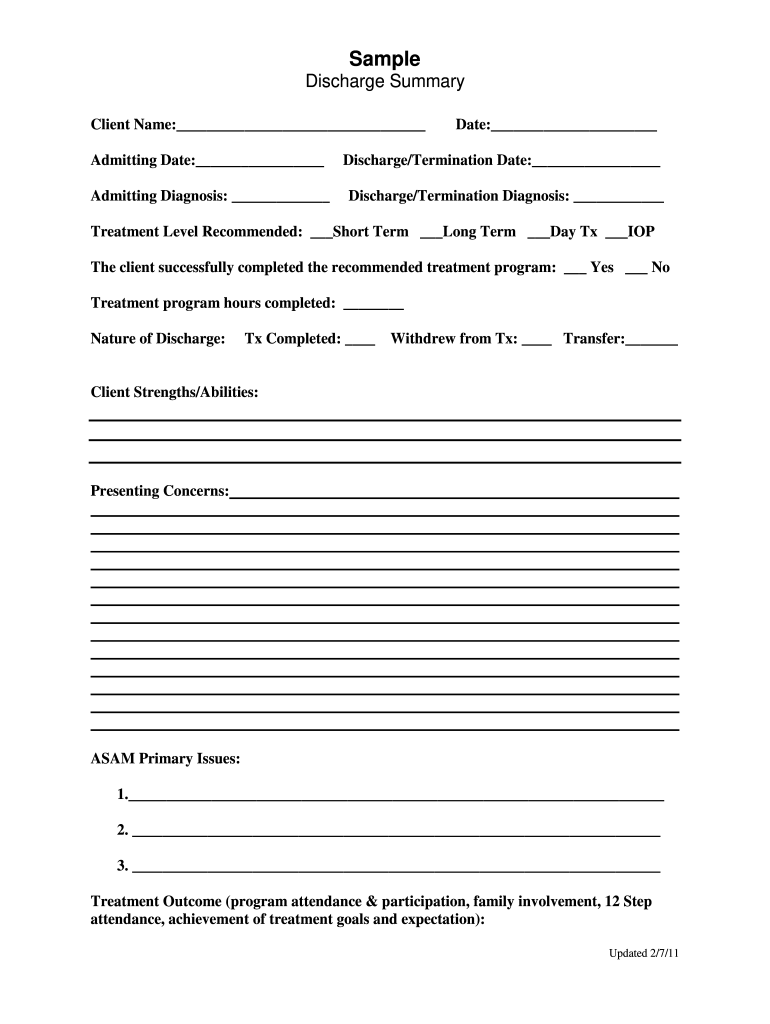
- Click ‘Get Form’ to open the online discharge summary in the editor.
- Begin by entering the client’s name in the designated field at the top of the form. This ensures accurate identification.
- Fill in the admitting date and diagnosis, which are crucial for tracking the client's treatment history.
- Next, specify the discharge/termination date and diagnosis. This information is vital for documenting the client's progress.
- Indicate the recommended treatment level by selecting one of the options provided: Short Term, Long Term, Day Tx, or IOP.
- Mark whether the client successfully completed their treatment program by selecting 'Yes' or 'No'.
- Document any nature of discharge details, including if treatment was completed, withdrawn, or transferred.
- Provide insights into client strengths and abilities as well as presenting concerns in their respective sections.
- List ASAM primary issues and detail treatment outcomes to reflect on program attendance and participation.
- Complete the discharge plan and referrals sections to ensure a comprehensive summary for future care.
- Finally, have both client and therapist sign and date at the bottom of the form to validate it.
Start using our platform today to effortlessly complete your online discharge summary for free!
Fill out online discharge summary online
It's free
It's free
See more online discharge summary versions
We've got more versions of the online discharge summary form. Select the right online discharge summary version from the list and start editing it straight away!
Got questions?
We have answers to the most popular questions from our customers. If you can't find an answer to your question, please contact us.
Contact us
How to take a discharge summary?
Understanding the Discharge Summary: Date and time of both, admission and discharge, symptoms during admission, provisional diagnosis, final diagnosis, all the investigations, every medication, summaries of surgeries and interventions performed, acute conditions amidst treatment due to primary diagnosis.
Can the hospital reprint discharge papers?
Everywhere Ive worked has given patients a copy of their discharge letter. If you want a copy you can complete a subject access request and unless they have a good reason they will have to give it to you. This applies to the rest of your medical record.
Can I walk out without discharge papers?
You have the legal right to leave. There is no law that requires you to sign discharge documents.
What is a digital discharge summary?
Electronic Discharge Summaries (DSUMs) traditionally have been generated via dictation and transcription at our hospital. Several factors established a need for a new method to write DSUMs within our electronic medical record.
Can we get a discharge summary online?
Yes, by providing accurate and comprehensive discharge summaries, our AI system can help improve patient care outcomes and streamline the discharge process.
Security and compliance
At DocHub, your data security is our priority. We follow HIPAA, SOC2, GDPR, and other standards, so you can work on your documents with confidence.
Learn more


Related forms
Information ChangeCorrections Form 2014-15 Student Name - thesummitschool
The document is a form requesting families to update their contact information for the school directory before the final ...

Dismissal - RCCH 12q - courts state hi
The document is a judgment order stating that a complaint has been dismissed without prejudice due to the failure to fil ...
Protected when completed -b schedule a background
The document is a financial evaluation form required by Immigration, Refugees, and Citizenship Canada (IRCC) for individ ...

Capemaycity departmentsAssessorCity of Cape May, NJ - Tax Assessment
The document is an application form for the Cape May City Dog Park, detailing the requirements for dog owners to obtain ...

Zoominfo pWilliam-PedutoWilliam Peduto - Deputy Chief of - Office of Mayor
The document is an application form for Third Party Agency (TPA) registration with the City of Pittsburgh's Department o ...
Temporary Electrical Service Affidavit
The document is an affidavit for a 30-day temporary electrical service issued by the City of Opa-locka for construction ...

Hospice revocation form pdf
The document is a revocation form for Medicare Hospice benefits, allowing beneficiaries to cancel their hospice care cov ...
People also ask
What is an electronic discharge summary?
These components are: Reason for hospitalization. docHub findings. Procedures and treatment provided. Patients discharge condition. Patient and family instructions (as appropriate). Attending physicians signature.
How long should a discharge summary take?
While a discharge summary can take 30 minutes to 2 hours to write on average if one waits till discharge, the process is slightly faster through a daily approach.