Mn dmv forms 2013-2026

Get Form
ps2000 form mn Preview on Page 1

Here's how it works

01. Edit your ps2000 form mn online
Type text, add images, blackout confidential details, add comments, highlights and more.
02. Sign it in a few clicks
Draw your signature, type it, upload its image, or use your mobile device as a signature pad.
03. Share your form with others
Send form ps2000 via email, link, or fax. You can also download it, export it or print it out.

How to use or fill out mn dmv forms 2013 with our platform

Form edit decoration
9.5
Ease of Setup
DocHub User Ratings on G2
9.0
Ease of Use
DocHub User Ratings on G2
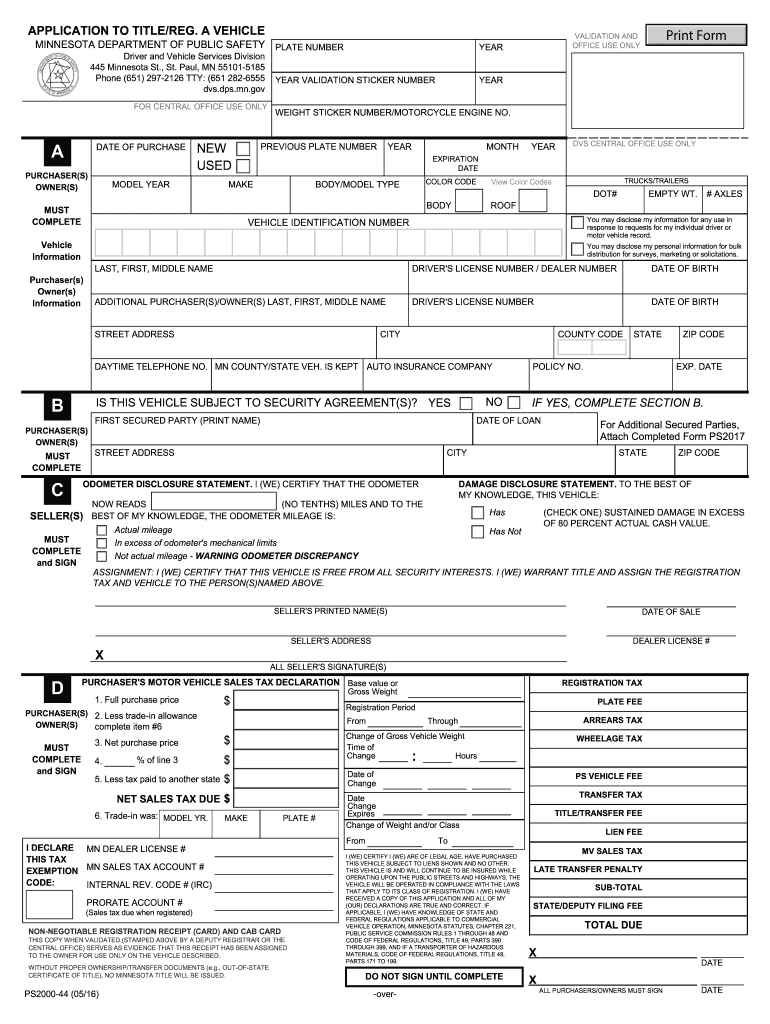
  1. Click ‘Get Form’ to open the mn dmv forms 2013 in the editor.
  2. Begin by filling out the 'Purchaser(s) Owner(s)' section. Enter your full name, driver's license number, and date of birth accurately.
  3. In the 'Vehicle Information' section, provide details such as the make, model year, and vehicle identification number (VIN). Ensure all fields are completed for a smooth processing.
  4. Complete the 'Odometer Disclosure Statement' by certifying the current mileage of the vehicle. This is crucial for legal compliance.
  5. If applicable, fill out Section B regarding any secured parties. Include their names and addresses as required.
  6. Review all entries for accuracy before signing at the bottom of the form. All purchasers/owners must sign to validate the application.

Start using our platform today to easily complete your mn dmv forms 2013 online for free!

See more mn dmv forms 2013 versions

We've got more versions of the mn dmv forms 2013 form. Select the right mn dmv forms 2013 version from the list and start editing it straight away!
Versions Form popularity Fillable & printable
2023 4.4 Satisfied (39 Votes)
2021 4.2 Satisfied (50 Votes)
2016 5 Satisfied (30 Votes)
2013 4.4 Satisfied (231 Votes)
be ready to get more

Complete this form in 5 minutes or less

Get form

Got questions?

We have answers to the most popular questions from our customers. If you can't find an answer to your question, please contact us.
Contact us
Title transfers can be submitted at any deputy registrar office or by mail. When a vehicle is purchased through a licensed dealer, the dealer will submit the title transfer to Driver and Vehicle Services (DVS).
Transfer of Minnesota Title Bring most current MN Title. Lien release, if applicable. Loan holder information (if applicable) Engine number - IF a motorcycle. Odometer reading - IF 10 model years and newer. Proof of identity, such as a drivers license or a State-issued ID card. Proof of Insurance.
A certificate of title is proof of vehicle ownership. Title transfers can be submitted at any deputy registrar office or by mail.
Every owner applying for a self-propelled motor vehicle or motorcycle/moped registration, re-registration, or transfer of ownership must provide proof of insurance. Required insurance information includes the insurance companys name, the policy number and the policy expiration date.
All sellers must complete and sign the title in the sellers section on the front of the title. All buyers must complete and sign the buyers section (next to the sellers section) as well as complete and sign the Application for Title by Buyer section.

Security and compliance

At DocHub, your data security is our priority. We follow HIPAA, SOC2, GDPR, and other standards, so you can work on your documents with confidence.

Learn more
ccpa2
pci-dss
gdpr-compliance
hipaa
soc-compliance

People also ask

Step-by-Step Car Title Transfer Process Donor Signs and docHubs the Title. The current owner signs the release-of-interest section on the title exactly as their name appears on the front. Complete Application and Affidavit. Submit Documents and Pay Fees. Receive Temporary Permit and Final Car Title.

Related links