




Here's how it works

01. Edit your ps2000 online
Type text, add images, blackout confidential details, add comments, highlights and more.

02. Sign it in a few clicks
Draw your signature, type it, upload its image, or use your mobile device as a signature pad.

03. Share your form with others
Send dochub com fillable form via email, link, or fax. You can also download it, export it or print it out.
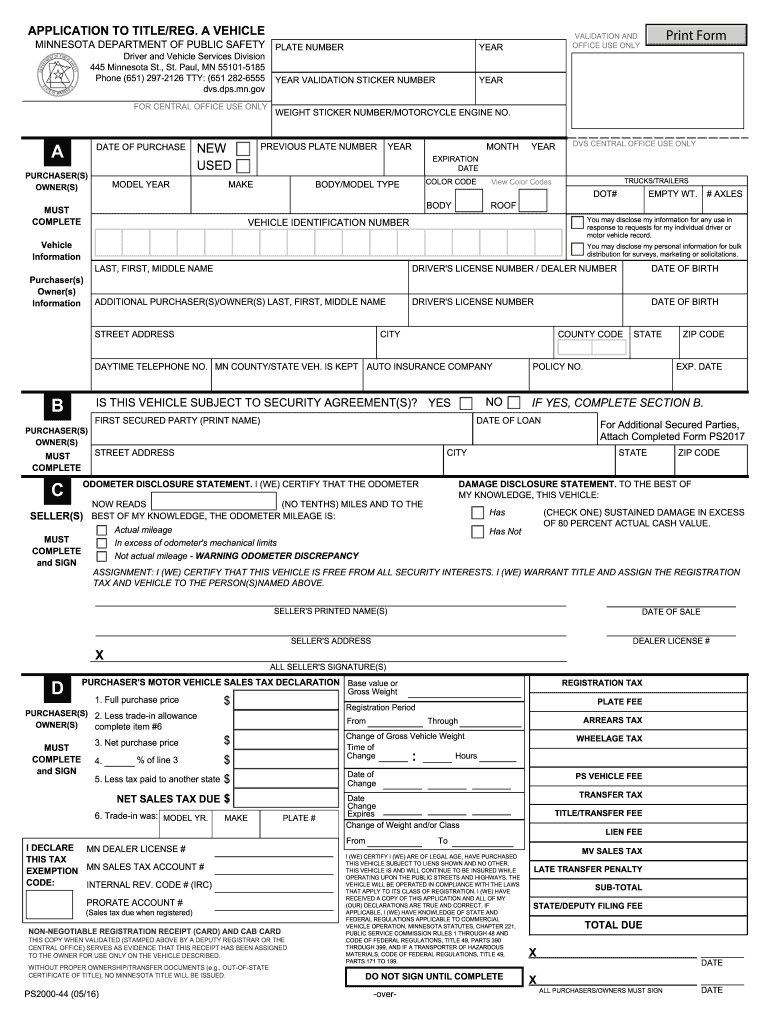
How to use or fill out Minnesota Title Vehicle with our platform

- Click ‘Get Form’ to open the Minnesota Title Vehicle application in the editor.
- Begin by entering the 'Date of Purchase' at the top of the form. This is crucial for establishing ownership.
- Fill in the 'Purchaser(s) Owner(s)' section with your full name and any additional owners if applicable.
- Indicate whether the vehicle is new or used, and provide details such as 'Model Year', 'Plate Number', and 'Color Code'.
- Complete Section B by providing your driver's license number, date of birth, and address. If there are additional purchasers, include their information as well.
- In Section C, disclose any security agreements related to the vehicle. If applicable, complete Section D regarding damage disclosure and odometer readings.
- Finally, ensure all required signatures are provided at the bottom of the form before submitting it for processing.
Start using our platform today to easily fill out your Minnesota Title Vehicle application for free!
Fill out minnesota title vehicle online
It's free
See more minnesota title vehicle versions
We've got more versions of the minnesota title vehicle form. Select the right minnesota title vehicle version from the list and start editing it straight away!
Security and compliance
At DocHub, your data security is our priority. We follow HIPAA, SOC2, GDPR, and other standards, so you can work on your documents with confidence.
Learn more


Related forms

Pto membership form template
The document is an invitation for parents to join the Lacoste Elementary Parent/Teacher Club (PTC), highlighting the clu ...

2012 Kois Center Confidential Information Questionnaire
The document is a Confidential Information Questionnaire for patients at a dental office, collecting personal, insurance ...

Cot form
The document is an Observation Notes Form used for classroom observations as part of the Classroom Observation Tool–RPMS ...

Form 5423 - Bill of Sale Metal Operators - Vehicles Ten Years or Older Without Title
The document is a Bill of Sale for Scrap Metal Operators in Missouri, specifically for acquiring vehicles that are at le ...

Expiration Date: 1 31 2025
The document outlines the application process for cash surrender and policy loans related to Government Life Insurance p ...
Va form 40 1330
The document provides detailed information on the process for claiming a standard government headstone or marker for eli ...