Da 4100 instructions 2006 form-2026

Get Form
da 4100 Preview on Page 1

Here's how it works

01. Edit your da 4100 online
Type text, add images, blackout confidential details, add comments, highlights and more.

02. Sign it in a few clicks
Draw your signature, type it, upload its image, or use your mobile device as a signature pad.

03. Share your form with others
Send da form 4100 via email, link, or fax. You can also download it, export it or print it out.

How to use or fill out da 4100 instructions 2006 form with our platform

Form edit decoration
9.5
Ease of Setup
DocHub User Ratings on G2
9.0
Ease of Use
DocHub User Ratings on G2
  1. Click ‘Get Form’ to open the da 4100 instructions 2006 form in the editor.
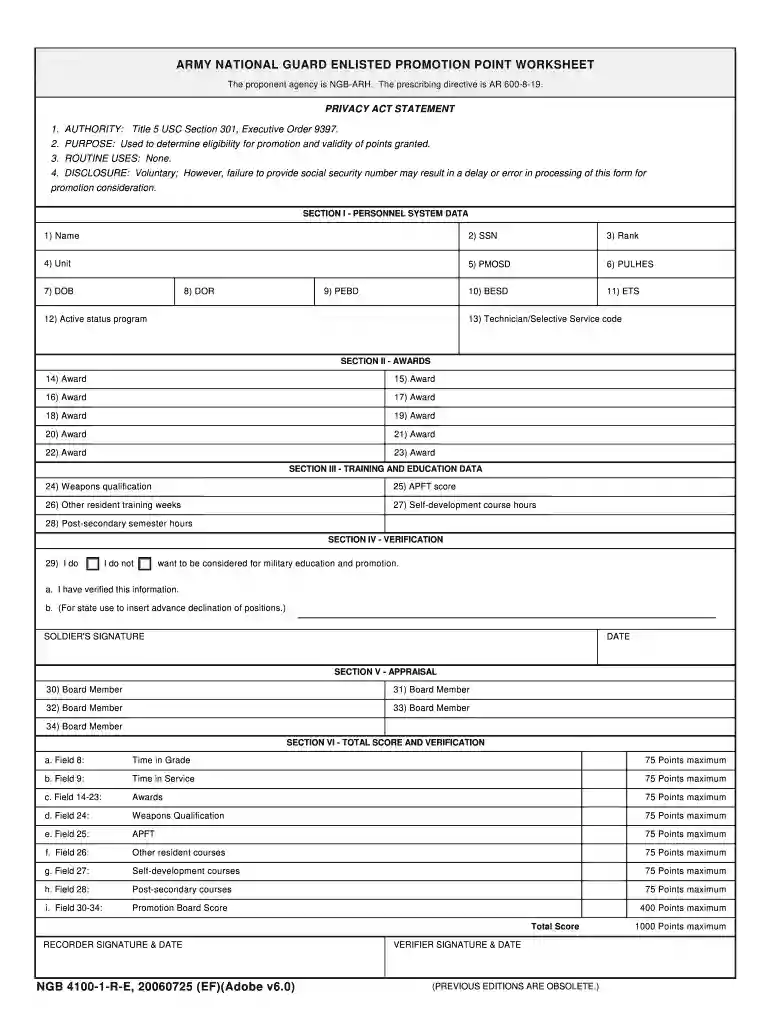
  2. Begin by filling out Section I - Personnel System Data. Enter your Name, SSN, Rank, Unit, PMOSD, PULHES, BESD, ETS, DOB, DOR, PEBD, Active status program, and Technician/Selective Service code accurately.
  3. Move to Section II - Awards. List all relevant awards in the provided fields (14-23). Ensure that you include all applicable recognitions.
  4. In Section III - Training and Education Data, input your Weapons qualification score, APFT score, Other resident training weeks completed, Self-development course hours, and Post-secondary semester hours.
  5. Proceed to Section IV - Verification. Indicate whether you want to be considered for military education and promotion by selecting 'I do' or 'I do not'. Verify your information and provide your signature and date.
  6. Complete Section V - Appraisal by entering the names of Board Members as required.
  7. Finally, calculate your total score in Section VI based on the criteria provided. Ensure all scores are accurate before signing off as the recorder and verifier.

Start using our platform today for free to streamline your document editing and completion process!

See more da 4100 instructions 2006 form versions

We've got more versions of the da 4100 instructions 2006 form form. Select the right da 4100 instructions 2006 form version from the list and start editing it straight away!
Versions Form popularity Fillable & printable
2013 4.9 Satisfied (469 Votes)
2006 4.2 Satisfied (26 Votes)
be ready to get more

Complete this form in 5 minutes or less

Get form

Got questions?

We have answers to the most popular questions from our customers. If you can't find an answer to your question, please contact us.
Contact us
The 4100. NGB Form 4100-1-R-E 4100-1B-R-E (Promotion Worksheets). Soldiers in the grade of E4 will receive the Enlisted Promotion Point Worksheet (NGB Form 4100-1-R-E) from HR personnel. Soldiers in the Grade E5 thru E8 will receive the Senior Enlisted Worksheet (NGB 4100-1B-R-E) from unit HR personnel.
The Fire Control Specialist integrates and processes tactical battlefield information from multiple users and sensors through a network of Army and JOINT automated battle command systems. Duties performed by this MOS include: Establishes, maintains and operates communications systems.
The Enhanced Early Warning Operator supervises or serves in a Patriot air defense unit or as a member of an air defense activity engaged in operations or intelligence functions of liaison units.
What is a 4100 in the army? The NGB 4100-1A is used to calculate administrative points for Sergeant and Staff Sergeant Promotion consideration. Take this sheet and compare it to the board roster to validate that all points are correct.
A specialist E-4 is one of the most common ranks held in the U.S. Army and is the highest rank for junior enlisted recruits. The following are U.S. Army personnel who may be qualified to receive the E-4 rank: Those who have passed the Basic Leader Course. Individuals who have been given lower-level supervisory duties.

Security and compliance

At DocHub, your data security is our priority. We follow HIPAA, SOC2, GDPR, and other standards, so you can work on your documents with confidence.

Learn more
ccpa2
pci-dss
gdpr-compliance
hipaa
soc-compliance
be ready to get more

Complete this form in 5 minutes or less

Get form