




Here's how it works



How to use or fill out Move Out Checklist - Your Place Property Management with our platform

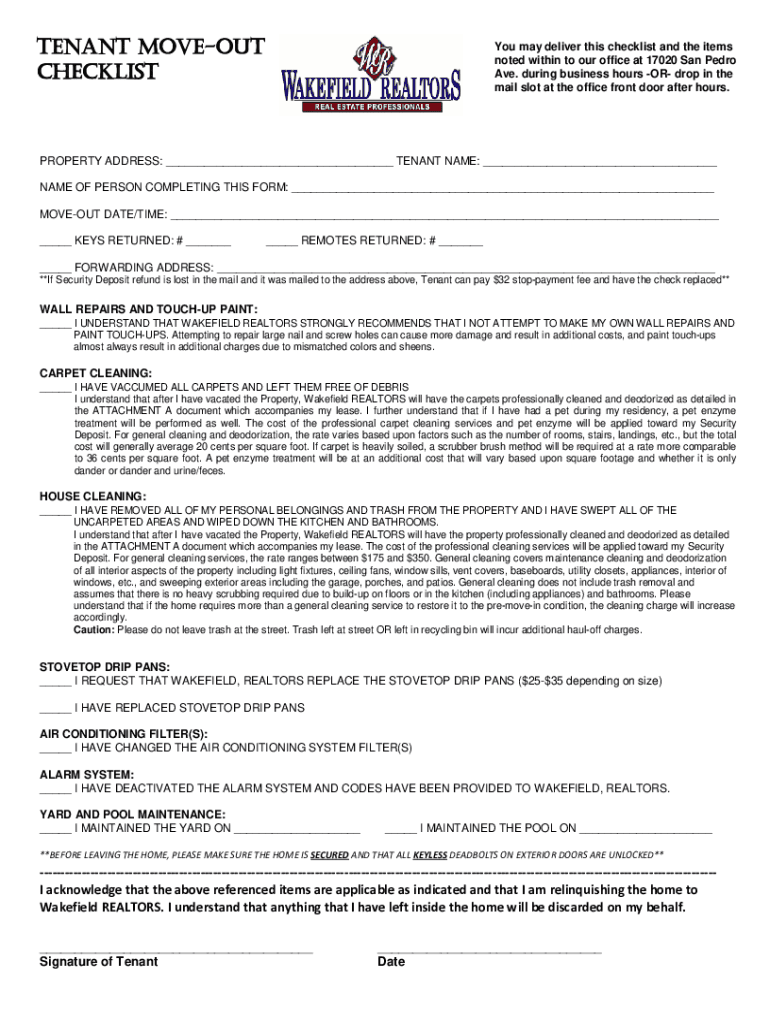
- Click ‘Get Form’ to open the Move Out Checklist in the editor.
- Begin by entering the property address and your name as the tenant in the designated fields. This ensures that all information is accurately linked to your move-out process.
- Fill in the move-out date and time, along with details about keys and remotes returned. This section helps document your compliance with return policies.
- Complete the wall repairs and carpet cleaning sections by checking off each item as you complete them. Make sure to follow recommendations regarding repairs to avoid additional charges.
- In the house cleaning section, confirm that all personal belongings are removed and areas are cleaned. This is crucial for ensuring a smooth transition and avoiding extra fees.
- Finally, review all entries for accuracy before signing at the bottom of the checklist. Your signature confirms your understanding of responsibilities related to your security deposit.
Start using our platform today for free to streamline your Move Out Checklist process!
It's free
See more Move Out Checklist - Your Place Property Management versions
Got questions?
How do I sign my Move Out Checklist - Your Place Property Management on iOS?
With DocHub, you can rapidly approve your Move Out Checklist - Your Place Property Management or any other paperwork on iOS, even without installing additional programs. You can access your DocHub account from any internet-connected browser and complete and sign your document in any preferred method with just a few clicks.
Can I print my Move Out Checklist - Your Place Property Management and finish it by myself?
If you choose analog ways of completing your Move Out Checklist - Your Place Property Management, you can easily download your file for printing. Search DocHub’s Forms & Templates catalog to find the exact document template you need and open it for editing or download it on your gadget in the format of your choice. It is possible to complete your form electronically and put your handwritten signature on it right after printing or eSign your document with DocHub.
What is a renter responsible for when moving out?
What are red flags for landlords?
How do I prepare for a move-out inspection?
Security and compliance
At DocHub, your data security is our priority. We follow HIPAA, SOC2, GDPR, and other standards, so you can work on your documents with confidence.
Learn more


