Type text, add images, blackout confidential details, add comments, highlights and more.
02. Sign it in a few clicks
Draw your signature, type it, upload its image, or use your mobile device as a signature pad.
03. Share your form with others
Send watercare leak rebate form via email, link, or fax. You can also download it, export it or print it out.
How to use or fill out leak allowance with our platform
Ease of Setup
DocHub User Ratings on G2
Ease of Use
DocHub User Ratings on G2
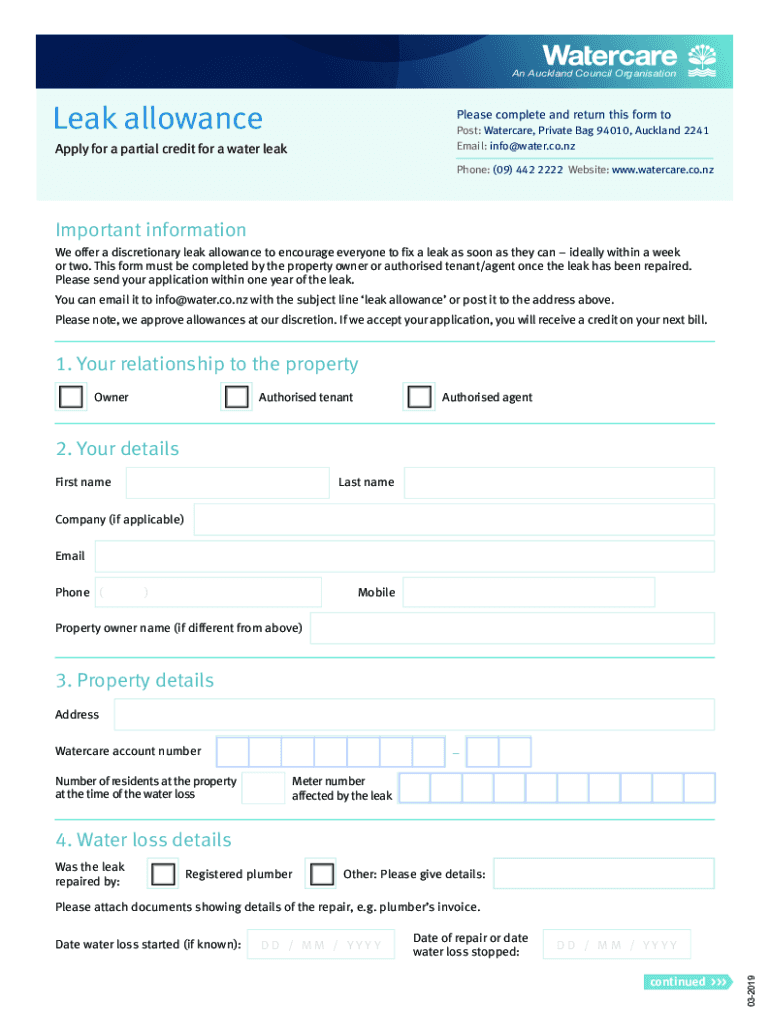
Click ‘Get Form’ to open the leak allowance form in the editor.
Begin by selecting your relationship to the property: Owner, Authorised tenant, or Authorised agent.
Fill in your personal details including First name, Last name, Company (if applicable), Email, Phone, and Mobile.
Provide property details such as Address, Watercare account number, Number of residents at the time of water loss, and Meter number affected by the leak.
In the Water loss details section, indicate if a Registered plumber repaired the leak or provide other details. Attach any relevant documents like a plumber’s invoice.
Enter the Date of repair or when water loss stopped and provide information about when water loss started if known.
Take a current meter reading and note down the Date the reading was taken. Ensure you only use black numbers from the meter.
Review and agree to the Leak allowance terms and conditions before signing and dating your declaration at the end of the form.
Start filling out your leak allowance application today for free using our platform!
Water leak allowanceSFPUC leak allowanceLeak allowance South East WaterLeak allowance form Thames waterLeak allowance Thames waterWater leak on pavement outside houseWater leak under houseWho to call for underground water leak
Security and compliance
At DocHub, your data security is our priority. We follow HIPAA, SOC2, GDPR, and other standards, so you can work on your documents with confidence.
How much is the leak allowance? The allowance adjustment, if granted, will be for 50% of excess usage for visible leaks and 100% of excess usage for concealedRead more
Cookie consent notice
This site uses cookies to enhance site navigation and personalize your experience.
By using this site you agree to our use of cookies as described in our Privacy Notice.
You can modify your selections by visiting our Cookie and Advertising Notice.