




Here's how it works



How to use or fill out The Local Butcher - Overview, News & Competitors with our platform

- Click ‘Get Form’ to open it in the editor.
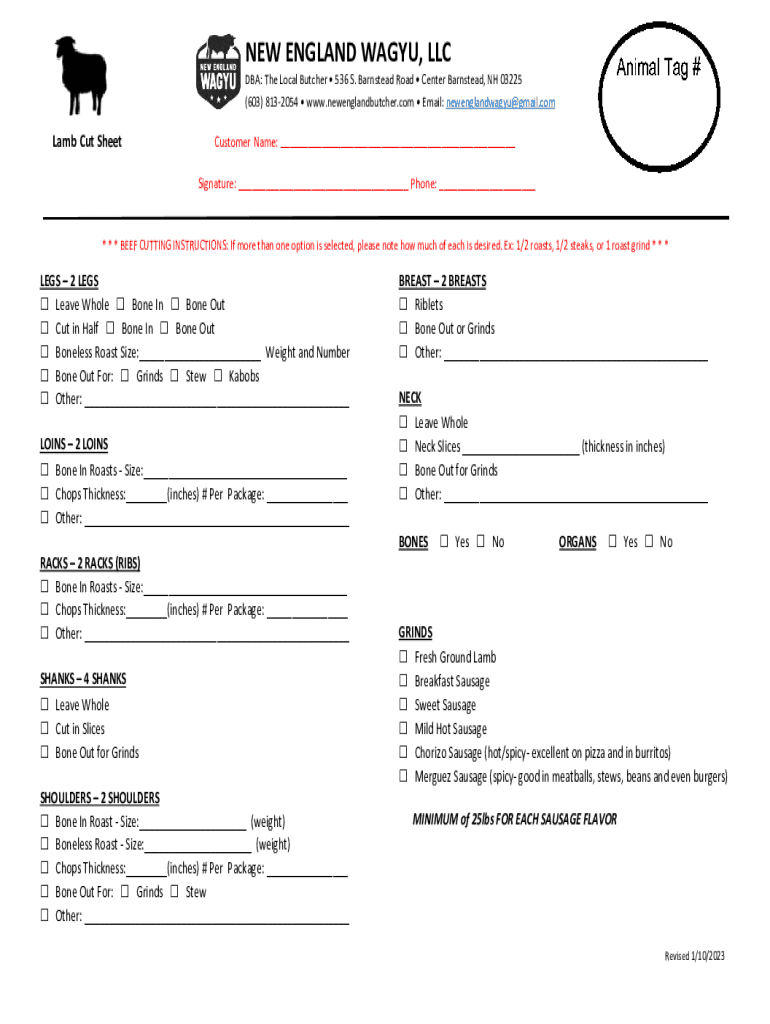
- Begin by entering your name in the 'Customer Name' field. This personalizes your order and ensures accurate processing.
- Sign in the designated 'Signature' field to confirm your order details. Include your phone number for any follow-up communication.
- For beef cutting instructions, select your preferences for each section (Legs, Loins, Breast, etc.). Indicate how you want each cut prepared by checking the appropriate boxes and providing additional details where necessary.
- Ensure you specify sizes and weights as required in the form fields. This information is crucial for fulfilling your order accurately.
- Review all entries for accuracy before finalizing. Use our platform's features to make any necessary edits easily.
Start using our platform today to streamline your document editing and form completion process!
It's free
See more The Local Butcher - Overview, News & Competitors versions
Got questions?
What do I need to sign my The Local Butcher - Overview, News & Competitors electronically?
Electronic document signing demands a software solution that works in compliance with data security and eSignature standards. DocHub is an excellent tool for that, since it fulfills all the aforementioned requirements. Whatever method you prefer to sign your The Local Butcher - Overview, News & Competitors in DocHub, your electronic signature will be legally binding and court-admissible.
How do you complete The Local Butcher - Overview, News & Competitors on iOS?
You need only a web connection and a web browser to complete your The Local Butcher - Overview, News & Competitors on an iOS phone. Open the DocHub website and authenticate. Then, add your file or choose it from the list in your dashboard. Then use our editing instruments to complete your form and save all your modifications. You may also send it to a specified recipient straight away.
Security and compliance
At DocHub, your data security is our priority. We follow HIPAA, SOC2, GDPR, and other standards, so you can work on your documents with confidence.
Learn more


