




Here's how it works



How to use or fill out New Client Referral Form - preferredprivatecare

- Click ‘Get Form’ to open it in the editor.
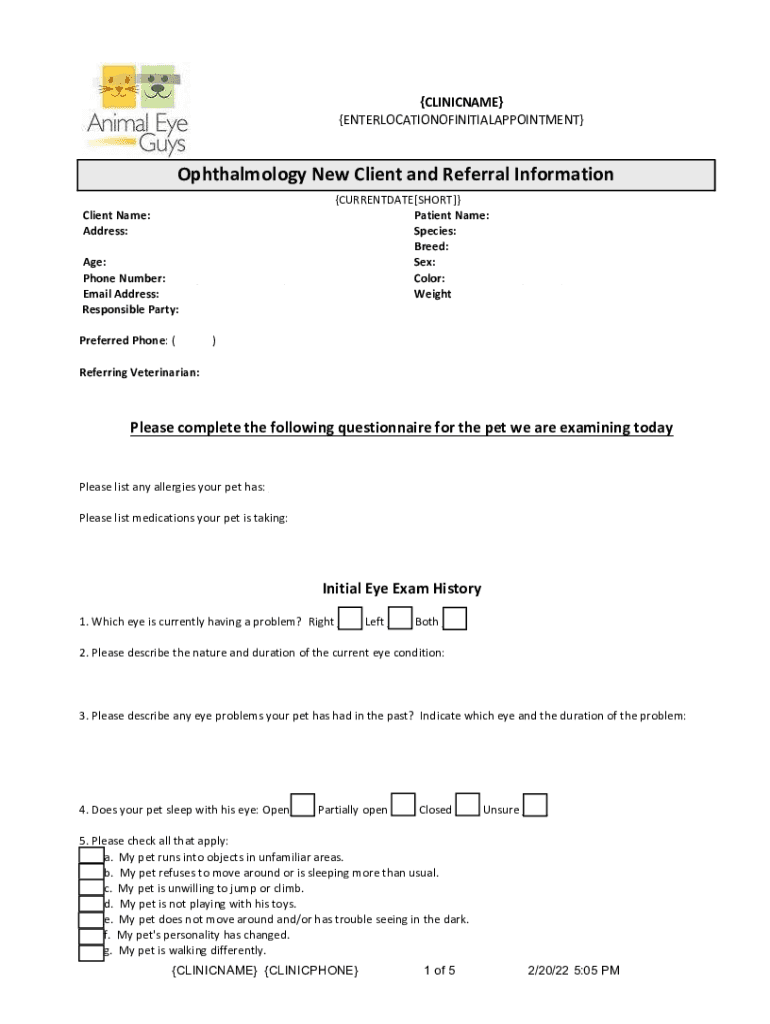
- Begin by entering the patient’s name and contact information in the designated fields, including address, phone number, and email. Ensure all details are accurate for effective communication.
- Fill out the pet's information such as species, breed, age, sex, color, and weight. This helps the clinic understand your pet's profile better.
- Complete the questionnaire regarding your pet's health history. Provide detailed answers about allergies, medications, and any current or past eye conditions.
- Review the referral policy carefully before signing. This section outlines important guidelines regarding your visit and consent for medical record sharing.
- Finally, sign and date the form at the bottom to confirm your understanding of the policies and provide consent for treatment.
Start filling out your New Client Referral Form today using our platform for a seamless experience!
It's free
See more New Client Referral Form - preferredprivatecare versions
Got questions?
Is it safe to sign my New Client Referral Form - preferredprivatecare electronically?
You should use only reliable software solutions with strong security compliance to sign your documents electronically. DocHub is just the type of editor you need! It stores data on Amazon Web Servers and complies with all necessary security standards and eSignature regulations, so it’s a trustworthy way to electronically sign your New Client Referral Form - preferredprivatecare or other documents using this tool.
How do you fill out New Client Referral Form - preferredprivatecare online?
You may get and modify your New Client Referral Form - preferredprivatecare online with the help of DocHub. Its simple yet feature-rich design enables you to begin effective work immediately after you register your account. Create your account and add your document, and then our user interface will guide you via our stress-free form completion experience.
Security and compliance
At DocHub, your data security is our priority. We follow HIPAA, SOC2, GDPR, and other standards, so you can work on your documents with confidence.
Learn more


