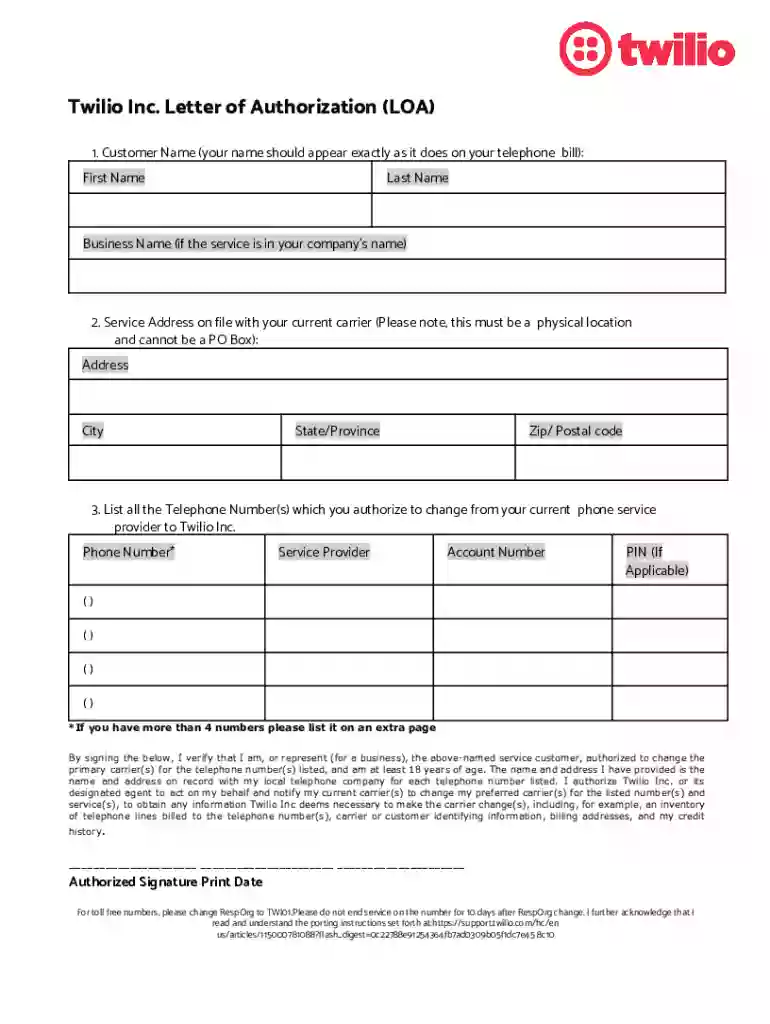
Support twilio hcarticleattachmentsLetter of Authorization for Number Portability 2026

Get Form
support twilio hcarticleattachmentsLetter of Authorization for Number Portability Preview on Page 1

Here's how it works

01. Edit your form online
Type text, add images, blackout confidential details, add comments, highlights and more.

02. Sign it in a few clicks
Draw your signature, type it, upload its image, or use your mobile device as a signature pad.

03. Share your form with others
Send it via email, link, or fax. You can also download it, export it or print it out.

How to use or fill out support twilio hcarticleattachmentsLetter of Authorization for Number Portability with DocHub

Form edit decoration
9.5
Ease of Setup
DocHub User Ratings on G2
9.0
Ease of Use
DocHub User Ratings on G2
  1. Click ‘Get Form’ to open it in the editor.
  2. Begin by entering your Customer Name. Ensure that your name matches exactly as it appears on your telephone bill, including first name, last name, and business name if applicable.
  3. Next, provide the Service Address associated with your current carrier. This must be a physical address; PO Boxes are not acceptable. Fill in the address, city, state/province, and zip/postal code.
  4. List all Telephone Numbers you wish to authorize for porting. For each number, include the service provider, account number, and PIN if applicable. If you have more than four numbers, please add them on an extra page.
  5. Finally, sign the document to verify your authorization. Make sure to print your name and date next to your signature.

Start using our platform today to easily complete and submit your Letter of Authorization for Number Portability!

See more support twilio hcarticleattachmentsLetter of Authorization for Number Portability versions

We've got more versions of the support twilio hcarticleattachmentsLetter of Authorization for Number Portability form. Select the right support twilio hcarticleattachmentsLetter of Authorization for Number Portability version from the list and start editing it straight away!
Versions Form popularity Fillable & printable
2021 4.8 Satisfied (31 Votes)
2017 4 Satisfied (41 Votes)
be ready to get more

Complete this form in 5 minutes or less

Get form

Got questions?

We have answers to the most popular questions from our customers. If you can't find an answer to your question, please contact us.
Contact us

Upload your support twilio hcarticleattachmentsLetter of Authorization for Number Portability to DocHub (after you’ve set up an account for this). If you need to fill out fields in it, use appropriate tools from the top pane. For instance, add Signature Fields, assign each to a particular person, and click on Sign → Request signatures from others. Customize your message for your recipients and click Send Request. You can also send your form by fax or as a Signing link instead of using email (you’ll locate these options by navigating to the Menu → Send)

You may complete and eSign your support twilio hcarticleattachmentsLetter of Authorization for Number Portability online, even on a tight deadline. All you need to access top-notch editing tools on any device is a DocHub account, that you can sign up in a few moments. When you sign up, upload your file or find what you are searching for in our catalog, complete it utilizing the editing tools you want, and place your electronic signature on it at the end.

Easily verify if you can port-in your desired US local phone numbers to bring Voice and Messaging capabilities from your current carrier to Twilio. Simply log in to your Console, navigate to Phone Numbers, select Port Host, and then choose Portability Check.
In the US, porting typically lasts from 5 to 15 days, but it can take up to 4 weeks or longer because of carrier rejections. For local US numbers, an approved A2P 10DLC campaign and brand registration is required to enable messaging on your ported number.
Procedure Submit your port request. Number gets approved by Twilio. Number is Submitted to Carrier Partner. Carrier Partner docHubes out to Losing Carrier. Response from carrier. Twilio docHubes out to you with your porting date. A2P registration process for the messaging capability of ported local numbers:

Security and compliance

At DocHub, your data security is our priority. We follow HIPAA, SOC2, GDPR, and other standards, so you can work on your documents with confidence.

Learn more
ccpa2
pci-dss
gdpr-compliance
hipaa
soc-compliance
be ready to get more

Complete this form in 5 minutes or less

Get form

People also ask

For this, an SMS is to be sent from the mobile number which is to be ported, the word PORT (which shall be case-insensitive, i.e., it can be port or Port etc.) followed by a space and the ten-digit mobile number which is to be ported, to 1900.
Its recommended to use the international number format. Use a + character and country prefix followed by the number, stripping a leading 0. For example, the local Dutch number: 0711223344 would be formatted as: +31711223344.
Send the following text message - PORT followed by your 10-digit mobile number to TRAIs central number for mobile number portability - 1900. Example: Send PORT 98xxxxxx98 to 1900.
You can generate a Unique Porting Code (UPC) by sending an SMS: PORT(Space)Mobile Number to 1900. You will receive the code via SMS from 1901. Please note that the code is valid only for 4 days. Please note: The validity of the Unique Porting Code for Jammu Kashmir and North-eastern states is 30 days.