




Here's how it works



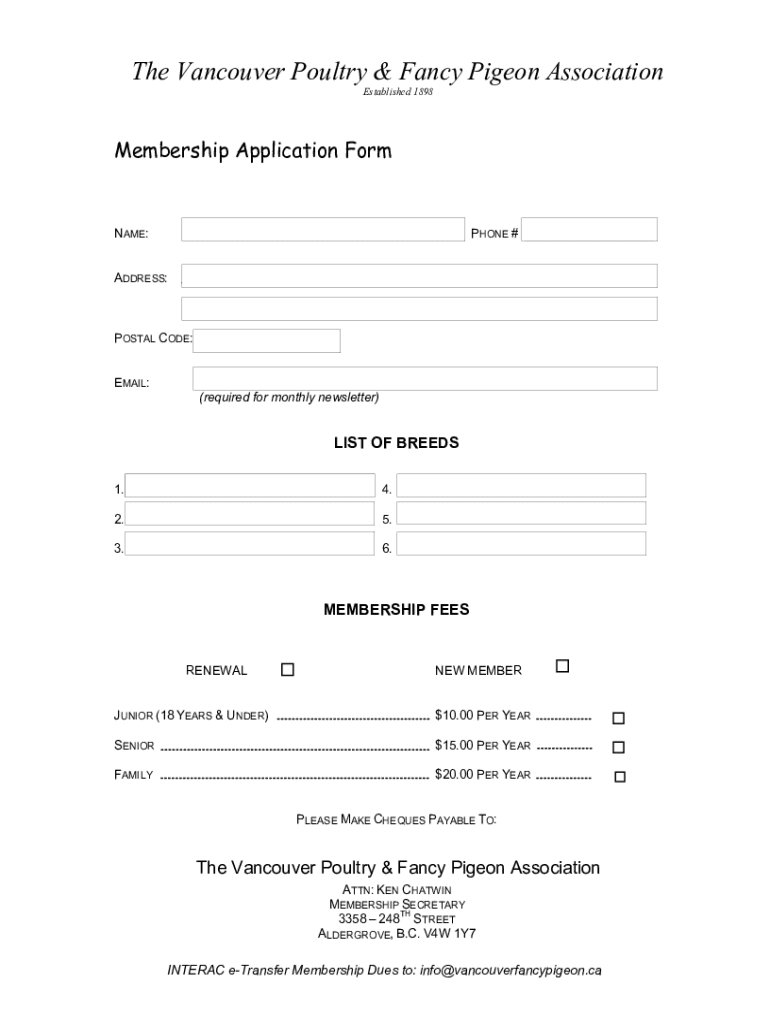
How to use or fill out the Vancouver Poultry & Fancy Pigeon Membership Application Form

- Click ‘Get Form’ to open it in the editor.
- Begin by entering your NAME in the designated field at the top of the form.
- Next, provide your PHONE # and ADDRESS in the respective fields to ensure accurate contact information.
- Fill in your POSTAL CODE and EMAIL address. The email is required for receiving the monthly newsletter.
- In the LIST OF BREEDS section, specify up to six breeds you are interested in by filling out each line accordingly.
- Select your MEMBERSHIP FEES category: RENEWAL or NEW MEMBER, and choose from JUNIOR, SENIOR, or FAMILY options based on your eligibility.
- Finally, follow the payment instructions provided at the bottom of the form for submitting your membership dues.
Start filling out your application today for free and enjoy all the benefits of membership!
It's free
See more DocHub form-library478008-hereHere - The Vancouver Poultry & Fancy Pigeon versions
Got questions?
How can I generate an electronic signature on my DocHub form-library478008-hereHere - The Vancouver Poultry & Fancy Pigeon from Google Chrome?
Managing your documentation with DocHub this way is extremely simple after you have downloaded its extension for Google Chrome. Navigate to the Chrome Web Store and install DocHub - Sign PDF from Gmail to obtain it. Give our tool access to your Google account, and then open an email with the DocHub form-library478008-hereHere - The Vancouver Poultry & Fancy Pigeon attached and point to the file with your cursor - the DocHub extension key will automatically appear there. Click on it to open your form in our editor. Make any required adjustments, fill out the blanks, and click Sign to create your legally-binding eSignature.
How do you fill out DocHub form-library478008-hereHere - The Vancouver Poultry & Fancy Pigeon online?
You can get and edit your DocHub form-library478008-hereHere - The Vancouver Poultry & Fancy Pigeon online with the help of DocHub. Its straightforward yet feature-rich design allows you to start productive work immediately after you register your account. Create your account and add your file, then our user interface will guide you through our stress-free form completion experience.
Security and compliance
At DocHub, your data security is our priority. We follow HIPAA, SOC2, GDPR, and other standards, so you can work on your documents with confidence.
Learn more


