Type text, add images, blackout confidential details, add comments, highlights and more.

02. Sign it in a few clicks
Draw your signature, type it, upload its image, or use your mobile device as a signature pad.

03. Share your form with others
Send cidb card renewal online via email, link, or fax. You can also download it, export it or print it out.

How to use or fill out cidb gov with our platform
Ease of Setup
DocHub User Ratings on G2
Ease of Use
DocHub User Ratings on G2
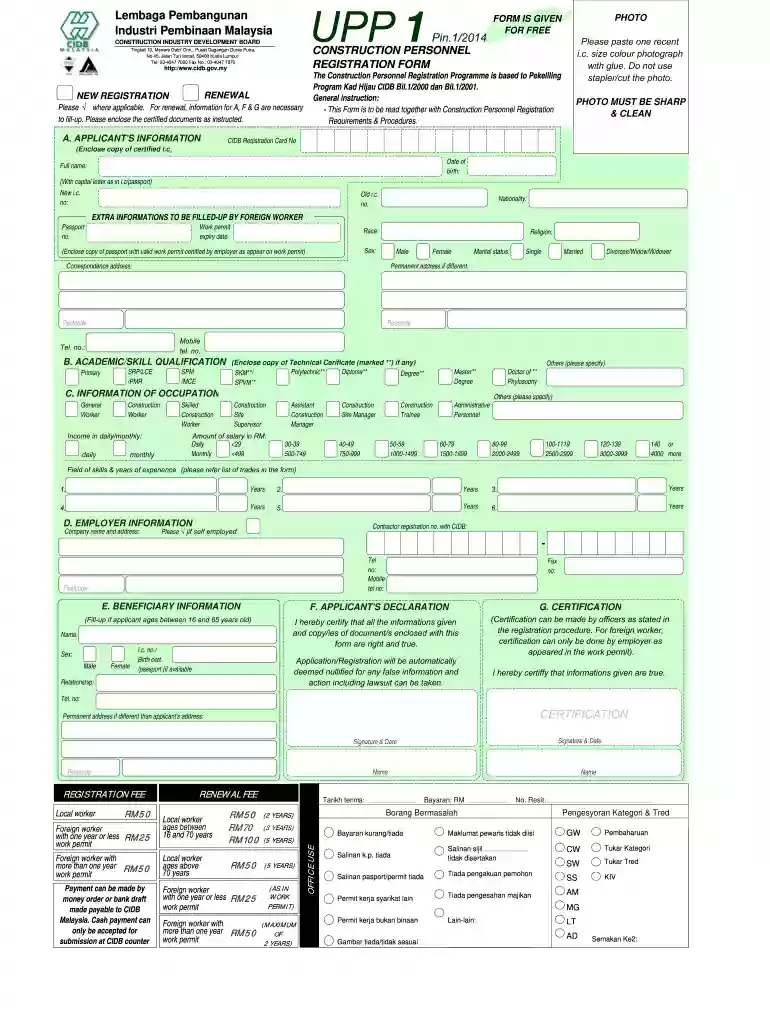
Click ‘Get Form’ to open the cidb gov document in the editor.
Begin by filling out Section A, 'APPLICANT'S INFORMATION'. Paste a recent color photograph in the designated area and ensure it is glued securely. Avoid using staples.
Complete your personal details including your full name, date of birth, and identification numbers. Make sure to provide accurate information as per your identity card or passport.
In Section B, 'ACADEMIC/SKILL QUALIFICATION', indicate your educational background by checking the appropriate boxes and attaching any necessary certificates.
Proceed to Section C, 'INFORMATION OF OCCUPATION', where you will specify your job title and income details. Ensure that you select the correct options for your occupation.
Fill out Section D with your employer's information, including company name and registration number with CIDB.
If applicable, complete Section E for beneficiary information. This section is mandatory for applicants aged between 16 and 65 years.
Review Sections F and G for declarations and certifications. Sign and date where required to confirm the accuracy of your information.
Start using our platform today to streamline your cidb gov form completion for free!
Whether youre a worker, contractor, or supervisor, having a CIDB Card ensures that you meet industry standards, comply with safety regulations, and gain access to a broader range of job opportunities.
What training programs does CIDB offer?
Program For Industry Skills Competency Training (LKK) Skills Competency Assessment (PKK) Certified Construction Site Supervisor (CSS) Certified Facilities Management Executive (FME) Certified Construction Traffic Management Officer (CTMO) Certified Construction. Project Manager (CCPM) Certified Construction Manager (CCM)
How long does CIDB registration take in South Africa?
How long does it take to register with the cidb? It takes 21 working days to register. The 21 day turnaround time applies to applications that are complete and compliant with the requirements of the grade the contractor is applying for.
How do I get a CIDB Green Card?
3 Steps to Apply Green Card (Kad Hijau CIDB) Attend e-SICW course (online) and exam. SIGN UP CIMS CIDB and apply green card. Get Your Green Card (By Post/ Walk in) (Check your green card status, by click here)
The CIDB Card is recognized across the construction industry in Malaysia. It serves as proof of competence and professionalism. For workers, it signifies that they have the necessary training and skills to perform their roles safely and efficiently.
Is CIDB registration mandatory?
The CIDB card (also known as Green Card) is a mandatory requirement for individuals working in the construction sector. This card serves as proof of registration and acknowledges the holders skills and contributions to the industry. However, not everyone is eligible to register for a CIDB card.
Is CIDB grading mandatory for construction?
The CIDB grading classes and thresholds Any contractor that intends to tender for a public sector construction contract must be registered on the CIDBs Register of Contractors. Currently, it is not compulsory for sub-contractors to be registered, nor Joint Ventures (JV).
Cookie consent notice
This site uses cookies to enhance site navigation and personalize your experience.
By using this site you agree to our use of cookies as described in our Privacy Notice.
You can modify your selections by visiting our Cookie and Advertising Notice.