




Here's how it works



How to use or fill out icpc 100a fillable form with our platform

- Click ‘Get Form’ to open the ICPC 100A fillable form in the editor.
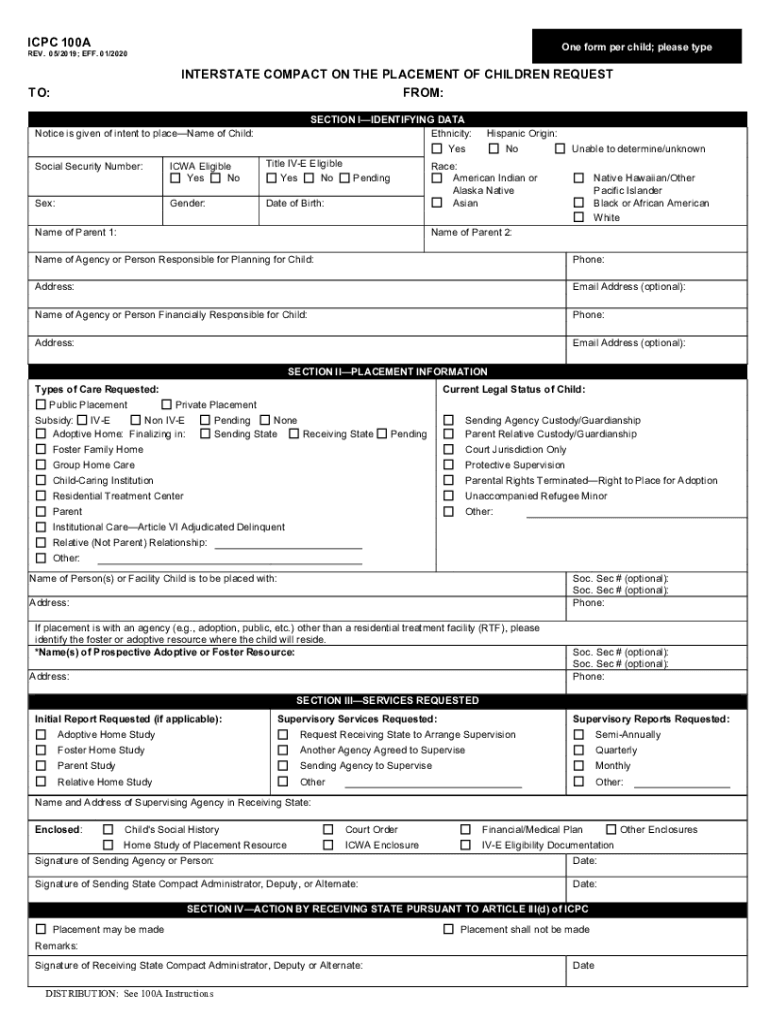
- Begin by entering the child's name and Social Security Number at the top of the form. Indicate if the child is ICWA eligible by selecting 'Yes' or 'No'.
- In Section I, provide identifying data such as ethnicity, race, and date of birth. Fill in the names of both parents and their contact information.
- Move to Section II to specify placement information. Choose from options like public or private placement and indicate any subsidies applicable.
- In Section III, request any necessary services such as home studies or supervisory services. Ensure you include the name and address of the supervising agency.
- Finally, review all sections for accuracy before signing at the bottom of Section IV. Ensure that all required enclosures are included.
Start filling out your ICPC 100A form online for free today!
It's free
See more icpc 100a fillable form versions
Got questions?
Can I complete and sign my icpc 100b online?
Yes, and it’s really easy! DocHub is a web-based PDF editor with advanced document management capabilities that allow you promptly modify your forms, complete blank fields and add new ones for other people to fill out, and create eSignatures in several ways. Add your icpc 100b, provide information as required, and choose how you want to eSign your template - by typing your name, drawing your signature, uploading its image, or utilizing a QR code.
What browser do I need to edit icpc 100a form online?
If you need to edit your icpc 100a form online easily, it does not matter what web browser you use. DocHub’s simple editing instruments are available using any internet browser. Just open the appropriate tab within our editor, add your file, and fill it out without stress.
How long does ICPC take in California?
What does IC PC stand for?
What is a 100 a form?
Security and compliance
At DocHub, your data security is our priority. We follow HIPAA, SOC2, GDPR, and other standards, so you can work on your documents with confidence.
Learn more


