Scdnr license online 2026

Get Form
scdnr license lookup Preview on Page 1

Here's how it works

01. Edit your scdnr license lookup online
Type text, add images, blackout confidential details, add comments, highlights and more.

02. Sign it in a few clicks
Draw your signature, type it, upload its image, or use your mobile device as a signature pad.

03. Share your form with others
Send sc fishing license lookup via email, link, or fax. You can also download it, export it or print it out.

How to use or fill out scdnr license online with our platform

Form edit decoration
9.5
Ease of Setup
DocHub User Ratings on G2
9.0
Ease of Use
DocHub User Ratings on G2
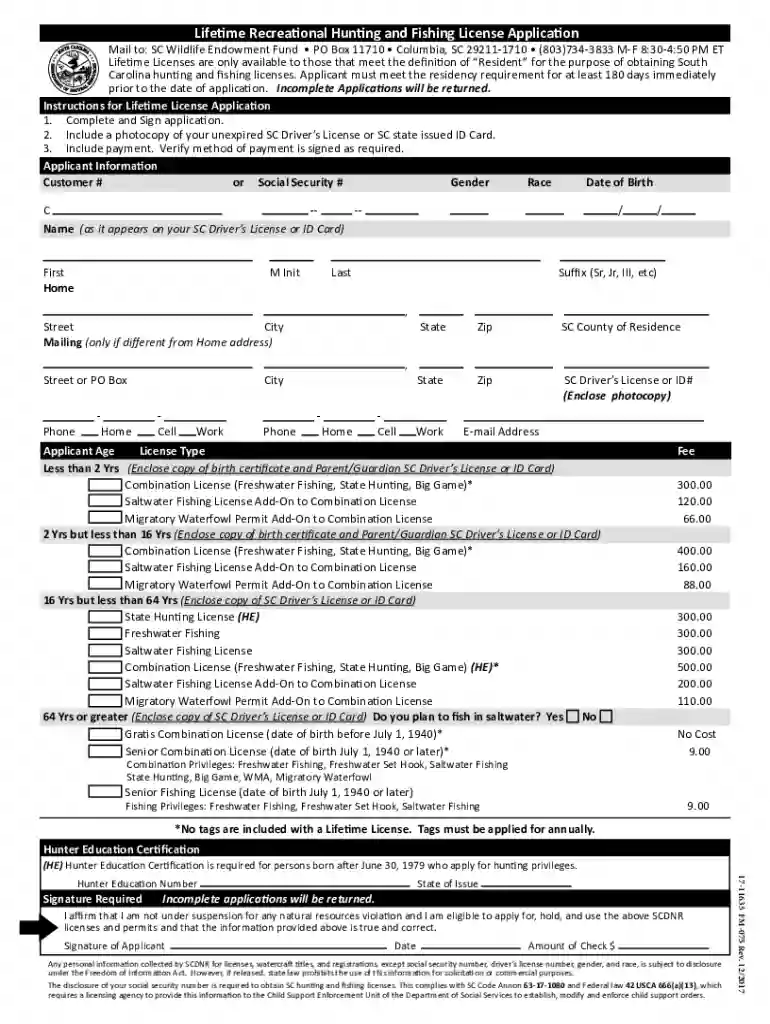
  1. Click ‘Get Form’ to open the Lifetime Recreational Hunting and Fishing License Application in the editor.
  2. Begin by filling out the Applicant Information section. Enter your Customer # or Social Security #, Gender, Race, and Date of Birth. Ensure that your name matches exactly as it appears on your SC Driver’s License or ID Card.
  3. Provide your Home Address including Street, City, State, and Zip Code. If your mailing address differs from your home address, include that information as well.
  4. Complete the Phone and E-mail Address fields. Make sure to provide accurate contact information for any follow-up.
  5. Select the License Type you are applying for based on your age category. Be sure to include any required documents such as a photocopy of your SC Driver’s License or ID Card.
  6. Affirm eligibility by signing the application and entering the date. Review all information for accuracy before submission.

Start using our platform today to easily complete your scdnr license application online for free!

See more scdnr license online versions

We've got more versions of the scdnr license online form. Select the right scdnr license online version from the list and start editing it straight away!
Versions Form popularity Fillable & printable
2017 4.8 Satisfied (129 Votes)
2014 4.3 Satisfied (163 Votes)
2012 4.2 Satisfied (65 Votes)
be ready to get more

Complete this form in 5 minutes or less

Get form

Got questions?

We have answers to the most popular questions from our customers. If you can't find an answer to your question, please contact us.
Contact us

A lot of software solutions are available on the market for document editing and signing. DocHub is one of the most widely used online solutions that comply with all data protection and compliance standards and guarantees your eSigned documentation is legally enforceable. All you need to try it out is to sign up for an account, add your scdnr online license, provide the requested information, and click Sign. Generate your eSignature by typing, drawing it, uploading its picture to your template, or scanning a unique QR code.

Using a swift editing system like DocHub, you do not require anything but a browser and connection to the internet to edit your scdnr senior lifetime license online online easily. Add your file or get the relevant form in DocHub’s catalog, open our editor with one click, and finish it electronically. To edit your forms at any time, register a free profile with DocHub.

Fees ProductsCost Duplicate or Modified License or ID $10 ID Cards: 17 years of age or older (within a year or less of renewal cycle) Free ID Cards: 5 to 16 years old $15 Knowledge Test $2 each7 more rows
Welcome to Go Outdoors South Carolina Login to: Purchase and view / print your licenses permits. Submit Harvest Reports / SC Game Check.
SCDMV: Changing to a South Carolina license Proof of identity, US citizenship and date of birth (government-issued birth certificate or valid US passport) Social security number. Proof of current, physical South Carolina address. Proof of legal name change, if applicable.

Security and compliance

At DocHub, your data security is our priority. We follow HIPAA, SOC2, GDPR, and other standards, so you can work on your documents with confidence.

Learn more
ccpa2
pci-dss
gdpr-compliance
hipaa
soc-compliance

People also ask

How Do I Get My State Hunting License? Complete the South Carolina hunter education certification requirements. Choose the correct license type. Buy the license through the South Carolina Department of Natural Resources website or a South Carolinaapproved agent.
If you purchase a hunting or fishing license by any means, you may download our mobile app, Go Outdoors SC, load your customer profile and sync your licenses to the app, this is also a valid hunting and/or fishing license.
To renew a drivers license in another state, you usually need to show up in person. Some DMVs allow you to make an appointment online so you wont need to grab a number and wait for hours. Others let you fill out the application online.

scdnr fishing license online