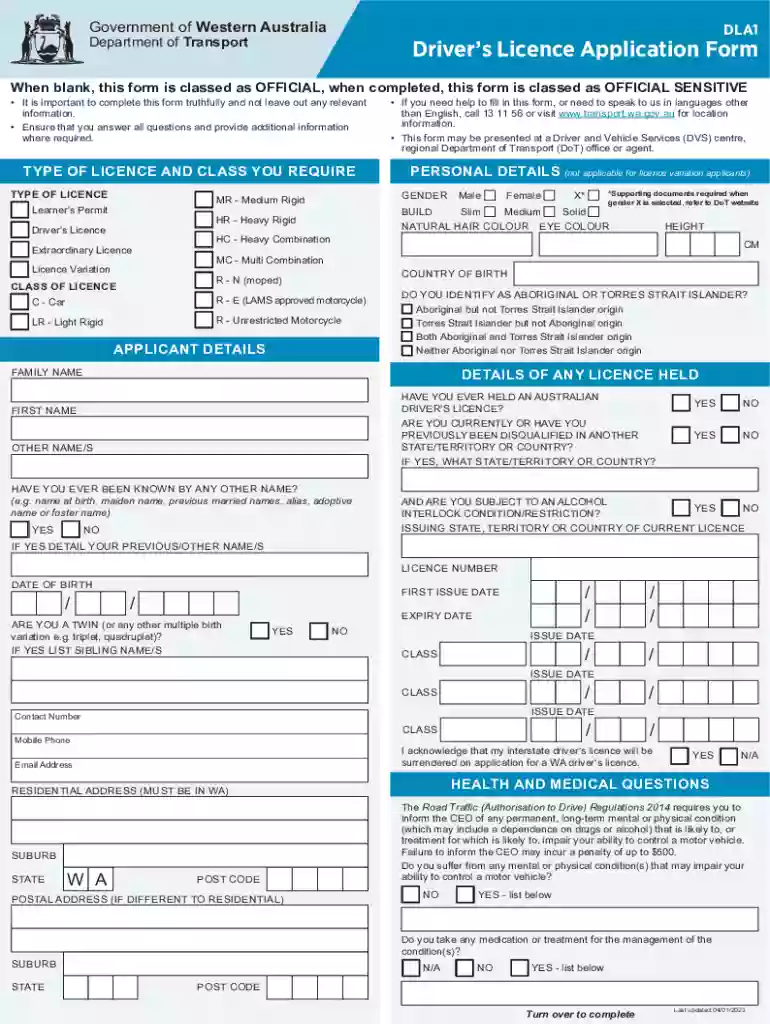
Application for a New Driver's Licence Number (E126) form 2025

Get Form
Application for a New Driver's Licence Number (E126) form Preview on Page 1

Here's how it works

01. Edit your form online
Type text, add images, blackout confidential details, add comments, highlights and more.

02. Sign it in a few clicks
Draw your signature, type it, upload its image, or use your mobile device as a signature pad.

03. Share your form with others
Send it via email, link, or fax. You can also download it, export it or print it out.

How to use or fill out Application for a New Driver's Licence Number (E126) form with our platform

Form edit decoration
9.5
Ease of Setup
DocHub User Ratings on G2
9.0
Ease of Use
DocHub User Ratings on G2
  1. Click ‘Get Form’ to open the Application for a New Driver's Licence Number (E126) in the editor.
  2. Begin by filling out your personal details in the 'Applicant Details' section, including your family name, first name, and date of birth. Ensure accuracy as this information is crucial for identification.
  3. Indicate your gender and height in the respective fields. If applicable, select any previous names you may have held.
  4. In the 'Health and Medical Questions' section, answer truthfully regarding any conditions that may impair your ability to drive. This is essential for safety and compliance.
  5. Complete the 'Privacy Statement and Declaration' section by reading carefully and signing to confirm that all provided information is true and complete.
  6. Finally, review all entries for accuracy before submitting your application through our platform. You can save or print the completed form as needed.

Start using our platform today to fill out your Application for a New Driver's Licence Number (E126) form online for free!

See more Application for a New Driver's Licence Number (E126) form versions

We've got more versions of the Application for a New Driver's Licence Number (E126) form form. Select the right Application for a New Driver's Licence Number (E126) form version from the list and start editing it straight away!
Versions Form popularity Fillable & printable
2023 4.7 Satisfied (31 Votes)
2021 4.8 Satisfied (130 Votes)
2019 4.3 Satisfied (24 Votes)
2015 4.3 Satisfied (59 Votes)
2013 4 Satisfied (56 Votes)
be ready to get more

Complete this form in 5 minutes or less

Get form

Got questions?

We have answers to the most popular questions from our customers. If you can't find an answer to your question, please contact us.
Contact us

You should use only reliable software solutions with strong security compliance to approve your paperwork electronically. DocHub is just the type of editor you need! It stores data on Amazon Web Servers and complies with all essential security requirements and eSignature laws, so it’s a reliable way to eSign your Application for a New Driver's Licence Number (E126) form or other documents with this tool.

If you need to edit your Application for a New Driver's Licence Number (E126) form on the internet swiftly, it does not matter what internet browser you employ. DocHub’s simple editing tools are available using any internet browser. Just open the appropriate tab in the editor, add your document, and fill it out without stress.

Log in to the Service NSW app with your MyServiceNSW Account details. To add a licence, either select the + symbol next to Licences Credentials or select Add a digital licence or credential from the carousel. Follow the prompts to add your licence to the Service NSW app.
Provisional, probationary and open licence fees ItemCost as at 1 July 2022Replacement driver licenceissued with the same expiry date as your current licence$82.10Interstate licence transferif your interstate licence is current$78.75Additional fee for grant of licence with code I (alcohol interlock)$359.005 more rows
Application for New Drivers Licence Number You must provide evidence of your identity and attend in person at a Driver and Vehicle Services (DVS) centre, regional Department of Transport office or agent to submit this application.

People also ask

To apply for a new licence or customer number, you must: Report the theft or incident to Police and obtain a Police Event Number or ReportCyber Receipt (CIRS) Number. Complete a Request for a new Driver Licence/Customer Number (PDF 952.73KB)
Your driving licence number is point 5 on the front of your photocard licence and is 16 characters long.
It is usually either next to or below your name or your birth date. Look for a number with 11 digits containing your birthday in a year-month-date or date-month-year format.
The Ohio state identification number is located to the right of the picture and just below the address listed. The number you are looking for is the license number.
Beginning Sept. 4, all newly issued or renewed Washington state drivers licenses will be given a new license number. New numbers will begin with WDL followed by a string of nine randomly assigned letters or numbers. Previously, license numbers were associated with a persons first and last name and birth date.

Related links