Type text, add images, blackout confidential details, add comments, highlights and more.
02. Sign it in a few clicks
Draw your signature, type it, upload its image, or use your mobile device as a signature pad.
03. Share your form with others
Send daf910 via email, link, or fax. You can also download it, export it or print it out.
How to use or fill out air force form 910 2008 with our platform
Ease of Setup
DocHub User Ratings on G2
Ease of Use
DocHub User Ratings on G2
Click ‘Get Form’ to open the Air Force Form 910 2008 in the editor.
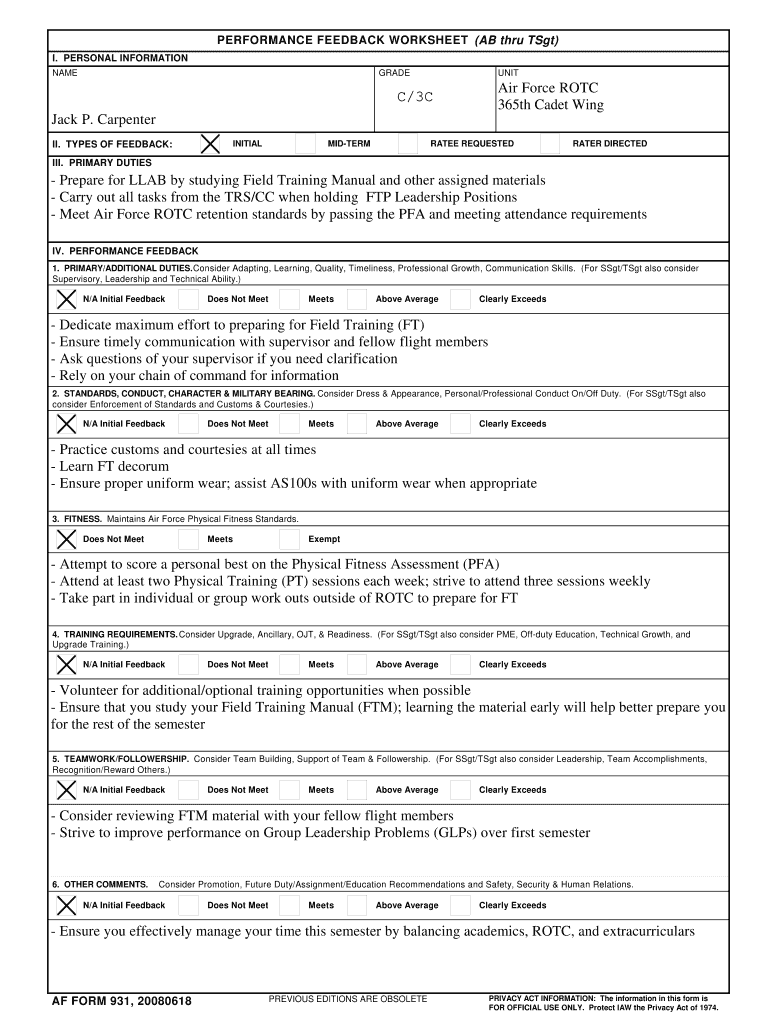
Begin by filling out the Personal Information section. Enter your NAME, GRADE, and UNIT accurately to ensure proper identification.
In the Types of Feedback section, select the appropriate feedback type: INITIAL, MID-TERM, RATEE REQUESTED, or RATER DIRECTED based on your situation.
Proceed to the Primary Duties section. List your responsibilities clearly, ensuring you highlight tasks such as preparing for LLAB and meeting retention standards.
For Performance Feedback, evaluate each duty by selecting from options like 'Does Not Meet', 'Meets', 'Above Average', or 'Clearly Exceeds'. Provide comments that reflect your performance.
Complete the Standards, Conduct, Character & Military Bearing section by assessing your adherence to dress and appearance standards.
Fill out the Fitness section by indicating whether you meet Air Force Physical Fitness Standards and provide relevant comments on your fitness activities.
Continue through Training Requirements and Teamwork/Followership sections using similar evaluation methods as above.
Finally, add any additional comments in the Other Comments section that may pertain to promotions or future assignments.
Review all entries for accuracy before signing. Use our platform's features to save and share your completed form securely.
Start using our platform today for free to streamline your form completion process!
We've got more versions of the air force form 910 2008 form. Select the right air force form 910 2008 version from the list and start editing it straight away!
Apr 27, 2011 On February 15, 2008, the Respondent filed a timely Answer (GC Ex. 1(e)) in which it denied that it had committed an unfair labor practiceRead more
This owners manual should be considered a permanent
If a crash occurs. ○ Be careful of electric shock hazard. u If a crash severely damaged your vehicle, there is a possibility of electrical shock. Do.Read more
Cookie consent notice
This site uses cookies to enhance site navigation and personalize your experience.
By using this site you agree to our use of cookies as described in our Privacy Notice.
You can modify your selections by visiting our Cookie and Advertising Notice.