Type text, add images, blackout confidential details, add comments, highlights and more.
02. Sign it in a few clicks
Draw your signature, type it, upload its image, or use your mobile device as a signature pad.
03. Share your form with others
Send air force feedback form via email, link, or fax. You can also download it, export it or print it out.
How to use or fill out AF Form 931 with our platform
Ease of Setup
DocHub User Ratings on G2
Ease of Use
DocHub User Ratings on G2
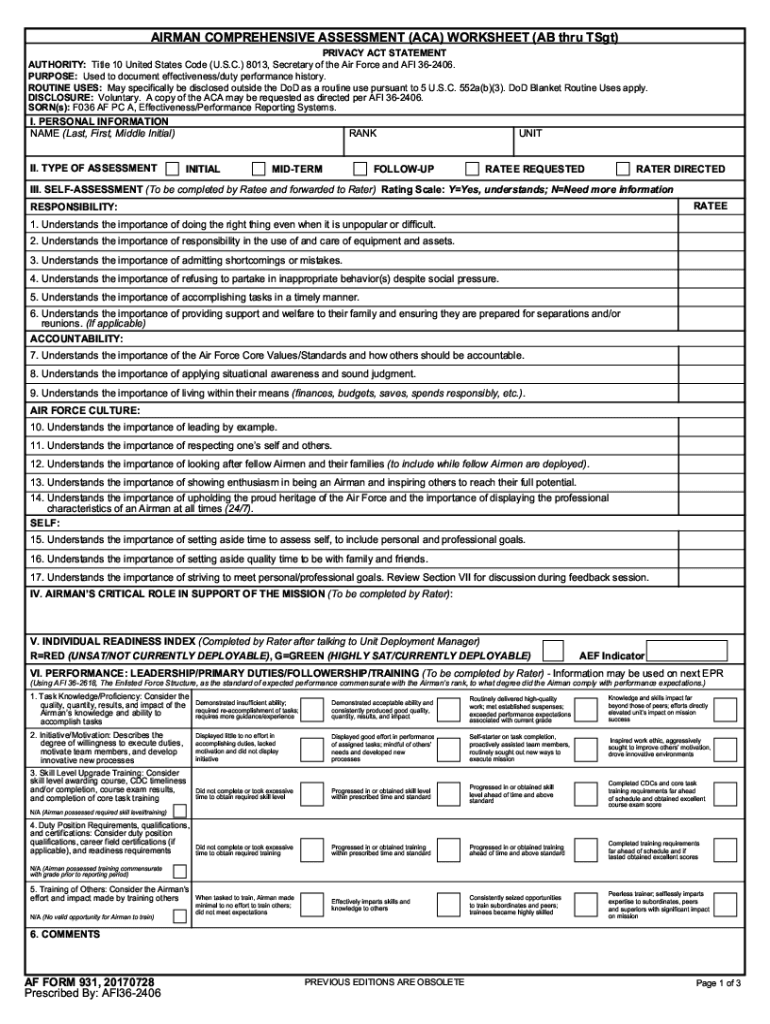
Click ‘Get Form’ to open AF Form 931 in the editor.
Begin by entering your personal information in the designated fields, including your name, rank, and unit. Ensure accuracy as this information is crucial for processing.
Next, navigate to the performance assessment section. Here, you will evaluate specific competencies and provide comments. Use our platform's text tools to add detailed feedback.
In the goals section, outline objectives for the upcoming period. This is an opportunity to set clear expectations and targets.
Finally, review all entries for completeness and accuracy. Utilize our platform’s features to save your progress or share it with supervisors for additional input.
Start using our platform today to streamline your form completion process for free!
AF Form 931, Enlisted Feedback Form (AB-TSgt). AF Form 932, Enlisted Feedback Form (MSgt-CMSgt). For any questions or further information email CMSgt Rod ElsonRead more
AF FORM 931, 20140701. PREVIOUS EDITIONS ARE OBSOLETE. PRIVACY ACT INFORMATION: The information in this form is. FOR OFFICIAL USE ONLY. Protect IAW the PrivacyRead more
AF (auto-focus) and AE (auto exposure) start to function. When AF or AE are locked, the beep tone sounds and the viewfinder lamp lights. 2. Then press itRead more
Cookie consent notice
This site uses cookies to enhance site navigation and personalize your experience.
By using this site you agree to our use of cookies as described in our Privacy Notice.
You can modify your selections by visiting our Cookie and Advertising Notice.