




Here's how it works



How to use or fill out valic login with our platform

- Click ‘Get Form’ to open the valic login document in the editor.
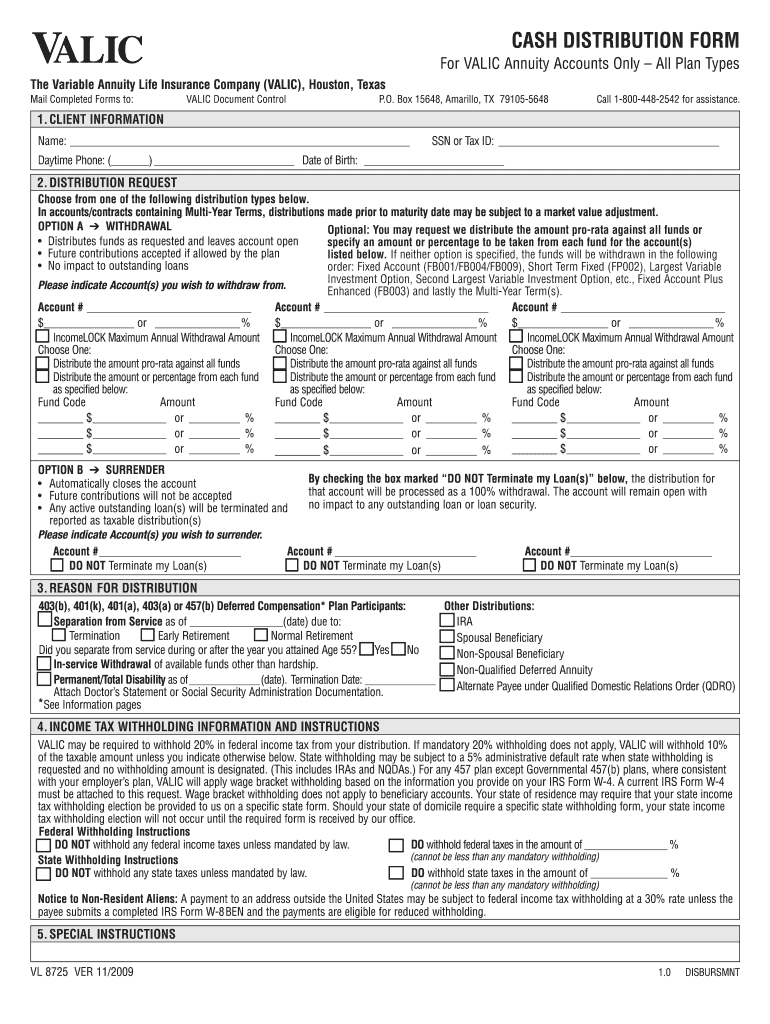
- Begin by filling out the Client Information section. Enter your name, SSN or Tax ID, daytime phone number, and date of birth accurately.
- In the Distribution Request section, choose either Option A (Withdrawal) or Option B (Surrender). Specify the account numbers and amounts for withdrawal if applicable.
- Complete the Reason for Distribution section by selecting the appropriate reason from the options provided.
- Fill out the Income Tax Withholding information as per your preference. Ensure you indicate whether to withhold federal and state taxes.
- Provide any Special Instructions needed for your distribution request.
- Finally, review all entered information for accuracy before submitting your form through our platform.
Start using our platform today to streamline your valic login process effortlessly!
It's free
See more valic login versions
Got questions?
What do I need to sign my valic aig login electronically?
Electronic document approval demands a software solution that complies with data security and eSignature standards. DocHub is an excellent tool for that, because it meets all the above mentioned requirements. Whatever method you prefer to sign your valic aig login in DocHub, your electronic signature will be legally binding and court-admissible.
How do you fill out valic online?
You can get and edit your valic online by using DocHub. Its straightforward but feature-rich design enables you to begin productive work immediately after you register your account. Create your account and add your document, then our user interface will guide you through our stress-free form completion experience.
Can I withdraw money from my VALIC account?
How do I check my VALIC account?
What is the VALIC 403b plan?
Security and compliance
At DocHub, your data security is our priority. We follow HIPAA, SOC2, GDPR, and other standards, so you can work on your documents with confidence.
Learn more


