




01. Edit your form online
Type text, add images, blackout confidential details, add comments, highlights and more.

Type text, add images, blackout confidential details, add comments, highlights and more.

Draw your signature, type it, upload its image, or use your mobile device as a signature pad.

Send it via email, link, or fax. You can also download it, export it or print it out.
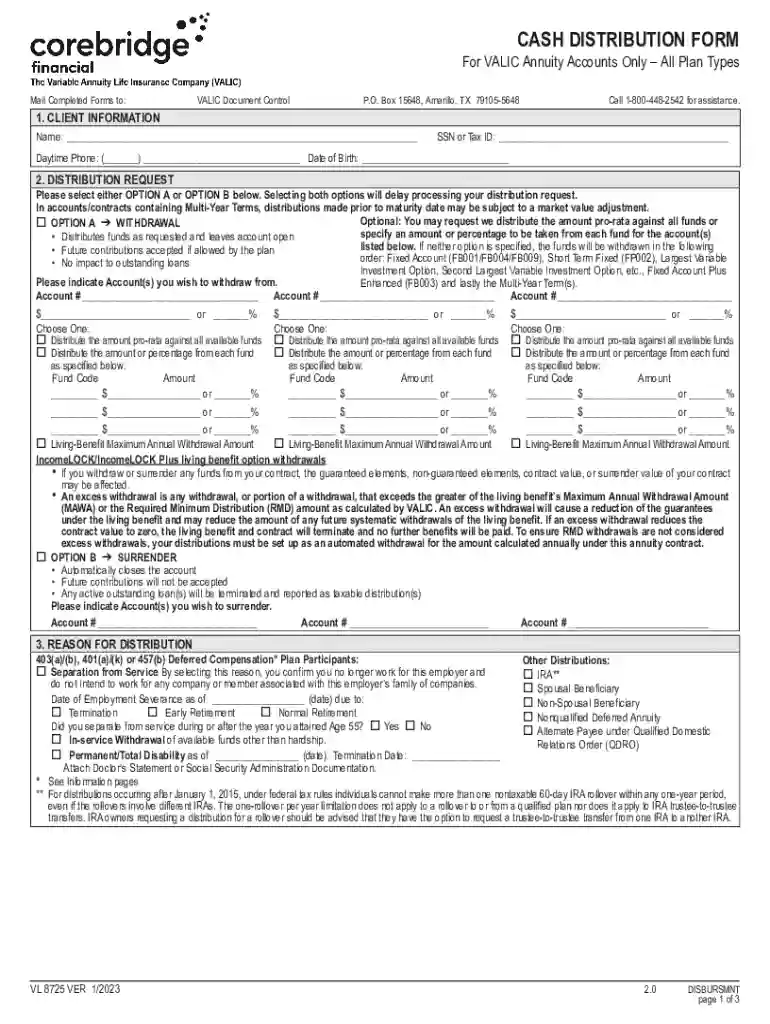
Completing a form online involves a series of methodical steps, ensuring accuracy and compliance throughout the process. Begin by understanding the form's purpose and eligibility requirements before accessing a secure platform like DocHub. This guarantees that the document you are working with reflects the most current legal standards, particularly for official forms such as the W-9 or CASH DISTRIBUTION FORM for VALIC Annuity Accounts.
Access the Form: Open your document directly from your device or through cloud storage services integrated with DocHub, such as Google Drive, Dropbox, or OneDrive. This enables seamless interaction with various file formats.
Understand the Requirements: Each section of the form may call for specific details. For example, if you're handling a CASH DISTRIBUTION FORM, you need to accommodate sections like client information, withdrawal preferences, and tax implications.
Use Editing Tools: Leverage DocHub’s annotation and text insertion utilities. You can modify your document by adding text, inserting images, or making annotations without altering the integrity of the original document format.
Incorporate Fillable Fields: Identify areas where data entry is required and utilize the Form Fields manager in DocHub. This feature allows you to incorporate text boxes, checkboxes, dropdowns, and signature fields, ensuring structured and organized data collection.
Review and Adjust: Before completing the submission, carefully review the information to confirm all sections reflect the intended details. Utilize collaboration features to share with others for additional input or approval.
Submit Form: Once finalized, you can electronically sign the document using DocHub’s legally binding electronic signature feature. Save a copy for your records and transmits it through email or any specified submission channel.
Understanding key elements of online forms is crucial for correct and efficient completion. This includes recognizing the functional design of forms, which typically involves sections for inputting personal data, specific requests, and compliance acknowledgments.
Structured Layout: Online forms are organized into user-friendly sections, such as personal data, preferences, and declarations. This format helps guide users through the completion process logically and efficiently.
Interactive Components: Features like checkboxes, dropdown menus, and signature fields enhance interactivity, making it straightforward for users to provide precise information and confirm their input.
Security Features: Data protection is prioritized, with features such as SSL encryption ensuring the safety of personal information during data entry and form submission.
Using forms online requires familiarity with digital tools and a secure internet connection. Platforms like DocHub enhance this process with user-centric features designed to facilitate ease and accuracy in document management.
Select and Open Form: Access the form via your chosen platform ensuring it is digitally optimized for editing and submission.
Input and Edit Information: Utilize convenient online tools to enter your data. Features such as auto-save and field guides ensure minimal entry errors.
Utilize Collaboration Tools: When necessary, share the document with colleagues or supervisors for review to ensure all information is accurate and file-ready.
Manage Signatures: Utilize digital signature options which are secure and compliant with legislation such as the ESIGN Act, making the process both efficient and trustworthy.
The digital transformation of forms presents significant advantages over paper formats, including enhanced accessibility, efficiency, and environmental benefits. Digital forms eliminate the necessity for physical storage and the risks associated with loss or damage.
Accessibility and Efficiency: Online forms are accessible anywhere and at any time, minimizing the need for physical document retrieval and distribution, which can be particularly cumbersome in formal settings or during emergencies.
Editing and Validation: Changes to digital forms can be made quickly with no need for white-out or reprint, maintaining the document's professional appearance even after multiple revisions.
Eco-Friendly Approach: Reducing paper usage significantly decreases the carbon footprint associated with document production, aligning with modern sustainability goals.
Online forms should be compatible with mainstream software tools to ensure ease of use and integration. DocHub’s platform effortlessly interfaces with popular systems and applications to enhance workflow efficiency.
Cloud Integration: With seamless compatibility with Google Workspace, Dropbox, and Microsoft OneDrive, forms can be imported and exported with ease, streamlining operations across diverse digital environments.
Document Editing Software: Platforms like TurboTax or QuickBooks can interact with forms seamlessly, especially for financial documents requiring integration into broader accounting systems.
Cross-Platform Synchronization: Whether you're using desktop software or mobile applications, online forms retain synchronization for consistent updates across all user devices, promoting efficiency and reducing administrative overhead.
Examples of using forms online highlight advantages such as time efficiency and enhanced accuracy in documentation. From HR onboarding documents to tax forms like the W-9, these tools facilitate diverse administrative tasks.
HR Processes: Employment applications and onboarding paperwork can be digitized, increasing response times and reducing errors in new hire documentation.
Financial Documentation: Forms such as the CASH DISTRIBUTION FORM for VALIC Annuity Accounts can be completed and processed more efficiently online, with clear sections for inputting sensitive financial information.
Legal Agreements: Contracts and NDAs can be processed securely online with electronic signatures for immediate enforcement and accessibility.
To facilitate the seamless completion of online forms, having required documents ready ensures a smoother process. Different forms necessitate diverse supportive paperwork, depending on their purpose and complexity.
Personal Identification: Forms typically require validation of identity, which may include IDs, social security numbers, or birth certificates.
Financial Records: For forms involving monetary transactions or declarations, having recent financial statements or previous tax documents is essential.
Legal Documents: When applicable, supporting legal paperwork should be available, especially if the form results in legally binding changes or declarations.
Utilizing forms online within a legal context necessitates adherence to specific guidelines to ensure compliance with jurisdictional and regulatory standards. This is crucial for maintaining the document's legal standing and for avoiding penalties.
Electronic Signature Compliance: Ensure signatures are compliant with legal standards such as the ESIGN Act, which validates their authenticity and legal standing.
Confidentiality and Security: Implement secure transmission and storage practices, such as document encryption, to protect sensitive information and uphold privacy expectations.
Adherence to Regulations: Remain informed about specific regulatory requirements related to document types, such as the IRS guidelines for tax forms, ensuring that forms are up-to-date and compliant.
At DocHub, your data security is our priority. We follow HIPAA, SOC2, GDPR, and other standards, so you can work on your documents with confidence.
Creating a Form. Most forms should be instances of Djangos models.ModelForm class. This makes it simpler to create a form for most, if not
Use Microsoft Forms to easily create online surveys, forms, quizzes and questionnaires. AI powered, free survey tool from Microsoft.
Oct 30, 2025 This page lists the USCIS forms that are currently available to file online. Visit the File Online page to learn about the benefits of filing a form using our


