




Here's how it works



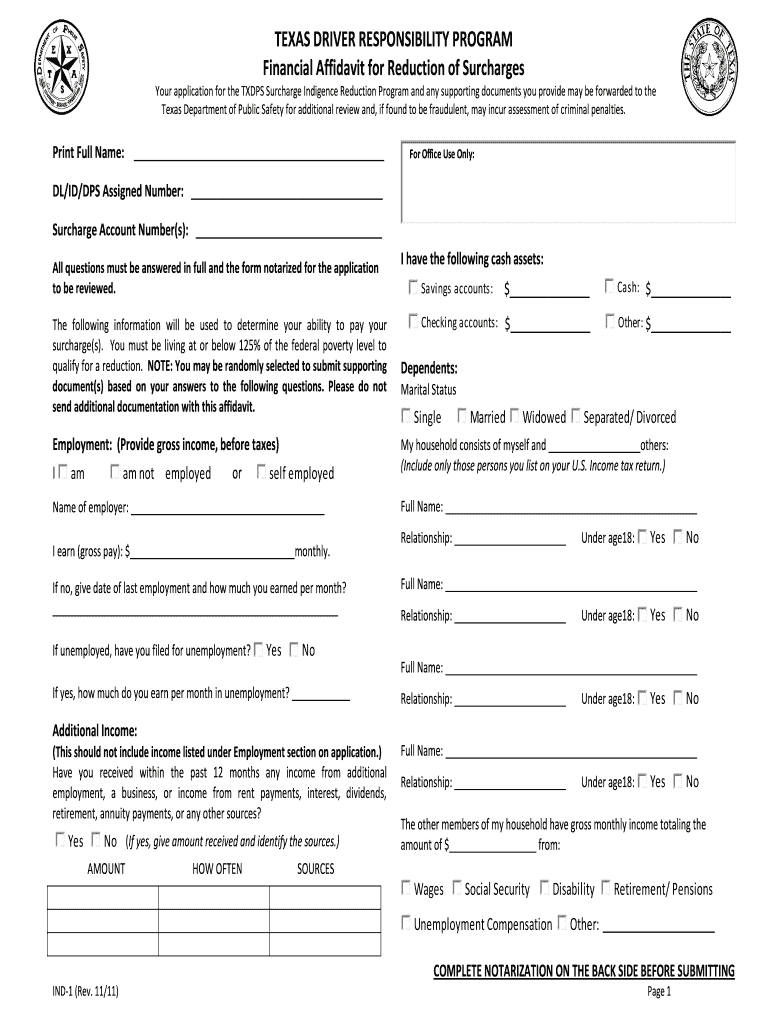
How to use or fill out Texas Driver Responsibility Program Financial Affidavit 2011 Form

- Click ‘Get Form’ to open it in the editor.
- Begin by entering your full name in the designated field at the top of the form.
- Provide your DL/ID/DPS assigned number and surcharge account number(s) in the respective fields for office use.
- Indicate your employment status by checking either 'I am employed' or 'I am not employed'. If employed, fill in your employer's name and gross monthly income.
- If unemployed, provide details about your last employment and any unemployment benefits received.
- Complete the additional income section if applicable, detailing any other sources of income you may have received in the past year.
- List your cash assets, including amounts for cash, checking accounts, and savings accounts.
- Fill out information regarding dependents and household members, ensuring to include their relationships and ages.
- Complete the notarization section on the back side of the form before submitting it.
Start filling out your Texas Driver Responsibility Program Financial Affidavit today using our platform for free!
It's free
See more texas driver responsibility program financial affidavit 2011 form versions
Got questions?
What is the optimum way to electronically sign my txsurchargeonline com?
A lot of software applications are available out there for document modifying and signing. DocHub is one of the most widely used online solutions that comply with all security and compliance standards and ensures your electronically signed paperwork is legally enforceable. All you need to try it out is to sign up for an account, upload your txsurchargeonline com, fill out the requested details, and click Sign. Create your eSignature by typing, drawing it, uploading its image to your form, or scanning a unique QR code.
Can I sign my texas driver responsibility program financial affidavit 2011 form while I edit it?
When you edit your texas driver responsibility program financial affidavit 2011 form with DocHub, you will not need to look for other software or services to eSign it. An electronic signature is part of DocHub’s substantial editing toolset, which allows you to apply changes in your form without switching between websites. Just complete your form, double-check the correctness of the information and put your electronic signature at the end to make it submission-ready in minutes.
Security and compliance
At DocHub, your data security is our priority. We follow HIPAA, SOC2, GDPR, and other standards, so you can work on your documents with confidence.
Learn more


