




Here's how it works



How to use or fill out texas surcharges surcharge online

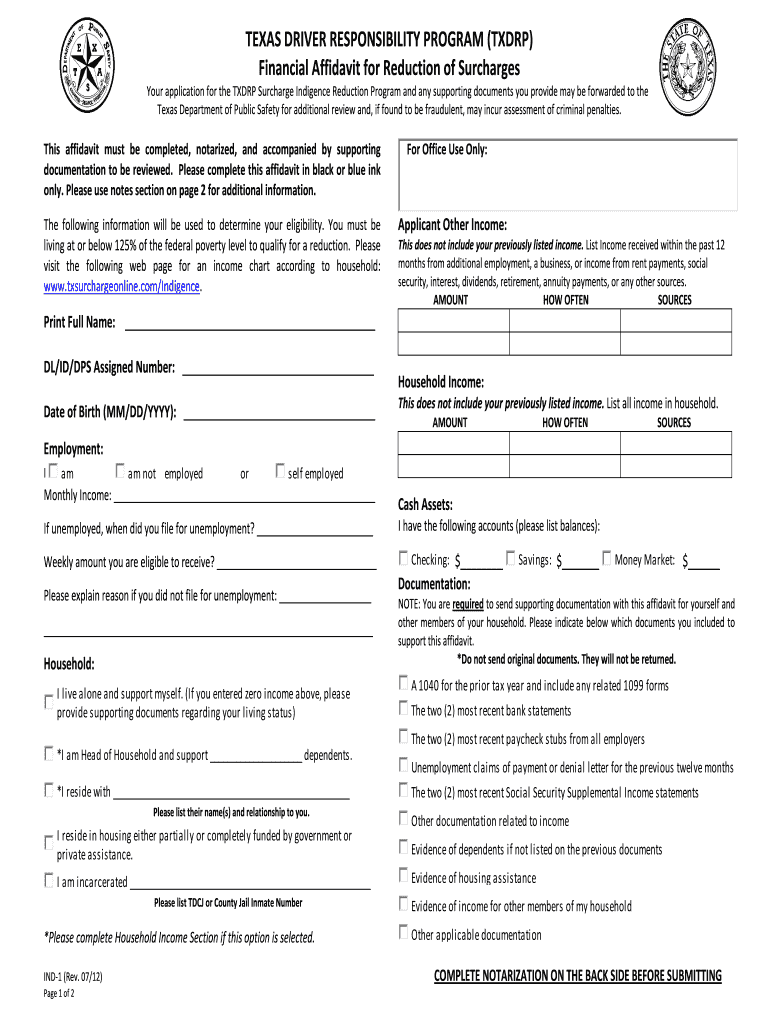
- Click ‘Get Form’ to open the Texas Surcharges Surcharge form in our editor.
- Begin by entering your full name in the designated field. Ensure accuracy as this will be used for identification.
- Input your DL/ID/DPS assigned number and date of birth in the respective fields. This information is crucial for processing your application.
- In the 'Applicant Other Income' section, list any additional income sources received within the past year, including amounts and frequency.
- Complete the 'Household Income' section by detailing all household income, ensuring to include amounts and sources.
- If applicable, indicate your employment status and provide details about your monthly income or unemployment filing date.
- Gather supporting documentation as specified in the form, ensuring you do not send original documents.
- Finally, complete notarization on the back side of the form before submitting it through our platform.
Start filling out your Texas Surcharges Surcharge form online for free today!
It's free
See more texas surcharges surcharge online versions
Got questions?
How can I sign my surcharge texas indigent program without printing?
Electronic signatures are a great alternative to traditional signing, as they save time, effort, and costs people spend on printing, scanning, and paper delivery. You can electronically sign your surcharge texas indigent program using a reliable and powerful online document processing services like DocHub. It complies with main eSignature regulations (ESIGN and UETA), so all forms approved there are legally binding and have the same validity as physically signed ones.
How to manage my form surcharge from Gmail?
If your go-to email service is Gmail, it is simple to integrate your DocHub editor in your work. Edit your form surcharge with DocHub tools and connect it to your drafts in Gmail. See how straightforward it is to exchange files and work together with a swift PDF editing solution at hand.
Security and compliance
At DocHub, your data security is our priority. We follow HIPAA, SOC2, GDPR, and other standards, so you can work on your documents with confidence.
Learn more




