




Here's how it works



How to use or fill out macomb county circuit court praecipe with DocHub

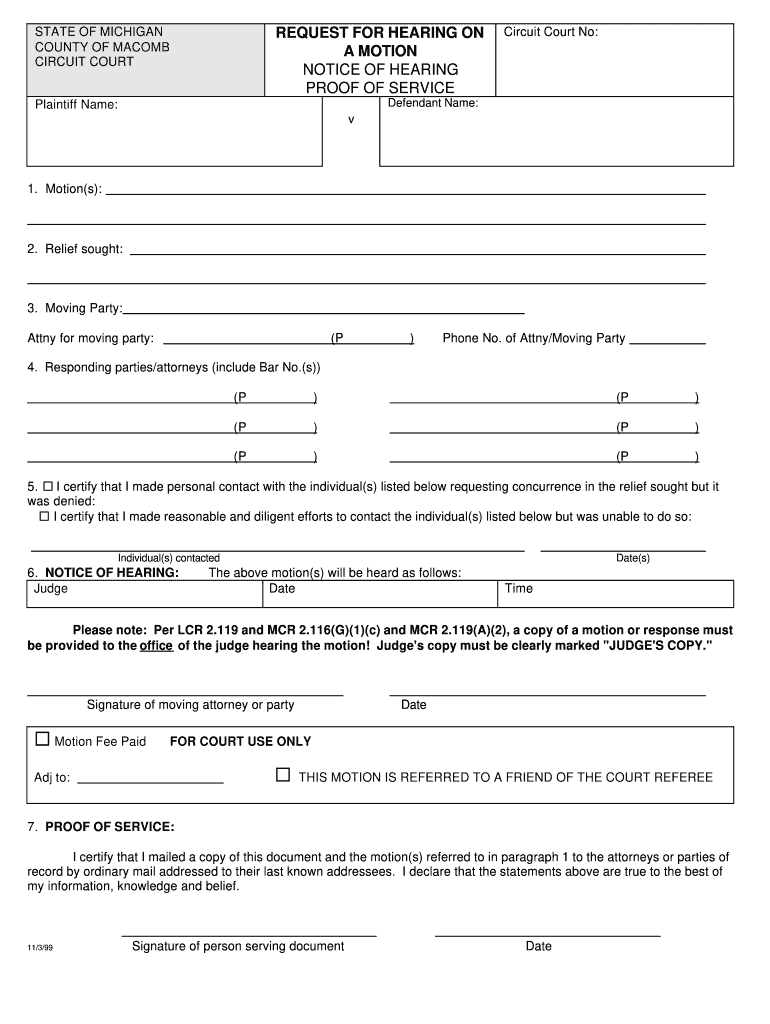
- Click ‘Get Form’ to open the macomb county circuit court praecipe in our editor.
- Begin by entering the Circuit Court Number at the top of the form. This is essential for identifying your case.
- Fill in the Defendant and Plaintiff names in the designated fields. Ensure accuracy as this information is critical for court records.
- In section 1, specify the motion(s) you are filing. Clearly outline what relief you are seeking in section 2.
- Complete section 3 with details about the moving party and their attorney, including contact information.
- List all responding parties or attorneys in section 4, ensuring to include their Bar Numbers where applicable.
- Indicate your efforts to contact other parties regarding concurrence in section 5, selecting the appropriate certification option.
- In section 6, provide details for the notice of hearing, including judge's name and hearing date/time.
- Sign and date at the bottom of the form, confirming that any motion fees have been paid if applicable.
- Finally, complete section 7 for proof of service by certifying that copies were mailed to relevant parties.
Start using our platform today to streamline your document editing and ensure a smooth submission process!
It's free
See more macomb county circuit court praecipe versions
Got questions?
Can I fill out and sign my wayne county epraecipe online?
Sure, and it’s really easy! DocHub is an online PDF editor with advanced document management functions that allow you rapidly modify your forms, fill out empty fields and add new ones for other people to fill out, and create eSignatures in several ways. Import your wayne county epraecipe, provide information as required, and choose how you want to eSign your document - by typing your name, drawing your signature, uploading its image, or using a QR code.
Can I print my praecipe and finish it on my own?
When you choose analog methods of completing your praecipe, it is simple to download your file for printing. Search DocHub’s Forms & Templates catalog to locate the exact document template you require and open it for editing or download it on your device in the format of your liking. It is easy to complete your form electronically and place your handwritten signature on it after printing or eSign your document with DocHub.
What is a praecipe in Michigan?
How can I find court records for Macomb County?
What is the 72 hour arraignment rule in Michigan?
Security and compliance
At DocHub, your data security is our priority. We follow HIPAA, SOC2, GDPR, and other standards, so you can work on your documents with confidence.
Learn more


