




Here's how it works



How to use or fill out Columbia, MD 21045 Email: CARGO ... - Cargo Logistics Group with our platform

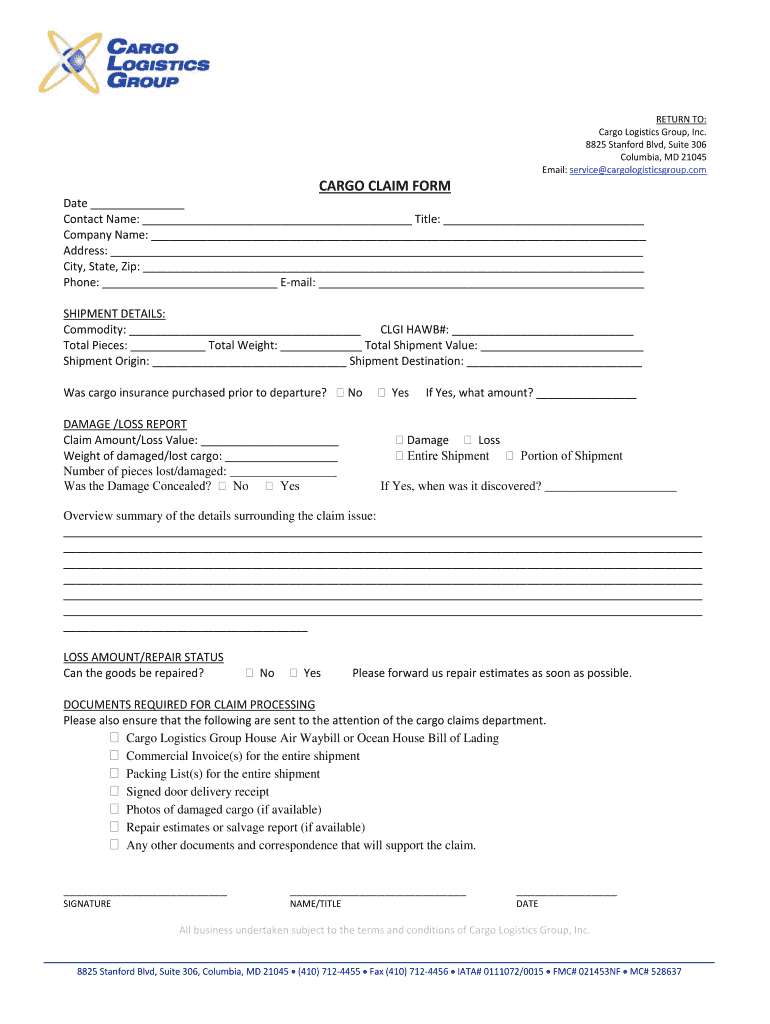
- Click ‘Get Form’ to open the Cargo Claim Form in the editor.
- Begin by entering the date at the top of the form. This is essential for tracking your claim.
- Fill in your contact name and title, followed by your company name and address details. Ensure accuracy for effective communication.
- Provide your phone number and email address to facilitate follow-up regarding your claim.
- In the Shipment Details section, specify the commodity, CLGI HAWB#, total pieces, weight, value, origin, and destination of the shipment.
- Indicate whether cargo insurance was purchased prior to departure by selecting 'Yes' or 'No'.
- Complete the Damage/Loss Report section by detailing the claim amount/loss value and specifics about damaged or lost cargo.
- If applicable, provide an overview summary of the details surrounding the claim issue in the designated area.
- Check off required documents for claim processing to ensure all necessary paperwork is included with your submission.
- Finally, sign and date at the bottom of the form before submitting it to Cargo Logistics Group.
Start using our platform today to streamline your document editing and claims process for free!
It's free
See more Columbia, MD 21045 Email: CARGO ... - Cargo Logistics Group versions
Got questions?
What do I need to sign my Columbia, MD 21045 Email: CARGO ... - Cargo Logistics Group electronically?
Electronic document signing requires a software solution that works in compliance with data security and eSignature laws. DocHub is a perfect tool for that, because it fulfills all the previously mentioned requirements. Whatever method you prefer to sign your Columbia, MD 21045 Email: CARGO ... - Cargo Logistics Group in DocHub, your eSignature will be legally binding and court-admissible.
How do you fill out Columbia, MD 21045 Email: CARGO ... - Cargo Logistics Group on iOS?
You need only a web connection and a web browser to complete your Columbia, MD 21045 Email: CARGO ... - Cargo Logistics Group by using an iOS phone. Open the DocHub website and authenticate. Then, add your document or choose it from the list in your dashboard. Then use our editing instruments to complete your form and preserve all your adjustments. You may also send it to a specified recipient immediately.
Security and compliance
At DocHub, your data security is our priority. We follow HIPAA, SOC2, GDPR, and other standards, so you can work on your documents with confidence.
Learn more


