







Definition and Purpose of the North Carolina Voter Registration Application
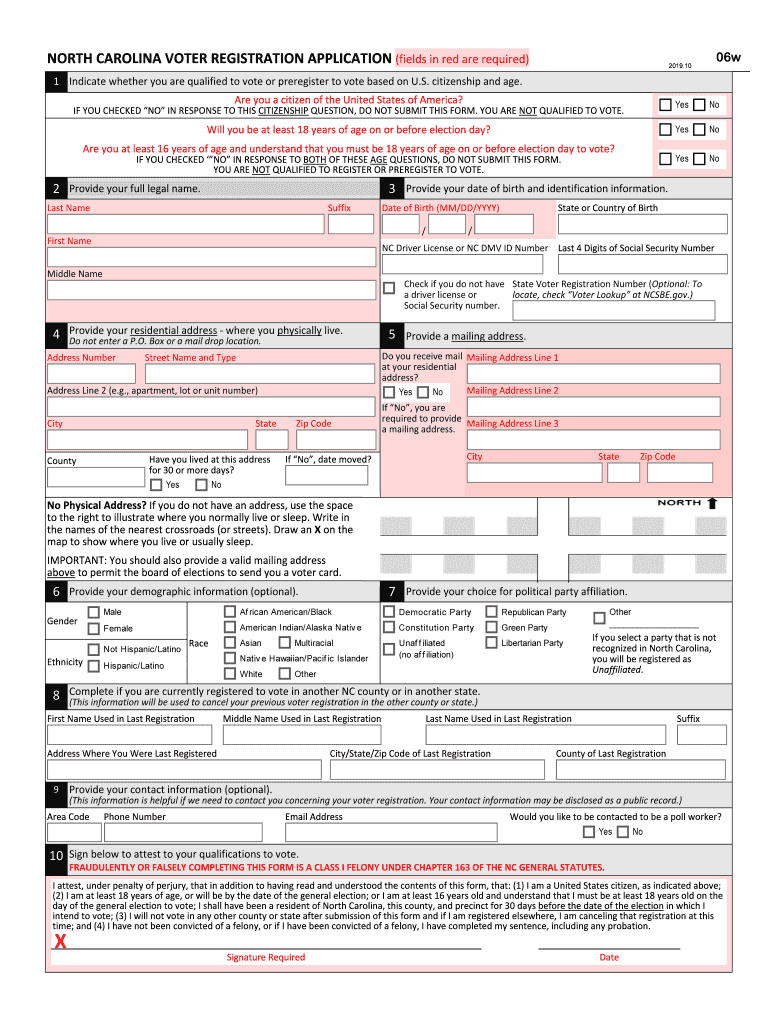
The North Carolina Voter Registration Application, formally known as NORTH CAROLINA VOTER REGISTRATION APPLICATION201910ELEDITSDRAFT03, is a document used by residents of North Carolina to register or preregister to vote. This form serves as a legal attestation of a person’s eligibility based on citizenship, age, and residency requirements set forth by the state. Designed to streamline the process of collecting personal and demographic information, the application captures essential details needed for voters to participate in elections. Users must complete sections that pertain to personal data, political party affiliation, and the acknowledgment of their legal qualifications to cast votes according to state laws. Through this form, North Carolina residents can ensure their participation in both local and national elections.
How to Use the North Carolina Voter Registration Application
To effectively use the North Carolina Voter Registration Application, individuals need to follow a systematic approach. Start by obtaining the form, available through local government offices, public libraries, or downloadable from authorized state websites. Once acquired, applicants should carefully fill out each section, providing accurate personal and residency information. Specific fields include:
- Personal Information: Legal name, date of birth, and social security number.
- Residency: Physical address and mailing address if different.
- Demographics: Optional fields for race and gender.
- Political Party Affiliation: Choose a political party, or opt for unaffiliated status.
Applicants should ensure all mandatory fields are complete and legible before moving ahead with submission. Misrepresentation or false information can lead to legal consequences, emphasizing the importance of accuracy.
Steps to Complete the North Carolina Voter Registration Application
Completing the North Carolina Voter Registration Application involves a step-by-step process:
- Gather Required Information: Before beginning the application, collect necessary documents like proof of residency and identity.
- Fill Out Personal Details: Enter your full legal name, date of birth, and other personal identifiers.
- Provide Residency Information: Indicate your current residential address; ensure it aligns with your legal documentation.
- Select Political Party Affiliation: Choose the political party you wish to enroll with or select 'unaffiliated.'
- Demographic Information: Fill out optional fields such as race and ethnicity for statistical purposes.
- Review and Certify the Application: Ensure all details are correct and certify the form by signing it.
- Submit the Application: Return the completed application to the appropriate local board of elections office by mail or in person.
Carefully following these steps guarantees the application is processed without unnecessary delays.
Who Typically Uses the North Carolina Voter Registration Application
The North Carolina Voter Registration Application is typically used by U.S. citizens residing in North Carolina who wish to engage actively in the democratic process. This includes individuals new to the state, those turning 18 by the next election, and existing residents seeking to update their voting information. The form is also relevant for preregistration by 16- and 17-year-olds who wish to vote once they turn 18. Preregistration ensures that young citizens are automatically registered when they reach voting age, encouraging early participation in elections.


Required Documents and Information
Applicants must furnish specific documents and information to ensure successful registration:
- Proof of Residency: Valid driver's license or utility bills displaying current address.
- Identification Number: Social Security number or a government-issued ID.
- Citizenship Verification: Legal documentation confirming U.S. citizenship, such as a birth certificate or passport.
- Signature: Handwritten signature certifying acknowledgment of the information's accuracy and truthfulness.
Adhering to documentation requirements is crucial for validation and processing of the application.
Legal Use and Compliance
Utilization of the North Carolina Voter Registration Application must align with legal standards and state guidelines. It serves as a binding legal document when individuals declare their intention to participate in elections and affirm they meet voter qualification criteria. Key legal components include:
- U.S. Citizenship: Affirmation of citizenship is mandatory.
- Age Requirement: The applicant must be at least 18 years old by election day, with provisions for 16- and 17-year-olds to preregister.
- Residency Requirement: The applicant should have resided in North Carolina and in their county of registration for at least 30 days before the election.
Understanding and adhering to these legalities ensures compliant use of the application.
Form Submission Methods
There are multiple methods for submitting the North Carolina Voter Registration Application:
- Online: Using secure state websites to submit electronic applications.
- Mail: Sending the physically completed form to the local board of elections office.
- In-Person: Directly submitting the form at designated government offices.
Understanding these submission options allows for flexibility and convenience, ensuring applications are received by stipulated deadlines.
Key Elements of the North Carolina Voter Registration Application
The form comprises several critical components which encompass:
- Personal Identification Section: Includes full name, birthdate, and unique identification numbers.
- Residency Declaration: Detailed address for verifying eligibility.
- Political Party Selection: Enables voters to affiliate with a political party or remain unaffiliated.
- Legal Affirmation and Signature: Endorsement by the applicant to validate information.
- Optional Demographics: Fields for race, ethnicity, and gender for broader data collection efforts.
Each component plays an integral role in the overall registration process, ensuring proper identification and compliance with voting requirements.


