Englishpage1 2026

Get Form
englishpage1 Preview on Page 1

Here's how it works

01. Edit your form online
Type text, add images, blackout confidential details, add comments, highlights and more.
02. Sign it in a few clicks
Draw your signature, type it, upload its image, or use your mobile device as a signature pad.
03. Share your form with others
Send it via email, link, or fax. You can also download it, export it or print it out.

How to use or fill out englishpage1 with our platform

Form edit decoration
9.5
Ease of Setup
DocHub User Ratings on G2
9.0
Ease of Use
DocHub User Ratings on G2
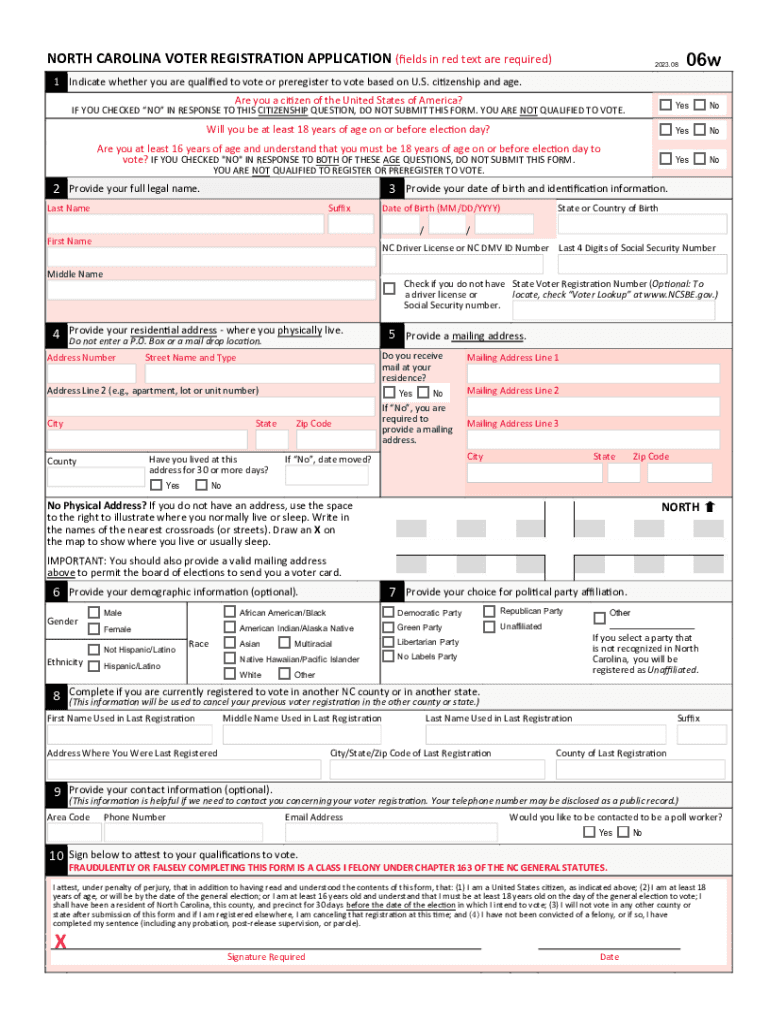
  1. Click ‘Get Form’ to open the North Carolina Voter Registration Application in the editor.
  2. Begin by indicating your eligibility to vote. Check 'Yes' for U.S. citizenship and age requirements. If you answer 'No' to either, do not submit the form.
  3. Provide your full legal name in the designated fields, ensuring accuracy for proper registration.
  4. Enter your date of birth and identification information, including your NC Driver License number or the last four digits of your Social Security number.
  5. Fill in your residential address accurately, avoiding P.O. Boxes. Confirm if you have lived there for at least 30 days.
  6. If applicable, provide a mailing address where you can receive correspondence from the Board of Elections.
  7. Optionally, complete demographic information such as gender and ethnicity.
  8. Select your political party affiliation from the provided options or choose 'Unaffiliated'.
  9. If previously registered elsewhere, provide details about your last registration to ensure proper cancellation.
  10. Finally, sign and date the application to attest to its accuracy before submitting it as instructed.

Start filling out your voter registration application today for free using our platform!

See more englishpage1 versions

We've got more versions of the englishpage1 form. Select the right englishpage1 version from the list and start editing it straight away!
Versions Form popularity Fillable & printable
2024 4.5 Satisfied (23 Votes)
2023 4.7 Satisfied (41 Votes)
2020 4.8 Satisfied (142 Votes)
2019 4.4 Satisfied (66 Votes)
2016 4.3 Satisfied (47 Votes)
2015 4.8 Satisfied (59 Votes)
2009 4 Satisfied (45 Votes)
be ready to get more

Complete this form in 5 minutes or less

Get form

Got questions?

We have answers to the most popular questions from our customers. If you can't find an answer to your question, please contact us.
Contact us

Yes, you can use DocHub for signing any business and personal documentation, including your englishpage1. All electronic signatures you create with our tool are legally binding and court-admissible, as DocHub complies with standards required by ESIGN and UETA. Save your completed form with a detailed Audit Trail if necessary.

If your go-to email service is Gmail, it is simple to integrate your DocHub editor into your work. Edit your englishpage1 with DocHub instruments and attach it to your drafts in Gmail. See how straightforward it is to exchange files and collaborate with a swift PDF editing solution at hand.

Englishpage.com offers hundreds of free online English grammar and vocabulary exercises.
In summary, here are 10 of our most popular english courses English Advanced C1: Universit di Napoli Federico II. Learn English: Advanced Grammar and Punctuation: University of California, Irvine. Google Advanced Data Analytics: Google. Create and Design Digital Products using Canva: Coursera Project Network.
/peɪdʒ/ Other forms: pages; paged; paging. A page is one sheet of a book, magazine, or other collection of papers.

People also ask

The 11 best websites to learn English in 2025 British Council. Daves ESL Cafe. BBC Learning English. Websites to learn English vocabulary. Duolingo. Memrise. Websites to learn English for kids. ABCya. Cambridge English. Websites for learning English grammar. FluentU. Other websites for learning English. VOA Learning English. TED.
page noun [C] (PAPER) (written abbreviation p.) a side of one of the pieces of paper in a book, newspaper, or magazine, usually with a number printed on it: For details on how to enter the competition, see page 134.
In medieval times, a page was an attendant to a nobleman, a knight, a governor or a castellan. Until the age of about seven, sons of noble families would receive training in manners and basic literacy from their mothers or other female relatives.

Related links