




Here's how it works



How to use or fill out REGISTRATION REQUEST FOR GRADUATE CREDIT - onestop.umn.edu with DocHub

- Click ‘Get Form’ to open it in the editor.
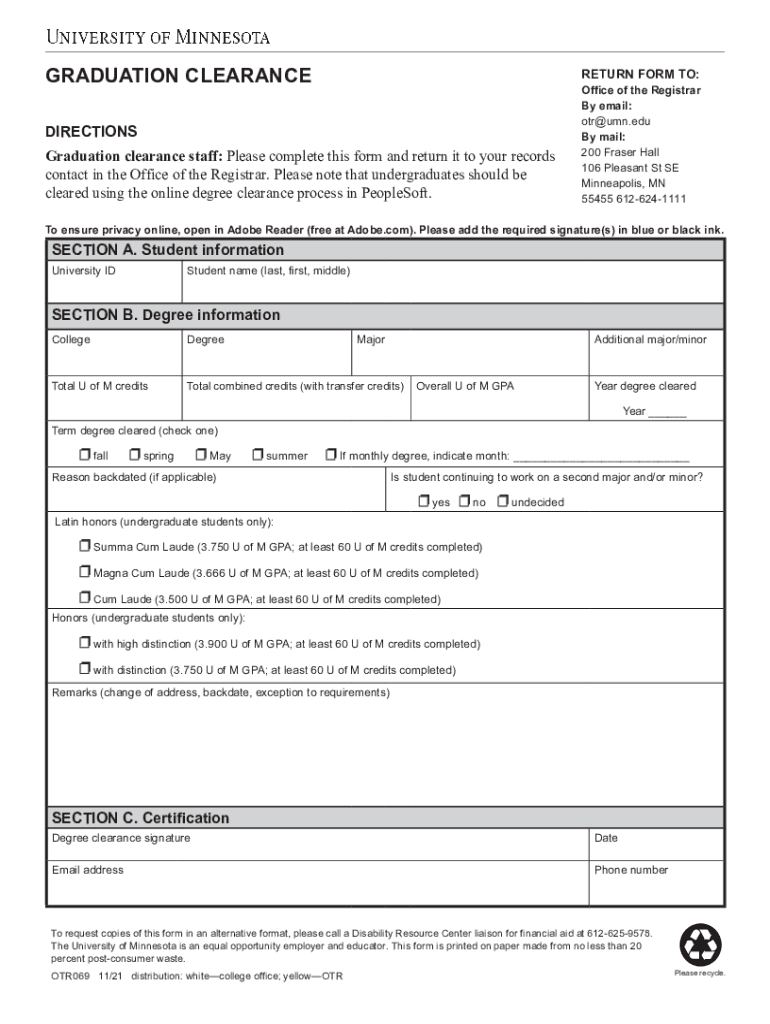
- Begin by filling out SECTION A with your student information. Enter your University ID and full name (last, first, middle) accurately.
- Proceed to SECTION B for degree information. Specify your college, degree, major, and any additional majors or minors. Ensure you include total U of M credits and overall GPA.
- Indicate the year and term when your degree will be cleared. If applicable, provide a reason for backdating and confirm if you are continuing with a second major or minor.
- In SECTION C, sign where indicated for degree clearance and provide the date along with your email address and phone number.
- Review all entries for accuracy before saving or exporting the completed form from our platform.
Start using our platform today to streamline your form completion process for free!
It's free
See more REGISTRATION REQUEST FOR GRADUATE CREDIT - onestop.umn.edu versions
Got questions?
What is the best way to send my REGISTRATION REQUEST FOR GRADUATE CREDIT - onestop.umn.edu for eSignature?
Upload your REGISTRATION REQUEST FOR GRADUATE CREDIT - onestop.umn.edu to DocHub (once you’ve created an account for this). If you need to fill out fields in it, use proper tools from the top pane. For instance, drop Signature Fields, assign each to a particular person, and click on Sign → Request signatures from others. Customize your message for your recipients and click Send Request. You can also send your form by fax or as a Signing link instead of using email (you’ll locate these options by navigating to the Menu → Send)
How to manage my REGISTRATION REQUEST FOR GRADUATE CREDIT - onestop.umn.edu from Gmail?
In case your go-to electronic mail service is Gmail, you can easily incorporate your DocHub editor into your work. Edit your REGISTRATION REQUEST FOR GRADUATE CREDIT - onestop.umn.edu with DocHub tools and connect it to your drafts in Gmail. See how easy it can be to exchange papers and collaborate with a swift PDF editing solution at hand.
Is 18 credits a semester too much?
How many credits do I need UMN?
What is it called when you take a college class for no credit?
Security and compliance
At DocHub, your data security is our priority. We follow HIPAA, SOC2, GDPR, and other standards, so you can work on your documents with confidence.
Learn more


