




Here's how it works



How to use or fill out 2021 affidavit with DocHub

- Click ‘Get Form’ to open the 2021 affidavit in our editor.
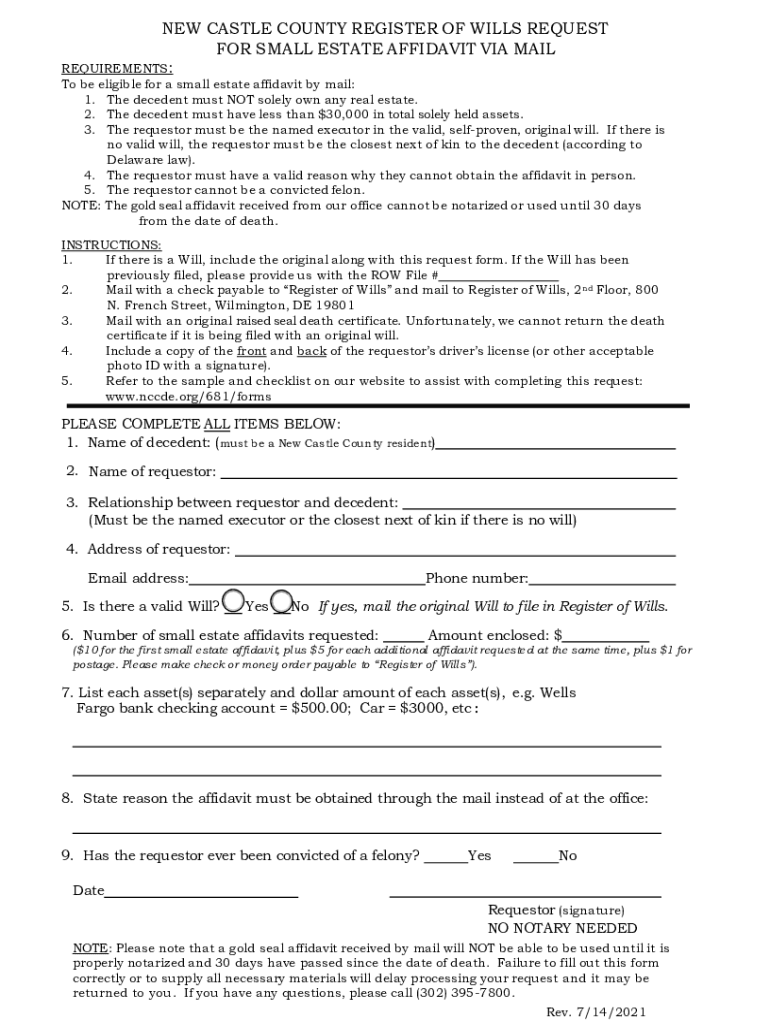
- Begin by entering the name of the decedent, ensuring they are a New Castle County resident.
- Fill in the requestor's name and their relationship to the decedent, confirming eligibility as executor or next of kin.
- Provide the requestor's address and email address for communication purposes.
- Indicate whether there is a valid Will. If yes, ensure to note that the original will must be mailed with this form.
- Specify the number of small estate affidavits requested and calculate the total amount enclosed based on provided fees.
- List each asset separately along with its dollar amount, ensuring clarity for processing.
- State the reason for requesting the affidavit via mail instead of in person.
- Confirm if the requestor has ever been convicted of a felony by selecting 'Yes' or 'No'.
- Finally, sign and date the form. Remember, no notary is needed at this stage.
Start using our platform today to fill out your 2021 affidavit easily and for free!
It's free
See more 2021 affidavit versions
Got questions?
How can I send my 2021 affidavit for eSignature?
Upload your 2021 affidavit to DocHub (after you’ve set up an account for this). If you need to fill out fields in it, use appropriate tools from the top pane. For example, add Signature Fields, assign each to specific party, and click on Sign → Request signatures from others. Customize your message for your recipients and click Send Request. You can also send your form by fax or as a Signing link instead of using email (you’ll find these options by navigating to the Menu → Send)
How do you get 2021 affidavit for my state?
If you are searching for a state-specific 2021 affidavit sample, you will find it in our DocHub Forms & Templates catalog. Use the search field, key in your form’s name, and search through the results for your state. You can also filter out irrelevant results while exploring our catalog by groups.
Security and compliance
At DocHub, your data security is our priority. We follow HIPAA, SOC2, GDPR, and other standards, so you can work on your documents with confidence.
Learn more


