Type text, add images, blackout confidential details, add comments, highlights and more.

02. Sign it in a few clicks
Draw your signature, type it, upload its image, or use your mobile device as a signature pad.

03. Share your form with others
Send it via email, link, or fax. You can also download it, export it or print it out.

How to use or fill out fl280s with our platform
Ease of Setup
DocHub User Ratings on G2
Ease of Use
DocHub User Ratings on G2
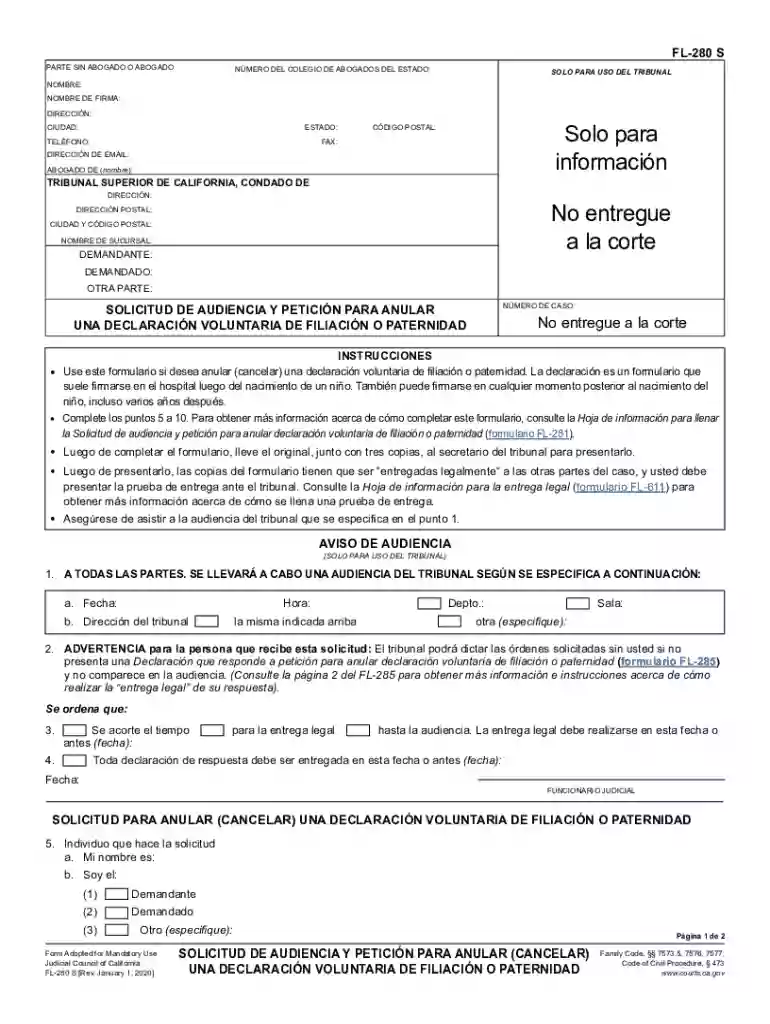
Click ‘Get Form’ to open the FL-280 S in the editor.
Begin by entering your name and contact information in the designated fields, including your address, phone number, and email. This ensures that all parties can reach you easily.
Fill in the details of the court, including its name and address. Make sure to provide accurate information as this is crucial for your case.
In section 5, indicate whether you are the plaintiff, defendant, or another party involved. This helps clarify your role in the proceedings.
Complete sections 6 through 10 by providing specific requests regarding genetic testing and reasons for annulment. Be thorough in explaining your circumstances to support your request.
Once completed, save your form and print it. Remember to bring the original along with three copies to file at the court clerk's office.
Start using our platform today for free to streamline your FL-280 S form completion!
Form Adopted for Mandatory Use Judicial Council of California FL-280 S. DE AUDIENCIA Y PETICIN PARA ANULAR (CANCELAR) ) la declaracin voluntaria de filiacin
Cookie consent notice
This site uses cookies to enhance site navigation and personalize your experience.
By using this site you agree to our use of cookies as described in our Privacy Notice.
You can modify your selections by visiting our Cookie and Advertising Notice.