




Here's how it works



How to use or fill out NY Absentee Ballot with DocHub

- Click ‘Get Form’ to open the NY Absentee Ballot application in our editor.
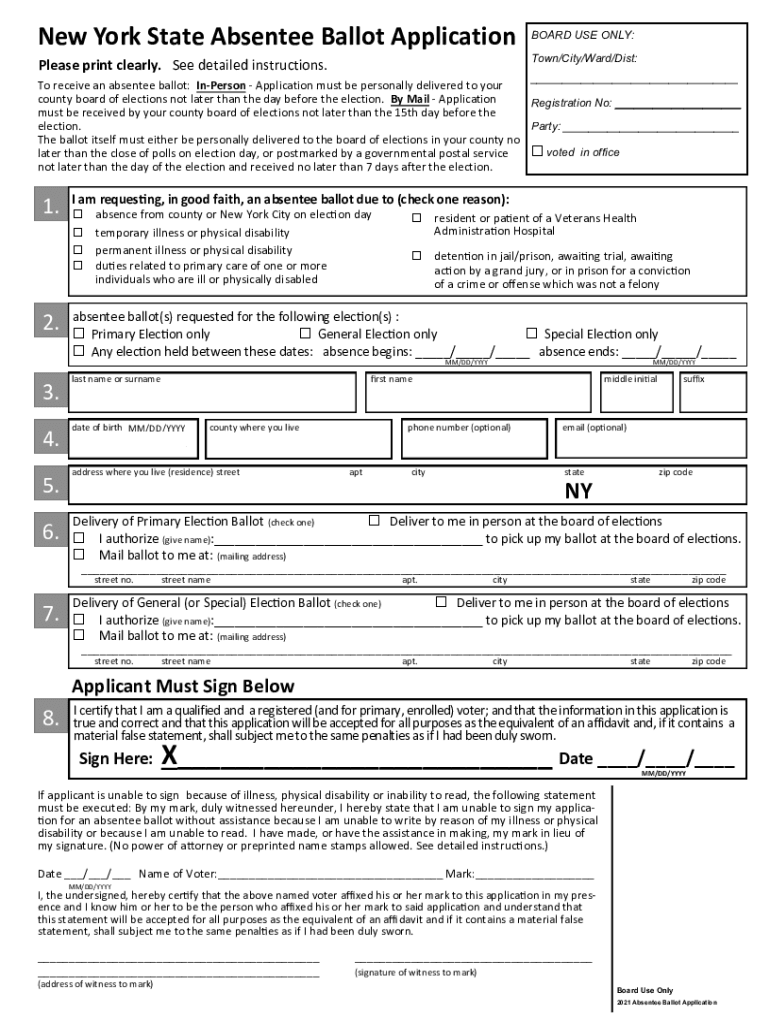
- Begin by filling in your personal information, including your last name, first name, middle initial, date of birth, and county of residence. Ensure all details are accurate for a smooth application process.
- Indicate your reason for requesting an absentee ballot by checking the appropriate box. Options include absence from the county on election day or temporary illness.
- Select the elections for which you are requesting ballots. You can choose from primary, general, or special elections.
- Provide your mailing address where you wish to receive the ballot. If someone else will pick it up, fill in their name in the designated section.
- Sign and date the application at the bottom. If you cannot sign due to a disability, follow the instructions provided for marking your application.
Start using our platform today to complete your NY Absentee Ballot application easily and for free!
It's free
See more ny absentee ballot versions
Got questions?
How can I create an electronic signature in my ny absentee ballot on Android?
Signing documents on a mobile device is quick, straightforward, and doesn’t require software installation if you have an account with DocHub. Log in from any browser, fill in your blank fields with your data, and click on Sign → Create your signature. You can draw your eSignature just as you usually do on paper, add its picture to your ny absentee ballot, or type in your name and stylize its look. No matter what option you choose, your paperwork will be valid.
Can I edit ny absentee ballot on my phone?
As a comprehensive document modifying service, DocHub is accessible on smart phones. Open DocHub in your choice of mobile browser and use our intelligent mobile-friendly toolset to fill out your ny absentee ballot.
Security and compliance
At DocHub, your data security is our priority. We follow HIPAA, SOC2, GDPR, and other standards, so you can work on your documents with confidence.
Learn more


