



Here's how it works



How to use or fill out Canada Poultry Form - Manitoba Province 2020-2021 - Fill ... with DocHub

- Click ‘Get Form’ to open it in the editor.
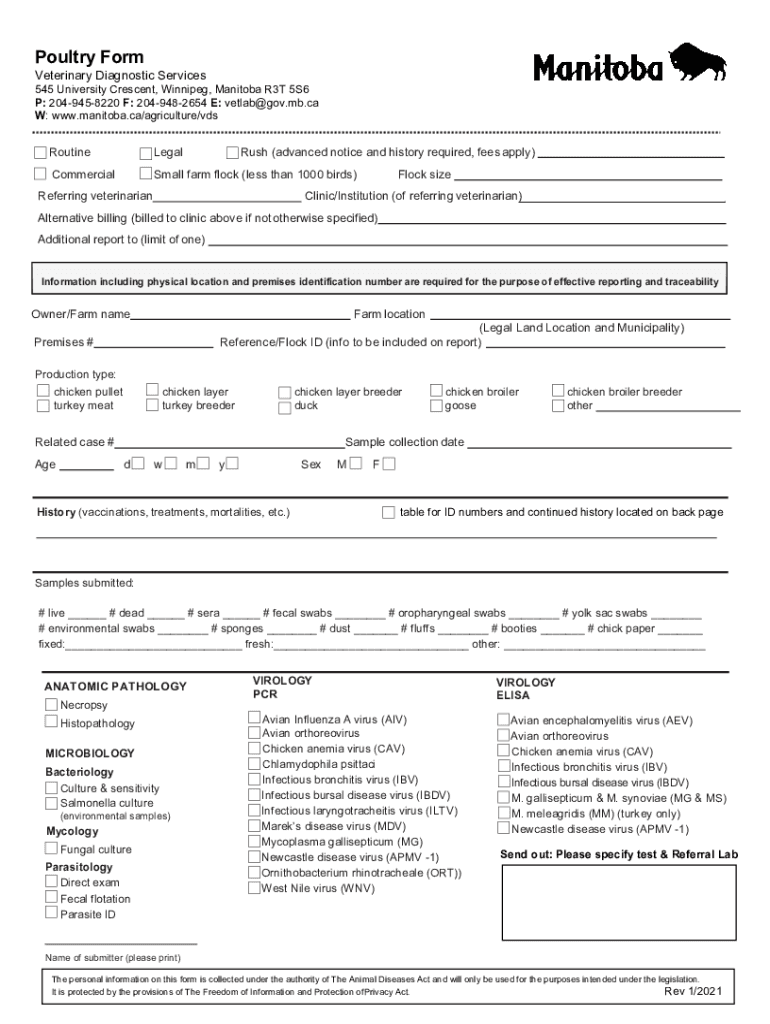
- Begin by entering your contact information, including the owner/farm name and farm location. This is crucial for effective reporting and traceability.
- Specify the flock size and production type by selecting from options such as chicken broiler or turkey meat. Ensure accuracy for proper categorization.
- Fill in the sample collection date using the provided fields for day, month, and year. This helps maintain a clear timeline of your submissions.
- Detail any relevant history regarding vaccinations, treatments, or mortalities in the designated section to provide context for your samples.
- Indicate the number of samples submitted across various categories like live birds, dead birds, and environmental swabs. Be thorough to ensure comprehensive reporting.
- Complete any additional sections as required, including specifying tests needed under virology or microbiology if applicable.
Start filling out your Canada Poultry Form today on our platform for free!
It's free
See more Canada Poultry Form - Manitoba Province 2020-2021 - Fill ... versions
Got questions?
How do I sign my Canada Poultry Form - Manitoba Province 2020-2021 - Fill ... on iOS?
With DocHub, you can rapidly approve your Canada Poultry Form - Manitoba Province 2020-2021 - Fill ... or any other paperwork on iOS, even without installing extra applications. You can access your DocHub account from any web-connected browser and complete and sign your form in any preferred method with just a few clicks.
How do you fill out Canada Poultry Form - Manitoba Province 2020-2021 - Fill ... on Android?
It is a no-brainer on a computer or via a mobile device to fill out a Canada Poultry Form - Manitoba Province 2020-2021 - Fill ... with DocHub. All you need to do is open any installed browser on your smartphone and proceed to the DocHub site. Once authenticated, add your file and open it in editing mode. Use our toolbar to make your edits and save changes. Optionally, keep your file in your files or send it to a recipient on the spot.
Security and compliance
At DocHub, your data security is our priority. We follow HIPAA, SOC2, GDPR, and other standards, so you can work on your documents with confidence.
Learn more