




Sydney student card 2026

Get Form
usyd digital student card Preview on Page 1

Here's how it works

01. Edit your usyd digital student card online
Type text, add images, blackout confidential details, add comments, highlights and more.
02. Sign it in a few clicks
Draw your signature, type it, upload its image, or use your mobile device as a signature pad.
03. Share your form with others
Send sydney student card via email, link, or fax. You can also download it, export it or print it out.

How to use or fill out sydney student card with our platform

Form edit decoration
9.5
Ease of Setup
DocHub User Ratings on G2
9.0
Ease of Use
DocHub User Ratings on G2
  1. Click ‘Get Form’ to open the Sydney Student Card application in the editor.
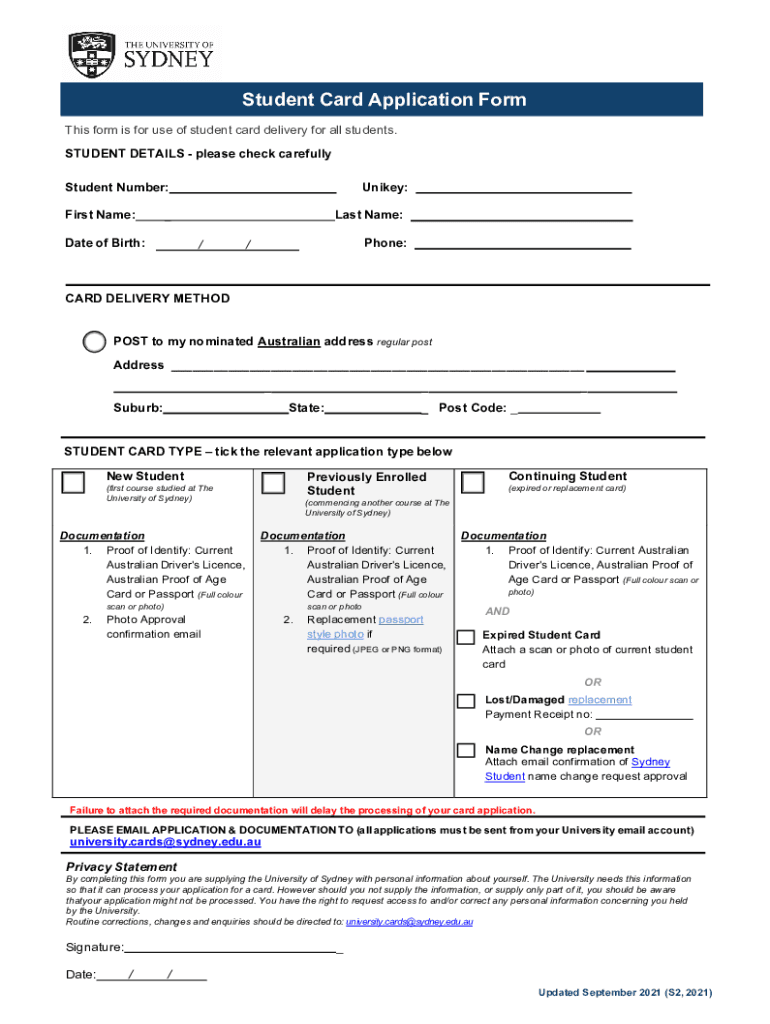
  2. Begin by filling in your Student Details. Enter your Student Number, First Name, Unikey, Last Name, Date of Birth, and Phone number accurately.
  3. Select your preferred Card Delivery Method. Choose between receiving it via regular post to your nominated Australian address and fill in the Address, Suburb, State, and Post Code fields.
  4. Indicate your Student Card Type by ticking the relevant option: New Student, Previously Enrolled Student, or Continuing Student. Ensure you understand the documentation required for each type.
  5. Attach necessary documentation as specified for your selected card type. This may include proof of identity and a passport-style photo if required.
  6. Review all entered information for accuracy before finalizing. Ensure that all required documents are attached to avoid delays.
  7. Once completed, email your application and documentation from your University email account to university.cards@sydney.edu.au.

Start using our platform today to easily fill out and submit your Sydney Student Card application for free!

See more sydney student card versions

We've got more versions of the sydney student card form. Select the right sydney student card version from the list and start editing it straight away!
Versions Form popularity Fillable & printable
2021 4.8 Satisfied (37 Votes)
2019 4.3 Satisfied (80 Votes)
be ready to get more

Complete this form in 5 minutes or less

Get form

Got questions?

We have answers to the most popular questions from our customers. If you can't find an answer to your question, please contact us.
Contact us

Of course, electronically drawing your signature is acceptable, but only if you utilize a tool that complies with industry regulations and policies. Consider DocHub, which guarantees eSignature validity under ESIGN and UETA requirements. All you need to approve your university sydney student card electronically is an account with DocHub and an internet connection. When you open your file in our editor, click Sign and choose the Draw tool.

When you edit your usyd student card with DocHub, you will not need to look for other applications or services to sign it. An electronic signature is a component of DocHub’s extensive editing toolset, which allows you to implement changes in your form without switching between websites. Simply complete your form, double-check the correctness of your information and place your electronic signature at the end to make it submission-ready within a few minutes.

Good news; the student discount card is completely free. Its vital you look after your Smartcard, though; if its damaged, lost or stolen, National Conditions of Carriage apply and well charge a 20 administration fee.
Here are our top tips on how to get student discount: Always keep your student card with you. Consider upgrading to a student discount card. Actually use your student discount. Always ask if a shop offers a student discount. Get student discounts on top of deals. Use your student discount online.
Your Student Identification Number (SID) is a unique nine-digit number that identifies you as a student at the University. If youve forgotten your SID, you can find it in Sydney Student. Go to My details and then Personal details. Alternatively you will also find your SID on your student card.

Security and compliance

At DocHub, your data security is our priority. We follow HIPAA, SOC2, GDPR, and other standards, so you can work on your documents with confidence.

Learn more
ccpa2
pci-dss
gdpr-compliance
hipaa
soc-compliance

People also ask

As a student of any school, college or university, youll get a free student ID card issued by the institution. If you prefer not to go to campus or choose distance education, you can apply online for your student ID card. And you can have your Student ID card posted to you.
You will need to complete our online student card request form and select I am a returning or continuing student and need a student card.
What do I need to get an ISIC card? A document that proves that you are currently studying full time at a recognised school, college or university. Examples below: Proof of identity (Govt issued ID or Passport) Passport style head and shoulders photo.
Theyre unsecured, so you dont need collateral or a security deposit. The key difference between student credit cards and standard credit cards is their eligibility requirements: student credit cards are designed specifically for those attending college, and applicants without a credit history can qualify for one.
Who is Eligible for a Student ID Card? If you are a student of any school, college, or university, you are eligible for student ID cards. So, if you are aged above 16, you can apply for a student ID card at your educational institution. However, the age requirement might vary in some institutions.

Related links